Repairing Windows Live Mail

Written by:  • Edited by: Tricia Goss
Published Jul 20, 2009
• Related Guides: Control Panel | Windows Live

If Windows Live Mail has suddenly decided to stop functioning properly, or at all, chances are the program may need to be repaired. Fortunately, this can be done by accessing a single menu. Read on for more information.

As You Would Uninstall

Uninstall
click to enlarge

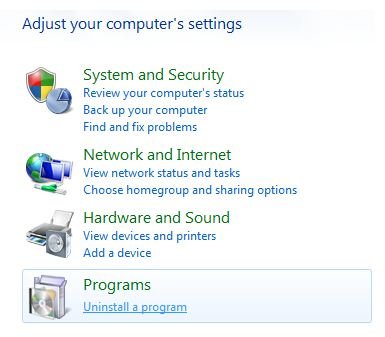
All Windows Live programs, not just Mail, contain a feature allowing you to repair ill-functioning software. It is not accessible from where you would launch the program; you will have to dig a little bit to find it. However, it is not entirely difficult to find. The first thing to do is to launch Control Panel.

In Vista, you will want the option that says, Uninstall a Program. In XP, you will want to select Add or Remove Programs. From your program list, look for Windows Live Essentials. Double-click it to continue.

Initiating the Repair

Windows Live Essentials
click to enlarge

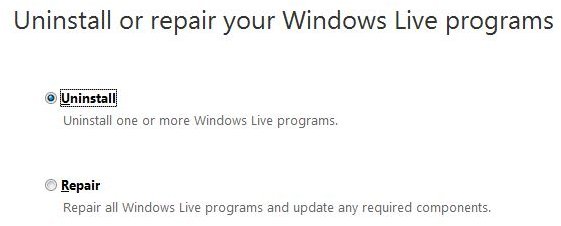
Of course, we are not actually going to be uninstalling all of your Windows Live programs. Instead, we just want to repair the damaged ones. You will notice that by clicking on Windows Live Essentials, you will be prompted to choose to uninstall the programs, or just repair them. Be sure to click on the Repair option before hitting Continue.

From here, the program will automatically look through your installed Windows Live components and repair all of them. It does seem like a bit of a hassle considering if you’re only looking to repair just one of them, but if there are some other components that you have installed that could use a tune-up, it will perform the same maintenance on them as well.
Repair
click to enlarge
Naturally, in the future if you’re looking to uninstall certain Windows Live programs, you will be able to choose the programs you wish to remove, instead of getting rid of all of them.

Try With Other Programs

There are other programs on your computer that may contain the option to repair them when choosing the option to uninstall them. Of course, not all programs do contain this option, so be careful that you do not accidentally uninstall programs that you are just looking to fix.

Unfortunately, most programs would require a clean re-install in order to get them running again. However, for Windows Live components, you are always given the option to repair them first. So, now you are ready to repair your Windows Live Mail program.

For more helpful articles, check out How to Repair Windows Media Player 11 in Vista and Bright Hub's Library of Internet Explorer Troubleshooting Tutorials.


Comments

Showing all 12 comments
 
1riteword Nov 29, 2011 12:48 AM
RE: Repairing Windows Live Mail
My problem with Windows live mail was that all messages were broken down into .txt and html.  I did not have an entry in "add & remove" programs but I did have several Windows Live entries that I repaired.  My Live Email is now working properly.
Tlarocco Nov 24, 2011 1:53 PM
RE: Repairing Windows Live Mail
Thank you very much I ran the repair for Window Live email, from the Control panel and it worked!! Thanks again
JD Aug 26, 2011 1:31 PM
Live Mail repair
Upon launching WLM, the program would get hung up and bring our whole system to a crawl. Forced to reboot to return to normal state. I ran the repair and it fixed the problems!! Thank you!!!
Anon UK Aug 8, 2011 9:11 AM
WLM Repair
Huge thanks! I could not open my WLM emails and searched for help online for days. Despaired. Then found your help and was able to repair WL Essentials via Control Panel as you instructed. It worked!! Again, many thanks.
Gary Porterfield Jul 20, 2011 7:11 PM
windows live mail
The server does not support a SSL connection.

Subject 'Emailing: Elaine Porterfield, fish, Gail Sikes, howard blair, Ray MCcary, Scott Porterfield, Troy Quinn, Ben Porterfield, Bevin Call, Chris Beeler'
Server Error: 250
Server Response: 250 OK
Server: 'Smtp.charter.net'
Windows Live Mail Error ID: 0x800CCC7D
Protocol: SMTP
Port: 25
Secure(SSL): Yes
Henry Bandura Jun 10, 2011 12:50 PM
Live Mail Text size
The text size (font) is frozen on very small print, and trying to adjust the function in "message" does not work.
kes Mar 31, 2011 9:32 AM
thank you
Thank you for the information it helped lots
Amarkant Aug 13, 2010 9:57 PM
Problem About IMAP Connection
i want to acess gmail in window live mail through , But always got a error message :

Your IMAP command could not be sent to the server, due to non-network errors. This could, for example, indicate a lack of memory on your system.

Configuration:
Account: Gmail (amarkant4gautam)
Server: imap.gmail.com
User name: amarkant4gautam
Protocol: IMAP
Port: 993
Secure(SSL): 1
Code: 800ccc0e

Can you tell me please solution ...
jim posey Mar 4, 2010 8:19 AM
w l m corrupted?
to matthew,
relly appreciated your help fven though i just might have to uninstall windows live mail
jim posey Mar 4, 2010 8:16 AM
server error
mserver while i was attempting to set my hot mail
as default mail in wlm
resulted in wlm erreor 0x8de0005
whole issue began when date and personals on msn web page appeared and won't go awaam back to google - might have to uninstall and reinstall win live essentials
Matthew Becker Aug 25, 2009 12:04 PM
Repair?
What is the processor and available RAM? Does Live Mail continue to do this even after repairing it? Do you have the latest Service Pack?
jason lian Aug 5, 2009 1:10 AM
too slow to creat a new mail by live mail
hello,my friend
when i want to creat a new email by live mail,it will take about 5 mins before i can edit it.It has disturbed me for 2 weeks,I really appreciat your help if you can help me,My system is windows vista home basic .
Thank you so much!
 
blog comments powered by Disqus
Email to a friend