Correcting the "Windows 7 Setup Unable to Create New System Partition" Error

Adapted by:  • Edited by: Lamar Stonecypher
Updated May 23, 2011
• Related Guides: Windows 7 | Windows | Hard Drive

There is a known issue when creating new partitions within Windows 7 where you see "Windows 7 Setup Unable to Create New System Partition." Learn how to circumvent it here.

As good as Windows 7 may be, it isn’t yet perfect. Many users have encountered problems during install or when trying to partition a drive within Windows. This article will discuss methods of working around this so you can partition your hard drives without any problems.

When setting up Windows 7 for the first time, there is a dialog box that instructs you to choose a partition to install Windows 7. Sometimes this box doesn’t contain any drives, even though you may have many installed. The first move here would be to turn off your PC and disconnect all but your DVD and the hard drive you are installing Windows onto.

Occasionally the Windows setup program has trouble with RAID drives, or multiple hard drives. Unplugging extraneous hardware is something I would advocate whenever installing a new Windows operating system. It seems to speed things up considerably, and prevents issues like these.

The next opportunity Windows has to produce this error is while you are attempting to partition from within Windows 7. For some reason, known only to Microsoft, Windows files aren’t installed in nice tidy lines or clusters on a hard drive. They can appear all over the place. Even if you defrag your drive first, sometimes Windows won’t allow you to partition a drive because there are system files in the way.

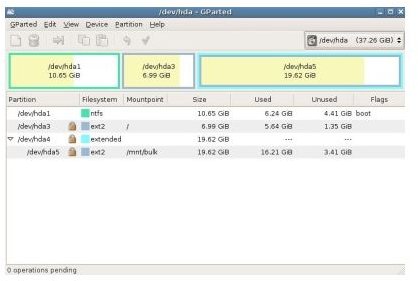
To circumvent this problem I suggest using a third party program GParted. I use GParted as it's Linux based (GNOME) and very reliable. Simply download the file which is an ISO image, burn it using your favorite burning tool, and choose the “burn ISO image” option. Once completed, restart your PC with the disk in the drive and boot from it.

GParted
click to enlarge

The GParted application will load automatically and show you a screen of your existing disks and partitions. To create a new partition it may be necessary to shrink an existing one. Highlight the hard disk you want and select “Resize/Move.” Drag the slider so it shows the size of the partition you want and click on the "Resize/Move" button. Once this operation is completed, highlight the free space and click “New.” Size the new partition and choose the file system, preferably NTFS, then click "Add." After the program completes, you should have a resized partition, and have added a new one.

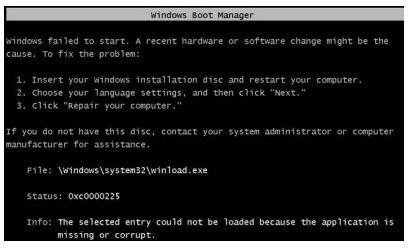
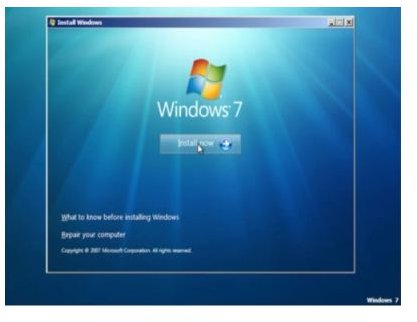
The GParted disk will allow you to move, resize, and generally manage partitions. The only problem is that you may have to repair your Windows 7 installation afterwards. Remember that Windows doesn’t put the files in a nice orderly fashion? There is a chance that the GParted program may move or damage files in the process of creating a partition if you are using your primary hard disk where Windows lives. If this happens then Windows won’t boot properly and you will have to boot again from the Windows 7 setup disk and choose to repair. This option is available on the second install screen, when you see the “Install now” option, look to the bottom of the window and select “Repair your computer.” The error screen you might see is image number 2. The repair option is image 3.

This all sounds like a lot of work, but it is a fairly simple process once you get into it. As with any fiddling you do with Windows, make sure you have a backup of all your important data before trying it, and create a restore point, just in case.
PartitionErrorScreen
click to enlarge

InstallNow
click to enlarge

Reference

Author's experience

Images by original author


Comments

Showing all 18 comments
 
norture Dec 19, 2011 12:19 PM
RE: Correcting the "Windows 7 Setup Unable to Create New System Partition" Error
I stumbled on this error message when attempting to install Windows 7 using USB pendrive. A solution that worked is to remove the drive when you get the eror, click on Next and plug it again. This will let you continue the installation process. <br><br>Of course you'd think it is harmful to unplug the drive, but rest assured that the drive is in read mode only so there's nothing to worry about.<br><br>Hope this helps ;-)
Shalaka Nov 12, 2011 11:27 AM
RE: Correcting the "Windows 7 Setup Unable to Create New System Partition" Error
Thanx alot disconnecting 2nd drive during install helped
Matthew Frederick Nov 5, 2011 7:40 AM
RE: Correcting the "Windows 7 Setup Unable to Create New System Partition" Error
i had this issue, i was trying to use a external card reader and a 8G CF card, which had worked before numerous times, however this tike it did not.<br><br>I then connected a thermalright external USB system with an SATA drive and BAM worked fine, so it seems this error can relate to issues with specific external "USB" related devices
Matthew Frederick Nov 5, 2011 7:40 AM
RE: Correcting the "Windows 7 Setup Unable to Create New System Partition" Error
i had this issue, i was trying to use a external card reader and a 8G CF card, which had worked before numerous times, however this tike it did not.<br><br>I then connected a thermalright external USB system with an SATA drive and BAM worked fine, so it seems this error can relate to issues with specific external "USB" related devices
Mathiau Nov 5, 2011 7:36 AM
RE: Correcting the "Windows 7 Setup Unable to Create New System Partition" Error
i had this issue, i was trying to use a external card reader and a 8G CF card, which had worked before numerous times, however this tike it did not.<br><br>I then connected a thermalright external USB system with an SATA drive and BAM worked fine, so it seems this error can relate to issues with specific external "USB" related devices
Guy Aug 21, 2011 5:03 PM
Problem Solved - Bios Boot Priority
Problem solved by entering the BIOS and configuring the Boot Priority so that the new disk will be first in order.
I guess Windows 7 installation can't proceed if the OS Disk is not the first in boot sequence.
Charles Apr 3, 2011 4:16 AM
THANK YOU
thank you thank you! @Bunie, installing it from USB, "removed it, refreshed (gave an error), and re-created the partition. Plugged the USB back in" works GREAT!
Bunie Feb 6, 2011 2:26 AM
Lol wtf
I was installing windows 7 from a usb drive. i removed it, refreshed (gave an error), and re-created the partition. Plugged the USB back in, and clicked "Next", and tada! Weirdness.
KRDUKIE Jan 14, 2011 7:28 AM
JOE'S IDEA WORKD FOR ME
I HAD THREE HARD DRIVES CONNECTED AND I DISCONNECTED TWO, RESTARTED THE COMPUTER AND THE INSTALLATION WORKED. ALSO DISCONNECTED MY BLUETOOTH DONGLE AS WELL. VERY INGENIOUS JOE.
Bobak Jan 7, 2011 11:32 AM
try this instead
Windows has to be installed on the boot drive it seems. So just load into bios and set that drive as your first to boot. Or try unplugging the other drives first.
J Jan 6, 2011 2:57 PM
autounattend.xml
Removing the USB drive isn't a viable option if you run into this while trying to perform an unattended installation with the autounattend.xml file on a USB flash drive.
What did work for us, though, was simply moving the ufd to a lower priority in the boot sequence - it had been higher than the HDD. This was on a Dell Optiplex 780.
The logfile in x:\windows\panther led us to this - it had an error entry towards the end that was followed by an entry stating that the auto-selected drive wasn't the boot drive.
Ryan Dec 3, 2010 11:30 PM
This is strange!
It took me few hours to figure this issue out until I saw this post was to unplug my USB drive and restated the system it is installing now. I really have RAID5 installing Windows 2008 R2
joker Dec 2, 2010 5:04 PM
removing all other hard drives
Holly crap I was about to start flipping out until I saw this page...... I had a SD memory card inserted and I just realized it . Took it out and baam no hesitation installing as I comment thxxx
ZatriX Nov 10, 2010 11:44 AM
Thanks Joe
Thanks the poster above for his solution! 4HDD's, the system with a much needed 2nd partition and this error... Unplugged the orther 3 drives - worked like a charm. I will however keep Gparted just in case :)
Daniel Aug 29, 2010 9:21 PM
another solution
was trying to install windows on my RAID 0 ICH10, couldn't get past the first step of selecting the drive. however i had gotten past before, (as i was doing a rebuild with a new raid controller also in the computer) wasn't sure what the issue was, i added another drive into the computer(random 1tb drive), selected which drive i wanted to install on in the exact same way i had before (IE RAID ICH10 drive), and it went though fine... which was odd, as it failed on the SAME drive before...

thought id give people some more info as i came across this topic in my search,

so may also be an idea to add another drive if removing all but the OS drives don't work.
James Aug 19, 2010 8:58 AM
Windows 7 Setup Problem
After hours and hours of formatting, reformatting, writing zeros to the disk, reformatting, this, that, and the other, I would add that the solution to this problem I found someplace else was the simplest thing imaginable: I removed my usb drive, rebooted, and Windows 7 immediately installed without any problems whatsoever. FYI
Ben Phillips Aug 15, 2010 5:17 PM
nice job, and thanks
There are hundreds of pages about this garbage, yours is the first that lays it all out in logical form. Thanks, I'll be looking at other brighthub stuff now.
Joe Feb 25, 2010 9:20 PM
Perfect solution
Great advice, I had this happen I have three hard drives. I unplugged the two non-system drives and restarted the computer and it worked.

Thanks!
 
blog comments powered by Disqus
Email to a friend

