A simple walk-through describing how to remove the dual boot option from Windows Vista. This is primarily for users who have installed more than one operating system on their machine and want to remove the need to choose when the machine starts.
Dual boot is a method whereby you can install two or more operating systems onto a machine and choose which one to load when you boot up. They can be a mix of Windows or Linux, whichever you need. Dual booting is a good way of trying out a new system or setup while keeping the rest of your system intact. A dual boot system will only access the operating system you choose, so any changes made to it won’t affect your other ones. This scenario is ideal when a new version of Windows or Linux comes out and you want to try it out before committing your whole system to it.
Creating a dual boot system is done when you install a second operating system. You can either set up a new partition on your disk before the install and install to there or have the installer program do it. I tend to go with the former as it’s an extra layer of protection for your existing data.
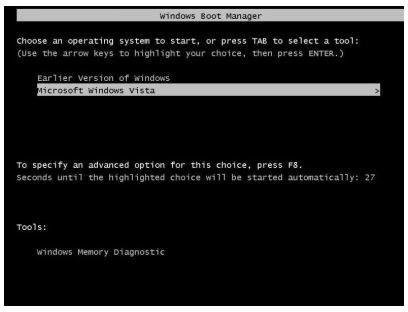
The setup process will be exactly the same- just ensure you choose the correct partition to install from so your existing system stays intact. Once your other operating system setup is complete, you should see a boot loader option the next time you reboot. The screen you see will depend on what operating system you installed. For example, the first screen below is the boot loader for Windows XP.
Now as useful as this feature is, it isn’t for everyone. If you have tested your operating system and either like or dislike it, you may want to remove the files and go back to how things were.
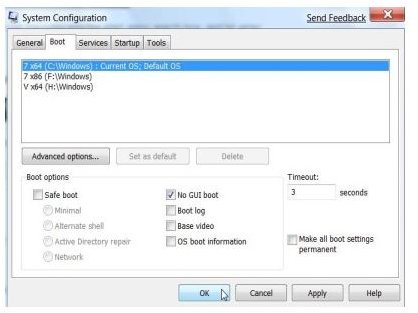
There are two ways to check how many systems you have installed. The first is to use a tool called “MSConfig.” This is a tool built in to all versions of Windows from XP upwards. You can type it into the Run bar or into a command prompt screen. The dialog box looks something like the second image for a dual boot system.
The other way is to go to Control Panel, System and Security, System and click on the Advanced tab. At the bottom you should see “Startup and Recovery.” Click the Settings button and you should see a window like the third image.
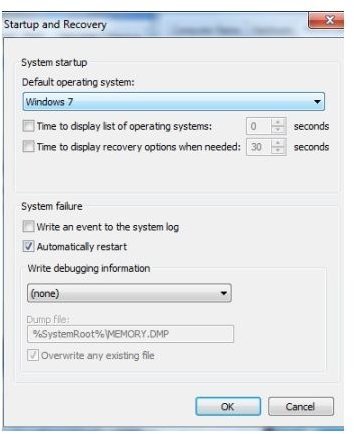
If you have dual boot, then there will be a tick in the box next to “Time to display list of operating systems.” Select in the bar above which system you want to default boot and uncheck the box.
The system may need to reboot, but when it starts it will load the selected operating system automatically. That, in a nutshell, is how to disable dual boot in Windows.


