Working with RAR Files in Windows

Written by:  • Edited by: Michele McDonough
Updated Feb 15, 2010
• Related Guides: Windows 7 | Windows | XP

So you downloaded a great new application. Unfortunately, when you try to open it, Windows tells you it doesn’t know what to do with a RAR file. In this article, we will explain what RAR files are and how to open them in Microsoft Windows.

Overview

RAR files are a type of file archive – similar to ZIP files. Archives contain one or more files or folders. The archive not only neatly packages the files, but also shrinks them without modifying them. This is called compression. In order to decompress the files, you will need to install a piece of software that can read the RAR file.

The RAR format was created by Eugene Roshal to allow for better encryption and compression than the popular Zip archive format. The RAR format also has better support for multi-part archives over its competitors.

Although you need a license for WinRAR to create RAR archives, there are free decompression applications you can use to extract the contents of a RAR file. In this article, I will show you how to use a free archive extraction program called 7-Zip to read your RAR file. Note that 7-Zip is compatible with Windows 7, Vista, and XP as well as older versions of the Windows operating system.

How to open RAR files in Windows

First, you will need a client that can open and extract the contents of a RAR file.

  1. Go to http://www.7-zip.org/
  2. Download the 32bit or 64bit version from the top of the page – if you aren’t sure which version to download, download the 32bit version.
  3. Once downloaded, double click the EXE file to start the installer.
  4. When the setup program starts, click Install.
  5. Wait for the installer to complete and then click Finish.
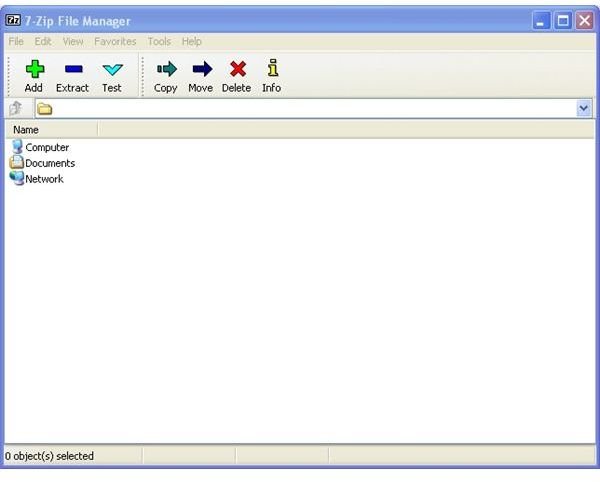
  6. Open 7-Zip by going to Start, Programs, 7-Zip, 7-Zip File Manager (Figure 1).
  7. Browse to the RAR file that you wish to open and left click on it once (Figure 2).
  8. Click the Extract button.
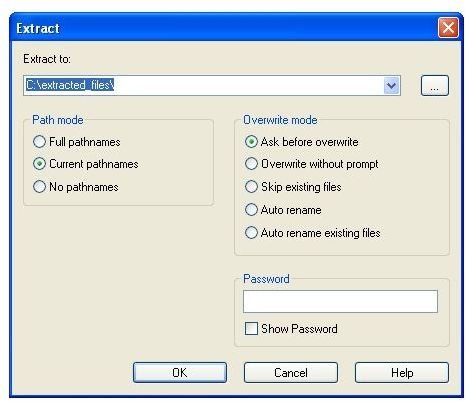
  9. Specify the location you wish to extract the files to and click OK (Figure 3).

The above method will extract all files from the RAR archive. If you only wish to extract a single file from the archive, follow this procedure:

  1. Follow steps 1-6 above.
  2. Browse to the RAR file. Instead of single-clicking the file, go ahead and double click it.
  3. You will be able to see all of the files in the archive.
  4. Select the file you wish to extract and click on the Extract button.
  5. Select the location you wish to save the file to and click OK.

After you’ve extracted the file(s), you can go to the location you saved them to and interact with them as you normally would.

As you can see, opening a RAR file isn’t very hard and doesn’t cost a thing!
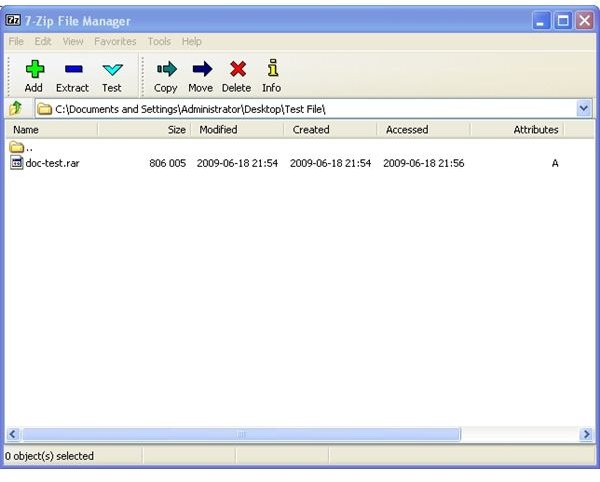
Figure 1Figure 2Figure 3

Comments

Showing all 33 comments
 
Mcsd108 Jan 31, 2012 10:23 PM
RE: Working with RAR Files in Windows
What if I am on a public computer where nothing can be installed?
fides Sep 12, 2011 10:13 PM
grateful!
thanks much! your instructions are very easy to follow and best of all, got the results i was looking for!
Anonymous Aug 30, 2011 10:10 AM
RE: Working with RAR Files in Windows
great :D
me Aug 20, 2011 10:26 PM
rar files
thanks very helpful and easy to use
Anonymous Jul 6, 2011 5:57 PM
7-Zip ?
your can use WinRAR is better then 7zip !
James Jul 6, 2011 5:05 PM
File not there
The file that i want to extract is not there, and even if i do find a file i need, it asks for a password. What do i do??
Ondra Jun 5, 2011 2:14 PM
Password
When I open the file, so it wants to know what I enter the password that ... I'm sorry I can not much English
MC Apr 4, 2011 3:07 AM
RE: Working with RAR Files in Windows
This program is crap - download it at your peril.
Rachel Mar 29, 2011 1:04 PM
Thanks
Thanks I had no idea how to open an RAR file and this was really helpful and easy to follow!
Garima Upadhyay Mar 9, 2011 2:13 PM
RE: Working with RAR Files in Windows
thanx ..
this was a gr8 help
Amanda Mar 2, 2011 8:00 PM
Thanks
Great information, worked like a charm! I appreciate your help.
princess Feb 26, 2011 12:35 AM
It works!!!
Thank you!
SL Feb 10, 2011 9:15 AM
It worked for me!
I followed the instructions and it worked for me. I DISREGARDED THE PASSWORD. Just left it BLANK. Somehow it worked like that. Didn't you try leaving it just blank?

THANKS A LOT FOR THE INSTRUCTIONS UP-LOADER!
Aussi Feb 6, 2011 9:31 AM
Password?
Yeah... mines doing the same thing. It keeps asking for a password. Anybody know what to do?
mimi Jan 17, 2011 7:41 PM
why does it ask for password?
Dear Ryan,

I have followed your instruction and everything seems working fine but when I click on the extract button, I need to fill in the password. I have no idea which password this could be----do you?
Ryan Tetzlaff Jan 2, 2011 6:45 PM
Eli - not able to open
Eli,

RAR files can be split into volumes or smaller sized files. Typically these will be named with an extension of .R01, .R02, etc. If you don't have all of the volume files with the main RAR file you won't be able to open the archive.... If you downloaded something off the internet, you'll want to be sure you have all of the pieces before you attempt to open the RAR file...

Hope that helps.

Ryan
Alex23 Jan 2, 2011 1:51 PM
RAR & Power ISO
Hi thansk for info? Can you open Rar fiels in power iso?
Thanks
Eli Dec 26, 2010 8:09 AM
not being able to open rar
still, I cannot open a rar file. because it is saying: next volume is required, you need to have the following volume to continue extraction.
And I really do not know what it means?
Could u help me please?
Ryan Tetzlaff Dec 15, 2010 5:38 PM
Socks?
I could use a new pair of socks.... wouldn't mind if Santa brought me them. Glad you found the article helpful!
michelle Dec 12, 2010 4:18 PM
Re: Bloody RAR Files
Man what a relief you are awsome Ryan. I hope Santa brings you more than a pair of sox.
bum Nov 18, 2010 2:27 AM
awesome!!!!!!!!
i am an idiot and i am awesome!!!!!!!!!!!!!!!!!!!!!!!!!!
raj kiran Nov 17, 2010 5:23 AM
about rar file opening
the information provided about how to open rar files was really satisfied me... THANK U...
Parul Sood Nov 10, 2010 10:21 PM
RE: Working with RAR Files in Windows
Thanks for great help
Mike McKiness Sep 18, 2010 11:58 AM
I'm getting an error saying aeoplayer
Hello Ryan,
I followed your instuctions and when I double clicked on the single file I got an message saying "aeoplayer". When I highlighted the file and hit the exract button it only gave me the option to rename the file or files. Please help!
Thanks
Mike
Charlie Sep 15, 2010 8:09 PM
Win7 Rar files opening in Dos or Vista (maybe avail)
This is a comical series of errors! I suckered myself into Vista on my main system after getting a pre-loaded notebook. Finally got Win7 and decided I'd take advantage of the built-in features of my MB, all the drives and memory I had and combine two into one 'powerhouse.' I transferred all my data onto this 2T RAID array accessing 8G on my not-up-to-date motherboard (at least as far as their RAID drivers (since fixed in the second-last, monthly BIOS updates ASUS has been posting), RELYING on the RAID first (it did come through for me when it failed!) and then just with compressed copies thrown into some of the 'vast space' I was swimming in!
Anyway, now I have some important data WinRAR compressed on a Seagate drive (occasionally failing, because it's the only one I haven't updated the firmware on since discovering this could have contributed to these problems!). The WinRAR file was created under Windows 7 on a SATA drive running under AHCI. It's the only one of the four same drives I haven't altered or updated the firmware or formatting. I've been gaining success accessing it and it is currently taxing my patience copying this file to one of the updated drives running well under Win7.
I think I'm finally going to make the switch to Linux (possibly Ubuntu?), but also have an option to boot to Wn7 -- to easily access the 64 bit RAID partitions and also have Win98 or XP.
Do you know of a version of RAR, or an utility that I can read this file (preferably from FreeDOS, or Win Vista in 32 bit?
I've found DOSRAR that I haven't been able to try yet. I'm accessing the file through "readntfs." This copy process is functioning still, but it's been going all night and this far into today (although this is the version of this data that I hadn't broken up, so it's 4.5G!).
If you've got some of your great wisdom to shed on accessing this file, or what approach would be best, I'd really appreciate it. I haven't gone right into Linux from lack of experience with it.
marchell Sep 8, 2010 2:45 AM
THANKS!
THANK YOU! i been struggling with RAR for like ever!!! you rock man just saved my life lol :)!
Enfant Terrible Sep 7, 2010 8:00 AM
Opening Rar Files in Windows
I thank you a lot too.
Ryan Tetzlaff Aug 31, 2010 3:48 PM
Glad I could help!
7-Zip is just one of many archive tools that can read the RAR format, but since it's pretty light-weight, free and supports lots of different formats, it's my top pick for handling archive files on Windows systems.

Glad my article helped!
Ryan
Arnold Aug 31, 2010 2:35 PM
RE: Working with RAR Files in Windows
Thanks Much . You gave a simple direct really useful free tip .
J Aug 13, 2010 5:00 AM
RE: Working with RAR Files in Windows
Awesome dude..thanks a lot
sujit Jul 24, 2010 2:37 PM
RE: Working with RAR Files in Windows
thnx man!!!!!!!!!!!
u rock!!!!!!!!!!!!
Sam Jul 14, 2010 1:18 PM
Thanks
Thanks man this helped alot!
BMaheu May 6, 2010 9:13 AM
Thanks a lot for the tip!
 
blog comments powered by Disqus
Email to a friend