Windows 7 adds some beautiful imagery and shades to the desktop, here’s how to find them and get the most from the new desktop features.
Brighten up your Background
Windows Vista moved Microsoft’s operating system away from the single desktop background concept, but Windows 7 picks up that ball and runs a whole lot further, adding imagination, art, and flexibility along the way. Windows 7 themes incorporate the background and the coloured edges of program windows and the Start menu, each giving a subtle touch to any desktop. If the Windows 7 Release Candidate desktop background default of the bubble-blowing fish remains, it could become an iconic computing image to join Twitter’s Whale and Apple’s fruity logo.
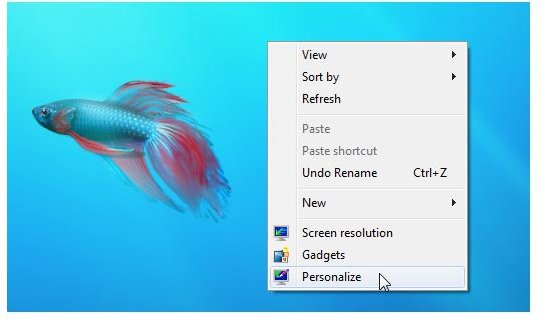
However, hedging its bets, Microsoft has added lots more art to the desktop themes option, from natural scenes to crazy paintings to regional specific art. As with previous versions of Windows, you can find the desktop properties via a right-click on a blank area of desktop. However, this time the themes are kept under the Personalize menu option. Click that and you are taken to the Personalization Control Panel.
Pick a Theme
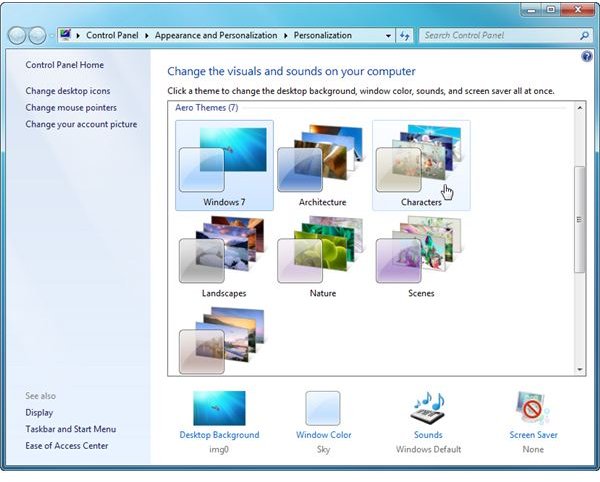
Not satisfied with Vista’s pretty but random scenery, Windows 7 has a great range of desktop images to choose from including Architecture, Landscapes, and Nature. However, the most striking are the Scenes and Characters, some of these striking images come from artist Yuko Kondo, who you can find out more about at his site . To set a new theme for your background, left-click once and then minimize the Control Panel to see the results.
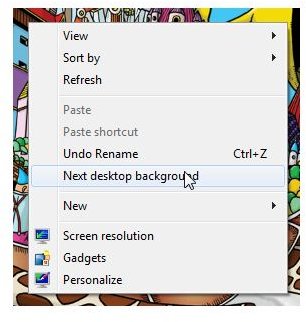
If you do not like the image currently showing, right-click on the desktop again and choose “Next desktop background” to see another one. The images will cycle automatically after an interval giving you something stunning to look at.
Add More Themes
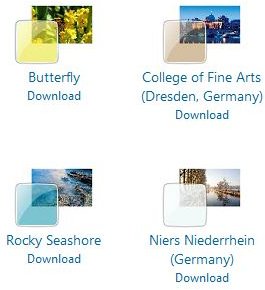
If you are not content with the images provided with Windows 7, click the “Get more themes online” option. You will be taken to a page on the Microsoft Windows 7 Web site where you can choose from dozens more packs of art to download. Click the download link and choose “Open” from the dialog box that appears, your chosen theme will automatically be installed and activated.
Of course, if you want to choose one of your own photographs, pictures or an image you find on a website as your background, find the image and right-click on its icon. Choose “Set image as desktop background” and it will become your new theme. To save it as a theme for future use, open the Personalize option again and click “Save theme.” Now you can reuse it again and again without having to hunt for the original image.
Back to Basics
Tucked away at the bottom of the Theme menu are Basic and High Contrast Themes, these are ideal for those who have difficulty reading against some of the colour schemes or cannot see icons against a busy display. They are also useful if your machine is low on system resources or has an older video card.
Of these, you can also use the Windows Classic theme to set the Start menu and taskbar back to a good old Windows XP default look, should you get bored of all the pretty pictures and artistic touches. Also, remember that Windows 7 Starter and Home Basic will not come with these features. Not that this should be a problem for 99.9% of all users.
If you are concerned about how the backgrounds will look if you have a large-sized monitor then you will be pleased to know that the images are stored at 1920x1200 resolution, large enough for pretty much any display.
Speed it Up
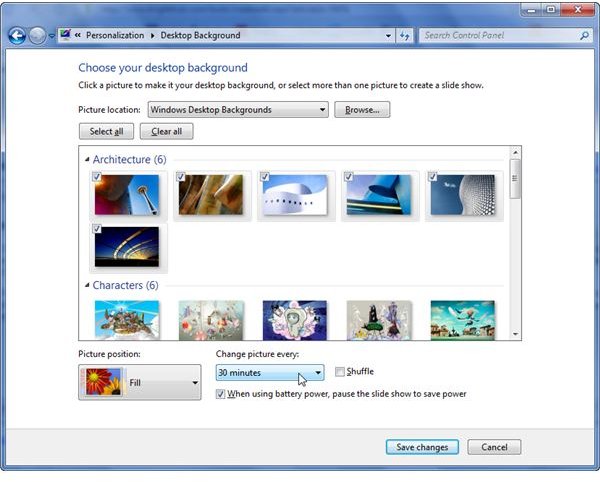
Once you have settled on your theme, click on the Desktop Background option at the bottom of the Personalize window. Here you can see all the images within a particular theme and tick or untick them, removing unwanted ones from your cycle of images. You can also choose how the picture is shown on-screen, although leaving it in Fill mode will be fine unless you start using odd-shaped images. There is also a Shuffle tick box, allowing you to muddle up the order of the chosen images, so you won’t know what is coming next.
Finally, you can choose how long it is until the background image changes, from mere seconds to minutes, from a couple of hours to just once a day. Click “Save changes” to commit these edits and go back to your desktop to await the next change in its visual finery.
Windows 7 finally gives the Windows desktop everything it deserves and all the features that used to be filled by third-party applications. It is easy to manage and provides endless eye-candy for the user, with the minimum of fuss and a tiny number of clicks and windows to browse through.