How to Restore Lost Favorites in Internet Explorer

Written by:  • Edited by: Bill Fulks
Updated Dec 9, 2009
• Related Guides: Start Menu | Windows Vista | Internet Explorer

You really don't know what happened, all you know is that you clicked the Favorites button on your Internet Explorer toolbar only to find them all missing. Don't panic just yet, a simple fix may help you restore lost favorites in Internet Explorer.

Check Your Account

If you booted up your computer, logged in and opened Internet Explorer only to find your Favorites apparently lost, close everything and log off by going to the Start menu and selecting Log Off or Switch User. It is possible that you accidentally logged in as another user or perhaps are using your computer's Guest account.

Log back in, making certain you are signing in under your user name. Once logged on, open Internet Explorer again and see whether your Favorites are still missing. If not, it was probably a simple case of mistaken identity. However, if your Internet Explorer Favorites still appear to be lost, you will need to keep troubleshooting.

Find the Folder

The next step to take is to find out if the empty Favorites folder still exists. This will determine whether the Favorites are lost or the entire folder itself is missing. To uncover which scenario you are experiencing, go to the Start menu, point to Find and select Files and Folders. Type favorites into the Named box and click Find Now. If you are using Windows Vista, click Start, type favorites into the Start Search box and press Enter.

Article Image
click to enlarge
There are three possibilities at this point:

  1. You find the Favorites folder, double click to open it and determine that the Favorites are still lost. If this is the case, read the section on restoring favorites to the folder
  2. You find the Favorites folder, and the Favorites are not missing from it. If this is the case, read the section on restoring the favorites folder to Internet Explorer.
  3. You do not find the Favorites folder. If this scenario fits, read the section on replacing a lost Favorites folder.

Restore Favorites to the Folder

There are two steps you can take to restore lost Favorites to the folder. If you regularly back up your system, you can restore the missing Favorites from a backup. Read Restore Application – Specific Files and Folders to learn how.

If you have not backed up your system, there is one more option that might just work. You can perform a System Restore and hope for the best. A System Restore will not bring back files that have been deleted, however it may restore user account information that was changed. This means a System Restore may or may not bring back your lost Internet Explorer Favorites, so cross your fingers.

For steps on performing a System Restore, read one of the following Bright Hub tutorials: Windows XP System Restore Points or How to use Windows Vista System Restore.

Restore the Folder to Internet Explorer

If you found the Favorites folder and it contains the items you thought were lost, the folder needs to be pointed back to Internet Explorer. Before moving on, it is imperative to mention that you should not edit the Windows registry unless you are comfortable doing so. Deleting or altering the registry incorrectly can seriously damage the system. If you are not confident about taking these steps, enlist the help of a professional.

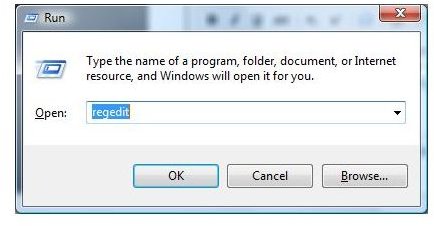
If you are ready to make changes, open the Registry Editor in XP by clicking Start and clicking Run. Type regedit in the Open field and click Go. If you are using Vista, simply click Start, type regedit into the Start Search field and press Enter.
Article Image
click to enlarge
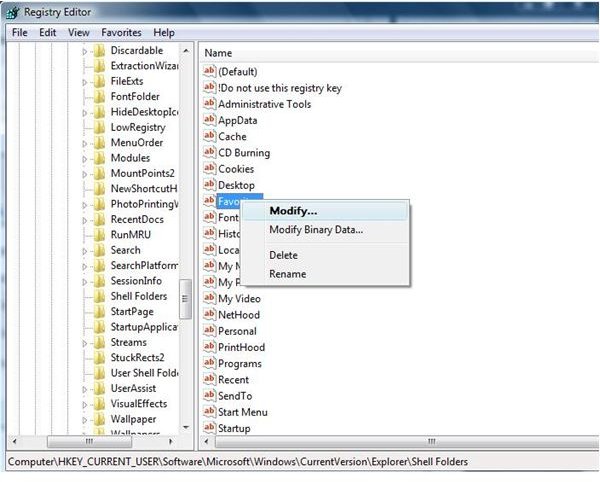
The Registry Editor will open. Find Favorites under the following Registry keys:

HKEY_CURRENT_USER\Software\Microsoft\Windows\Current Version\Explorer\Shell folders

HKEY_CURRENT_USER\Software\Microsoft\Windows\Current Version\Explorer\User Shell folders

HKEY_USERS\.default\Software\Microsoft\Windows\Current Version\Explorer\Shell folders

HKEY_USERS\.default\Software\Microsoft\Windows\Current Version\Explorer\User Shell folders

Once you find Favorites under the first key, right click it and select Modify.
Article Image
click to enlarge
The Edit String dialog will open. The Value Data field should contain the correct location of your Favorites folder. If it does not, enter the right location to restore your missing Favorites folder to Internet Explorer.

The correct location for Windows XP is:

C:\Documents and Settings\<Current User>\Favorites\

The location for Vista is:

C:\Users\<Current User>\Roaming\Favorites\

Replace Lost Folder

If the entire Internet Explorer Favorites folder is missing, you can restore it from a backup, as noted in the Restore Favorites to the Folder section of this article. If you don't have a backup, you can attempt a System Restore (also as noted in Restore Favorites to the Folder).

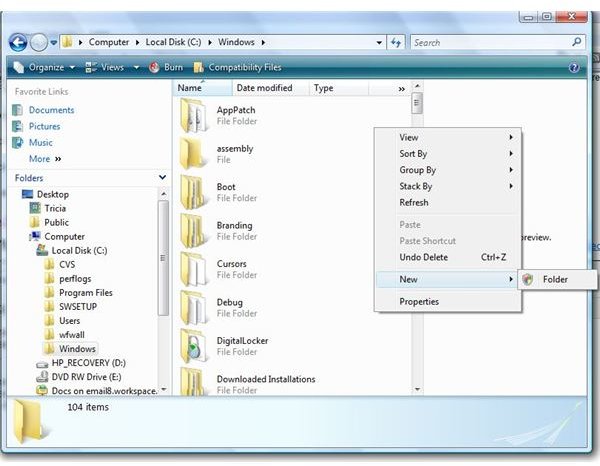
If you are unable to restore a lost Favorites folder in either of these manners, you will have to start from scratch. To make a new Favorites folder, go to My Computer (Computer in Vista), double click Local Disk (C:), and open Windows. Right click a blank area on the right side of the window, point to New and click Folder.
Article Image
click to enlarge
Name the folder Favorites and go to the Registry Editor to make sure that the correct file paths are entered (refer to 'Restore the Folder to Internet Explorer' in this article for details).


Comments

Showing all 21 comments
 
Asokc Feb 12, 2012 8:23 PM
RE: How to Restore Lost Favorites in Internet Explorer
Thanks. I restored my favorites after a virus attack.  The direction was simpe and easy to follow. Best wishes.
Jaknife Dec 5, 2011 5:40 AM
RE: How to Restore Lost Favorites in Internet Explorer
Very simple to make IE Favorites visible again after virus attack.  Click Start, type "favorites", click on IE folder that comes up, cllick Organize and Select All, right click on one of the folders/files, click properties, un-check Hidden, click Apply, windows comes up where you check Apply to all sub-folders and files, click Okay.  Open IE and your favorites will be there again.  I think by nature they are Read Only, so un-checking Read Only won't change them to Read.  I discovered all this by accident, same way I figured out that all my docs and pix were still there, just invisible.  I had retrieved my resume from an e-mail I'd sent and wanted to save it to My Documents, but it said the file already existed and asked if I wanted to save it with (2) suffix.  I went into Control Panel and un-checked "Hide files..." box and they all hidden became visible again, just in that hazy look a hidden file has.  I then selected all, properties, un-checked Hidden and Read Only (which works for files and folders to make them Read), and voila!  Now, gotta make sure that all remnants of virus are gone.  BTW, I did system restore after getting all those scary windows, hard drive problems notifications, etc., that the virues caused, by did it from Safe Mode, which is irreversible, but I couldn't get to System Restore any other way.  Good luck all.
Tricia Goss Nov 16, 2011 6:32 PM
RE: How to Restore Lost Favorites in Internet Explorer
Hi Dewlaw, <br>So glad this was helpful to you.Thanks for taking the tie to comment!
Dewlaw Nov 16, 2011 7:05 AM
RE: How to Restore Lost Favorites in Internet Explorer
Lost favorites after virus (rogue security).  Used above to restore Favorites files to Favorites tab.
Jim May 21, 2011 9:59 PM
Missing Explorer Favorites
1.If you look in your mydocuments/favorites folder and you can see your sites, but not in internet explorer, then the files might be hidden. I had a virus (alureon) and one of the annoying things that happened was all the files in my favorites folder had their attributes switched to hidden. The files were there, the registry was correct but no favorites were shown in I.E.
Brianne Apr 17, 2011 11:41 PM
Still not working.
I found the Favorites Folder and it did contain my info that I thought was lost. I followed the steps and edited the registry but this did not change anything. There are still no favorites listed in my Fav's Tab on IE. I would really like to get that list back on the tab if there are any other suggestions. At least I was able to find the fav's in a folder though if not. It isn't convenient to go to the sites through that folder (I did make a quick launch button to this folder at least) but at least I still have the info. Thx.
tico Mar 28, 2011 7:07 PM
thanks
Thanks so much TRICIA. You saved my soul. I regained all my favourites. Once again thanks and long life to you. may your life be full of of joy and happiness.
Dr. Mel McDonald Jan 7, 2011 9:48 PM
Lost bookmarks in a Favorites folder.
When I click on Favorites folders in IE, my bookmarks in that folder are gone or are invisable.
Tricia Goss Nov 23, 2010 9:21 PM
RE: Dan
Check out this Microsoft Support article:
http://support.microsoft.com/default.aspx?scid=kb;en-us;974852

I hope that helps!
Dan McCormick Nov 23, 2010 8:39 PM
lost favorites
Hello Tricia,

We recently upgraded our system from Windows XP to Windows 7. I had my daughter's computer savy friend back up "most of our files" to our external hardrive, clean the computer hard drive, and reinstalled with Windows 7. If he did not create a backup file for favorites, is there a way to recover those favorites? My wife has many saved favorites on her research for our two adopted children from China with their special needs!
Damien Jardine Oct 30, 2010 7:36 PM
Lost favorites
Thank you John Burnett, you have saved me days of scratching my head. After reading your post I realised that was mucking around with attributes a while ago, checked the favorite folder and sure enough it was hidden. One click and back to normal.
Moe Sep 19, 2010 1:26 PM
Recover favorites the easy way
Here is the simplist way.
Go to C:\Users\<Current User>\Favorites\ folder then right click on it and look under previous version then select the date you wanted to go back to and hit restore. Voila, now you have all your favorites back.
John Burnett Sep 1, 2010 7:27 AM
Lost Favorites in Internet Explorer
... or perhaps, as in my case, all the links are still where they should be, but I'd inadvertantly set the attributes to Hidden (took me over a week to discover it).
Stan Aug 24, 2010 6:37 PM
Lost I.E. Favorites
I, too, am running Win7 with I.E.8. I discovered that suddenly my Favorites were no longer there. I was able to restore the Favorites by copying them from a folder that was listed in Explorer in the normal location under "User name".

While I now have Favorites I can access, I am unable to organize them or add to them. When I try, IU get an error message that says it isn't able to add the web site that that it is an "unspecified error". I am wondering if there are registry changes that would fix this issue.
pai Jul 8, 2010 11:55 AM
Asking for recovering favourites
hi I have a problem my favorites was lose and I want to restore but i do as ur suggestion but doesn't work can u recommend me more. I'm not sure that i add too much or not but if it too much websites that i add and it over limit then it's lost ?
Ellen LaPergola May 5, 2010 11:20 AM
Lost Favorites
Hi, I am running an Windows XP and the Explorer 8; restoring the pc to an earlier date has not worked. I read your Registry Editor option and wondered if one follows your instructions, what could possibly go wrong? I would like to know what type of adversity could happen to my pc? Thanks much!
Tricia Goss Apr 25, 2010 12:07 AM
RE: How to Restore Lost Favorites in Internet Explorer
Hi Mike,
Yes, if they do not contain the correct location of your Favorites folder, enter the right location.
mike Apr 23, 2010 12:50 PM
how to restore lost favorites in internet explorer
Help, I am attempting to edit registry (Vista) as advised above, Am I to edit each of these registry keys to
C:\Users\<Current User>\Roaming\Favorites\
janet Apr 5, 2010 1:07 PM
lost favorites
Thank you so much I have ask everyone on the net how to find lost favorites nothing worked I found your site and the answer was right there I logged on as administrator instead of owner You Fixed It !! Thank you so much!!!
janet
Gregory Wilson Jan 9, 2010 11:08 PM
How about for Windows 7
Hello, Can you provide me the same information except for Windows 7, some files are similiar but for others there are slight changes and I don't want to make a mistake.
tanuj Sep 4, 2009 9:52 AM
favorite folder
hi...
i read your tutorial for restoring favorite folder. actually i can't add links to my favorites folder and in solving this query i follow yr suggestion. in proceeding i found my faovriote folder with all te links after that i was go in registery and modify the location of folder by default it is same which we required. but still i modify with (C:\Documents and Settings\Manoj\Favorites) manoj is a user name but after all i suffer from same problem so plese help me.
and thanks for your great support
 
blog comments powered by Disqus
Email to a friend


