Internet Explorer Not Showing Pictures? Try These Troubleshooting Tips
Is It a Single Site?
The first troubleshooting step to take is to verify that the issue is with Internet Explorer and not simply problems with the site you are attempting to view. Check out a few other websites and see if pictures are displayed on them. If so, the original site is having a problem. You may want to check for a “Contact” link at the bottom of the page to notify the site’s owner of the problem. If the problem persists when trying to view pictures on any sites, the issue is with Internet Explorer.
Clear the Cache
Internet Explorer collects temporary files as you browse your way around the Internet. When your hard disk starts to fill up, it may affect IE’s ability to display pictures. Deleting temporary files is easy, and should be done on a regular basis – at least once a week is recommended.
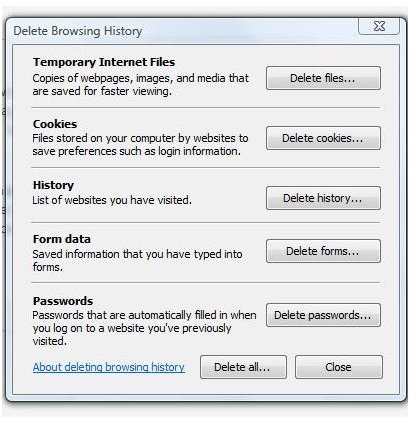
To delete temporary Internet files, open Internet Explorer and go to the Tools menu. Click Delete Browsing History and the Delete Browsing History dialog will open. All you need to do is click the Delete Files button, although it’s not a bad idea to delete them all. If you don’t use Internet Explorer to store passwords, click Delete All at the bottom of the dialog. If you don’t want to lose passwords you have stored, click each button individually except for the Delete Passwords button.
After deleting temporary Internet files, open Internet Explorer again and see if pictures are now displayed once more.
Turn Them On
It is possible that Internet Explorer doesn’t display pictures because the Show Pictures option has been disabled. If someone else uses your computer, or perhaps you enlisted help getting a slow computer to run faster, this might just be the culprit. On slow systems, particularly those using a dial-up Internet service, users sometimes turn off the Show Pictures option to help the computer run more quickly.
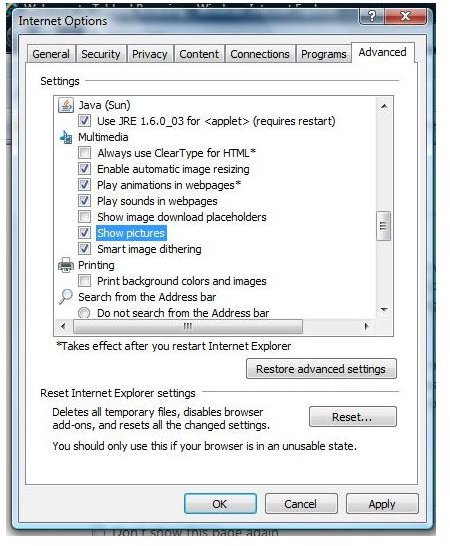
To verify that Show Pictures is enabled, open Internet Explorer and go to the Tools menu. Click on Internet Options, and go to the Advanced tab of the Internet Options dialog box. In the Settings box, scroll down to the Multimedia section and verify that Show Pictures is selected. If not, click the check box and click Apply to save these changes. Close the dialog and then close Internet Explorer. Open it again and check to see if pictures are now displayed.
Security Settings
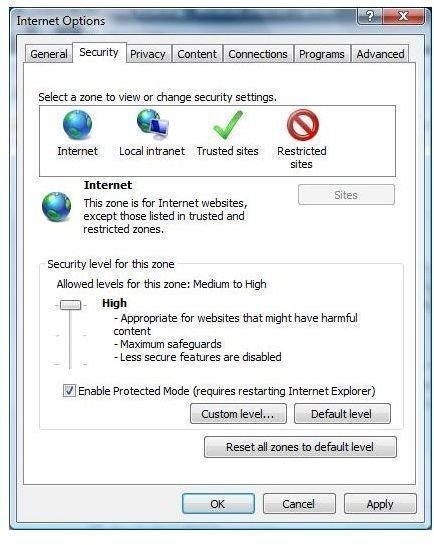
If IE still doesn’t display pictures at this point, check out your Internet Explorer security settings. If the security settings in Internet Explorer are too high, they may block pictures from being displayed. To check security settings, open Internet Explorer and go to the Tools menu. Click on Internet Options. When the Internet Options dialog is displayed, go to the Security tab. Click the Default Level button to restore IE security settings to default.
If you have tried all of these troubleshooting steps and Internet Explorer still doesn’t display pictures, your system’s firewall may be interfering. Refer to the firewall’s manufacturer for assistance. Read the Bright Hub series Firewall Basics or the Bright Hub tutorial Protecting Your Computer Using Windows Vista’s Firewall for more helpful information.