Java double to int
Assignment of double/float to integer types
In the article on Java Integer Arithmetic, we showed how Java performs arithmetic with integer values. We now show how it is done with floating-point numbers.
In Java, double to int (and int to double) conversions are sometimes necessary. For example, we may calculate a percentage but are interested only in the whole number part of the result. For instance, the result may be 64.37% but we don’t care about the fraction. Our natural instinct is to assign the double value to an int variable.
However, Java does not let us assign a floating-point value (float or double) directly to an integer variable (byte, short, int or long).
For example, consider:
int n = 987.654321; //cannot assign double to int
long m = 3.24f; //cannot assign float to long
None of these statements is valid in Java. We can use a cast to make them valid, as in:
int n = (int) 987.654321;
long m = (long) 3.24f;
Now, 987 is assigned to n and 3 is assigned to m.
When we assign a floating-point value to an integer type, the fractional part, if any, is dropped (not rounded) and the resulting integer value is assigned. It is up to us to ensure that the integer obtained is small enough to fit in the integer type. If not, the resulting value is unpredictable.
For example, the largest byte value is 127. The statement
byte b = (byte) 300.75;
is valid and will attempt to store the value 300 in the byte variable b. Since this is too big to fit in b, the value assigned is unpredictable. In this case, the value assigned is 44.
As another example, the statement
short s = (short) 65585.36;
will store 49 in s; 65585 is too big to fit in a short variable. Here, the low-order 16 bits of 65585 (which happens to be 49) is stored in s.
Suppose the double variable d has the value 987.654321. If we want the rounded value of d (988) stored in the int variable n, we could do this with
n = (int) (d + 0.5);
If the first digit after the point in d is 5 or more, adding 0.5 would add 1 to the whole number part. If the first digit after the point is less than 5, adding 0.5 would not change the whole number part.
For example, if d is 245.75, adding 0.5 would give 246.25 and 246 would be assigned to n. But if d were 245.49, adding 0.5 would give 245.99 and 245 would be assigned to n.
Assignment between double and float
As expected, you can store a float value in a float variable and a double value in a double variable. Since float is smaller than double, Java allows you to store a float value in a double variable without any problems. However, if you try to assign a double value to a float variable, Java will complain. Consider:
double d = 987.654321;
float x = d; //this is wrong; can’t assign double to float
The second statement will give an error message since Java will recognize that precision could be lost when assigning a “bigger” value (double) to a “smaller” variable (float). However, if we are sure that that is what we want to do, we can use a cast to tell Java that we know what we are doing and are aware of the risk. We must write the statement as:
float x = (float) d;
The construct (float) is called a cast and it forces the double value d to be converted to float. A cast consists of a type name enclosed in brackets.
However, since a float variable allows only about 6 or 7 digits of precision, we should expect that the value of d may not be assigned precisely to x. Indeed, when run using one compiler, the value 987.654297 was assigned to x. When d was changed to 987654321.12345, the value assigned was 987654336.000000. In both cases, about 6 or 7 digits of precision were retained.
As an exercise, see what values would be printed using your compiler.
Recall (from the article Floating-point Numbers and Expressions) that Java automatically treats a floating-point constant as a double type, unless it is followed by f or F. We must be careful with statements such as:
float x = 3.64; //wrong
Since 3.64 is a double constant, Java will not allow us to assign it directly to a float variable. We can make the assignment valid by using either of the following:
x = (float) 3.64; //use a cast to convert to float
x = 3.64f; //write 3.64 as a float constant
Expressions with integer and floating-point values
It is quite common to use expressions involving both integer and floating-point values, for example,
a / 3 where a is float
n * 0.25 where n is int
In Java, the rule for such expressions is:
If either operand of an arithmetic operator is floating-point, the calculation is done in floating-point arithmetic.
In the first example above, the integer 3 is converted to float and the calculation is done in float. In the second example, n is converted to double (since 0.25 is double) and the calculation is done in double.
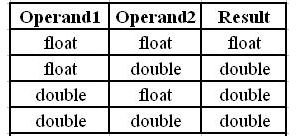
If the expression contains floating-point values only, the calculation is done in double unless both operands are float, in which case the calculation is done in float. This can be summarized as follows (click image for larger view):
Oper1 Oper2 Result
float float float
float double double
double float double
double double double
For example, if g is float, the expression g/36.0 is done in double since 36.0 is a double constant.
How do we get the exact value of an integer division, 19/5, say? We can force a double precision calculation by writing one or both constants as double, thus: 19/5.0, 19.0/5 or 19.0/5.0. We can also use a cast, as in
(double) 19 / 5
A cast allows us to force the conversion of one type to another. Here, the int 19 is cast to double, forcing 5 to be converted to double and a double precision division is performed.
However, we must be careful with a construct like
(double) (19 / 5)
since it may not do what we think. This does NOT do a floating-point division. Since both constants are integer, the expression inside the brackets is evaluated as an integer division (which discards the remainder), giving 3; this value is converted to double, giving 3.0.
References
Java Programming – A Beginner’s Course
Related programming references
Article: Java double to int
This post is part of the series: Introduction to Java Programming
This is a series which aims to discuss and teach Java programming to the complete beginner. Absolutely no programming background is assumed.
- Introduction to Java Programming - An Overview
- Java - Data, Variable and Algorithm Explained To A Beginner
- Java Example: Algorithm and Program For Area of Square
- Java Programming For Beginners - Test, Debug, Document, Maintain
- JDK Java Compiler: The Java Development Kit
- Java Programming For Beginners - How To Compile And Run Java Programs
- Data Types, Constants And Variables
- Java Programming For Beginners - Characters and printf
- Java Programming For Beginners - Part 9
- Java Programming For Beginners - Part 10
- Java Programming For Beginners - Part 11
- Java Programming For Beginners - Part 12
- Java Programming For Beginners - Part 13
- Java Programming For Beginners - Part 14
- Java Programming For Beginners - Integer Data Types
- Java Programming for Beginners - Part 16
- Java Integer Arithmetic For Beginners
- Java Programming For Beginners - Part 18
- Java Programming For Beginners - Part 19
- Java double to int and Other Conversions