SoftActivity’s Keylogger allows you to keep tabs on your children, students or staff by creating detailed report of their activities. Loaded with powerful features, a simple install and a simple but effective interface SoftActivity’s Keylogger is nearly perfect.
Introduction
Keyloggers have evolved over the years from simple keystroke watchers to fullyfledged surveillance suites. Without question, the SoftActivity Keylogger keeps up. With a bucketload off features, a reasonable price and reasonable stealth, SoftActivity Keylogger offers almost everything you could ask for from a keylogger. It should however be noted that this is a single unit solution. If you want to monitor full network activity you should check out SoftActivity’s Activity Monitor (review coming soon).
Installation (4 out of 5)
Installation was quick and easy, requiring only minimal user intervention.
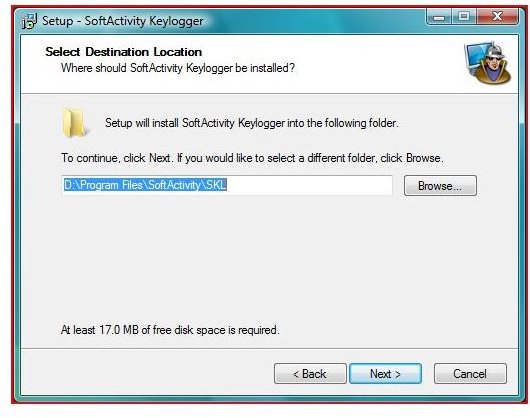
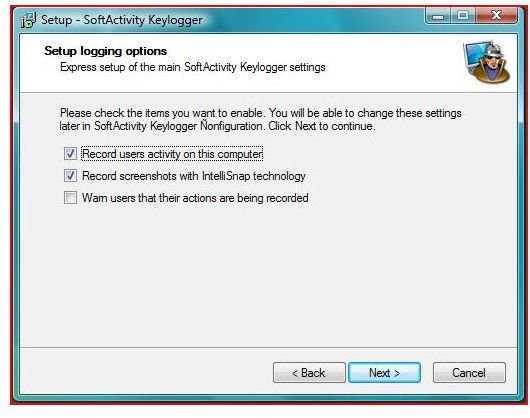
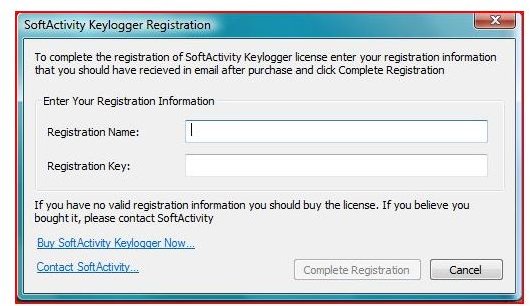
Users are prompted to set a password, and to set initial settings. These settings include install location, password, screenshot capture settings (discussed in features section) and registration information.
Features (5 out of 5)
The biggest draw of SoftActivity Keylogger is its massive feature list. SoftActivity Keylogger’s user reports include a huge amount of information including:
- Most used applications
- Most viewed webpages (tested with both Firefox 3.0 and IE7)
- IM conversations
- Application Use (including keystrokes, for instance passwords)
- Email information (usage statistics, and sent/received messages)
- Login Times
- Log file emailing (can be scheduled or one time)
- Smart screenshots (basically screenshots with every new mouseclick)
As you can see, this so called ‘keylogger’ is far more than just that. Better yet, it allows you to narrow down this information by date and export the data as a customized Excel, CSV (comma separated value) or HTML document.
SoftActivity Keylogger can track data for multiple users, and switching between them is as easy as clicking a sidebar button (see user interface below).
In short, SoftActivity’s Keylogger is the most fully featured keylogger on the market today.
User Interface (4 out of 5)
SoftActivity Keylogger’s interface is made up of two main screens.
The Control Panel and The Report Viewer
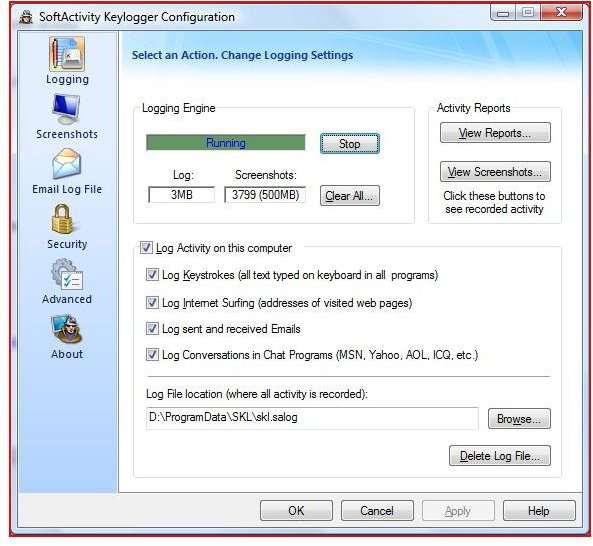
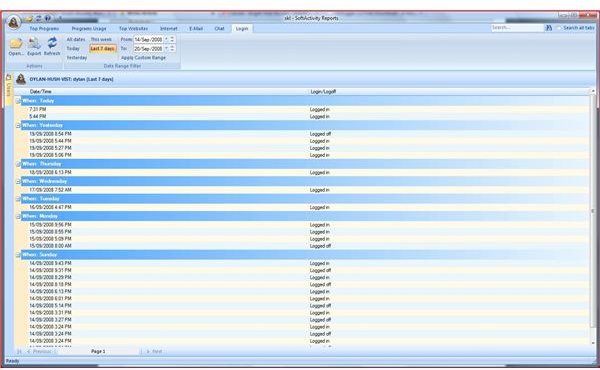
These are both well layed out and simple to use. A keylogger does not require eyecandy, and SoftActivity obviously realizes this. The control Panel gives access to settings involving Logging, Screenshots, Log File Emailing, Security and Advanced Features through a series of tabs. Likewise, the report viewer gives access to all of the features included in the list above in a similar tab system, while providing access to different user accounts through a sidebar located on the right.
Stealth and Security (3 out of 5)
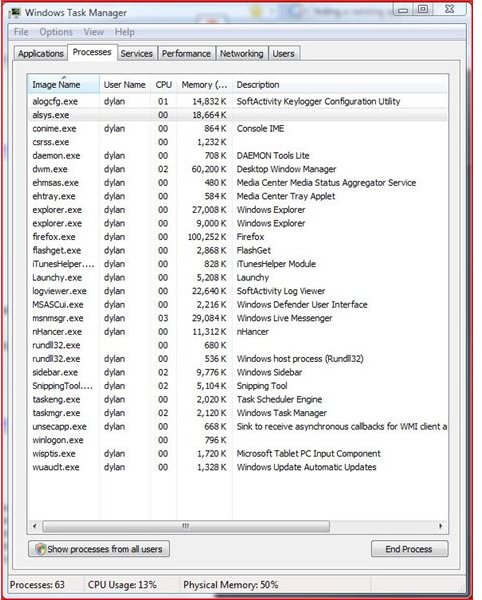
Although the average user will not see it, it will be easy for someone suspicious to see the SoftActivity Keylogger running in the task manager. It will not show up under applications, but under processes it comes up as alsys.exe (which we note is using 18mb of ram).
Secondly, a user can easily overcome SoftActivity Keylogger’s keylogging feature using a handy little application called Unlogger . Screenshots however will persist, as will application usage data, so this is nearly pointless.
Price (5 out of 5)
SoftActivity sells single computer licenses of its Keylogger for only $34.95 USD. This is fairly standard. What makes SoftActivity’s pricing great is that it offers group licensing discounts as well as educational licensing discounts. If you buy 11 licenses or more the price is dropped to $24.95 USD/license, or as an enterprise solution you can have unlimited licenses for $999.95 USD. Educational prices brings the cost for 11 licenses down to $19.97 USD/license and the price for unlimited licenses to $799.95.
Conclusion
If you’re looking for a fully featured surveillance suite, with simple but effective controls and don’t care too much about stealth, then SoftActivity’s Keylogger is for you. The pricing, features list and great interface easily overwhelm its imperfect stealth. Also, I loved the report emailing feature and the separate sections for IM use and E-Mail. SoftActivity has a winner, with its new and improved Keylogger.
Looking for Keylogger Protection?
If you want to find a way to protect yourself from the security risks associated with keyloggers? Then be sure to read our reviews of Zemana AntiLogger and KeyScrambler Pro .
More Reviews!
Would you like to read more reviews? Look around Bright Hub and you’ll find reviews of numerous other leading security solutions including Norton Internet Security , Kaspersky Internet Security , ESET Smart Security , McAfee Total Protection , Blink Professional and ZoneAlarm Internet Security Suite .


