Computer starting to get slow? Need something to help speed up your computer’s startup? Running out of space on your hard drive? Then this article is for you. Here you will find a solution that will help you deal with both–Zappit! System Cleaner.
What is Zappit System Cleaner?
What is Zappit! System Cleaner?
It is a tool to help speed up your computer and help you reclaim drive space cluttered and used up by the various programs you use. Why would you need it? Because you can bring back life to the speed of your computer and reclaim some needed disk space.
Some may not know this, but over time, the act of installing and removing files clutters up your startup areas to the point that you don’t even know what is running in your computer’s background any more. These little programs suck up network, CPU, and memory resources–resulting in the sluggishness of your computer.
Zappit! System Cleaner can help with this, and guess what the price is? FREE! Zappit! System Cleaner is freeware.
Installation
The product I installed is called Zappit! System Cleaner by Cloudeight 1.1 with a tag line that says “clean up and speed up your system with this program”. You can download it at https://zappit.net/ .
The installer is just 1.43 MB, and can be installed in about 2 minutes. The installation footprint is 2.3 MB–pretty small for such a useful tool. Pretty fast and easy huh?
Core Features
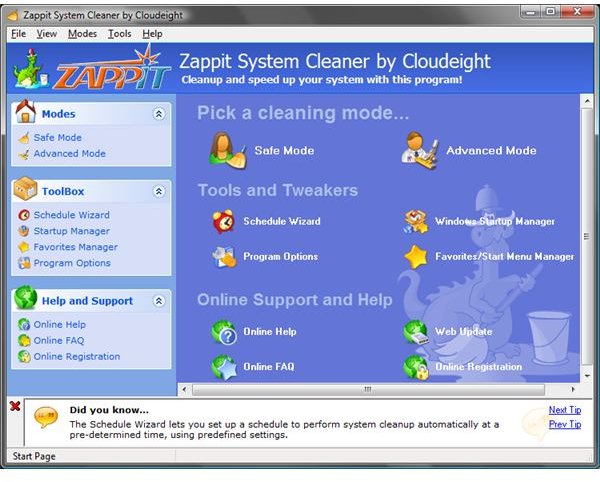
Immediately after launching Zappit, you are presented a menu system showing you what it can do. The menu system offers two core capabilities: cleaning (claim wasted disk space) and tweaking (speed up system):
Cleaning
- Safe Mode - deletes only “safe to remove” files, folders, and settings
- Advanced Mode - provides access to more removal options and allows users a finer control over what is removed
Tools and Tweakers
- Schedule Wizard - allows you to schedule a cleaning job
- Startup Manager - provides control over “auto-started” programs
- Favorites Manager - allows one to alphabetically sort the favorites and start menu
- Programs Options - gives control over user interface and a couple of system options–system restore point creation and locking of HOSTS file before cleaning
Help
- Online Help - access help online (goes online for latest help information)
- FAQ - access to frequently asked questions (goes online for latest FAQ)
- Updates - allows you to see if there is a new version available online
Some Basic Tests
To see how well this tool worked, I ran two basic tests against it core features just to see what would happen out of the box.
TWEAKING Test
The first test took advantage of Zappit’s tweaking feature–startup manager. I measured my computer’s startup time from the moment I entered my login credential to the point Windows Vista sidebar showed up; it took 1:22 (min:sec).
I then opened Zappit and selected the startup manager. Zappit allows you to manage current user/all user start menu and registry auto-starts.
From the start menu, I removed OneNote 2007 Screen Clipper and Launcher, as well as the Apache web services. From the registry, I removed the Sidebar, Google Update, Google Toolbar Notifier (SWG), and CDLOADER. Google quick searc box, HP usage tracking, HP software update, SUN Java UpdateSched, Groove Monitor.
I shutdown, and repeated the measurements. Now it takes 40 seconds–a 67% improvement in startup!
Warning: When in doubt about what you are removing, check with someone more technically adept, or simply do not remove what you aren’t sure about. If you end up deleting a registry auto-start item which later on results in a program no longer working properly anymore, then you may have to restore your settings to a known good last restore point.
CLEANING Test
I did the cleaning test in 2 part: Safe mode, then Advanced mode.
Before running the cleaning test, I measured the current available space on the laptop I was using. It had 18.5 GB of free disc space.
After running the safe mode cleaning, I reclaimed 3.6 GB of free space in 6.5 minutes. My total free space now is 22.1 GB. I then started to check out the advanced mode. I ran it using the default settings; Zappit allowed me to reclaim another 1.3 GB, in 4 minutes.
This cleaning feature that got me back 4.9 GB of previously wasted space!
Summary
For a free product, I can’t complain; but for something that’s free and actually delivers on its promise, I’m impressed.
Out of the box, one can quickly gain some performance improvements (through the startup management feature) and recover significant disk space used by the system for temporary storage.
One word of advice though, you need to be careful when removing auto-start up items, as you might accidentally remove something you need if you aren’t careful.
Appendix: Detailed information about what each function does
Safe Mode
Using Safe Mode, the following objects are cleaned:
- temporary Internet files
- Internet Explorer: history
- Internet Explorer: auto-complete data
- Empties recycle bins globally
- Scans hard drive for some types of temporary files
- c:\windows
- c:\users\auser\AppData\Local Settings
- c:\users\auser\AppData\Roaming
- Removes unprotected Internet Explorer Cookies
Advanced Mode
Using Advanced mode allows you to be more precise in the clean up specification. It will clean:
- Windows tracks
- Recycle Bins
- Clipboard Data
- System Temp Folder
- Windows Directory Temp Folder
- Recent Documents Lists
- Search History
- Common Dialog History
- Run History
- Wallpaper History
- Direct 3D Recent Applicaiton
- Direct Draw Recent Application
- Direct Input Recent Application
- Junk Files
- Internet tracks
- Microsoft Internet Explorer
- temporary Internet files
- Address bar history
- History
- AutoComplete form data
- Cookies
- Offline web pages
- Downloaded program files
- Downloaded folder memory
- Reset start page (UNCHECKED by default)
- Opera
- History
- Download history
- Cookies
- Temporary Internet files
- Mozilla/Netscape Navigator
- History
- Temporary Internet files
- Cookies
- Saved passwords and login names (UNCHECKED by default)
- Mozilla Firefox
- History
- Temporary Internet files
- Cookies
- Saved passwords and login names (UNCHECKED by default)
- Microsoft Internet Explorer
- Program files
- Windows Media Player
- MS Paint
- MS Wordpad
- WinRAR
- ACDSee
- Adobe Acrobat
- Adobe Acrobat Reader
- Adobe Photoshop
- Visited Dirs
- Preferences (UNCHECKED by default)
- ProgramSpeedbitDownloadAccelerator
- Google Toolbar
- GoZilla DownLoader
- Custom tasks (UNCHECKED by default)
- Empty custom folder
Startup Manager
The startup manager allows the control of the following:
- Current User
- Start Menu Auto-starts
- Registry Auto-starts
- All Users
- Start Menu Auto-starts
- Registry Auto-starts:
- found lots, but only removed these:
- Google Quick Search Box
- HPUsage Tracking
- HP Software Update
- SunJavaUpdateSched
- GrooveMonitor


