A full-depth Review of Comodo SecureEmail
What is Comodo SecureEmail?
Ordinary (unencrypted) emails can be read by anyone involved in processing the electronic message, like a postcard. To ensure email privacy and sender authenticity you can use Comodo SecureEmail, which takes email (asymmetric, public key) encryption to the next level by making it easy to use greatly reducing configuration errors security breaches.
System Requirements (5 out of 5)
Comodo Secure Email 2.0 runs on 32-bit and 64 bit editions of Windows 2000 (SP4), XP (SP2), Vista, as well as on Windows 7. The software requires between 20 and 30 MB free hard disk space and very little RAM.
Installation and Setup (4 out of 5)
The installation of Comodo SecureEmail isn’t difficult but comprises numerous steps including certificate sign-up (your personal private key to sign and decrypt emails) for first time users. The default install process is described in detail in the user guide, but let me add here that you can get the free email certificate before installing the Comodo SecureEmail software to reduce complexity and to make the install smoother. I also recommend following this path if IE is not your default browser to avoid installation problems or lengthy troubleshooting processes.
Interface (5 out of 5)
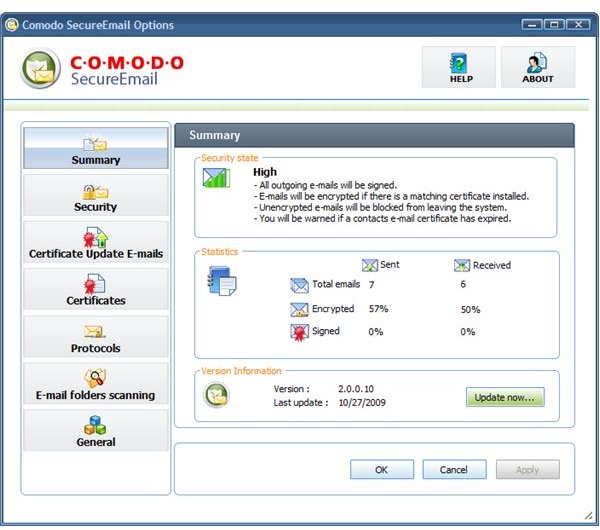
Comodo SecureEmail 2.0 has a nice, easy-to-use GUI which allows you to view settings or to make configuration changes without getting lost in deep menus. Unobtrusive pop-up boxes near the taskbar keep you in the picture when sending and receiving secure mail.
Features (5 out of 5)
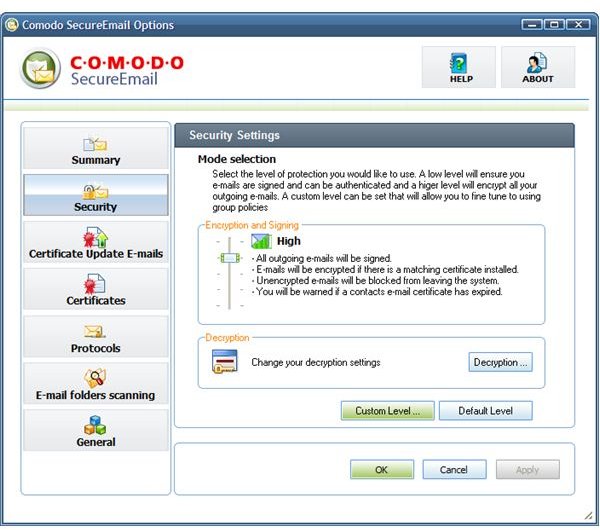
Comodo Secure Email tries to encrypt and / or sign your emails automatically depending on the selected security profile, default is medium which means that your emails will be automatically signed (authenticity) but only encrypted if the public key of the recipient is installed on your computer.
The High security setting does not permit sending unencrypted emails, and Very High additionally demands that all messages leaving your computer are signed. Dragging the slider to Low on the other hand means that emails will neither be encrypted nor signed. Comodo Secure Email can also be customized according to your needs or completely turned off.
Features continued
You can even send an encrypted email to someone with whom you did not exchange keys (you don’t have the public key to speak in PKI terms) by making use of Comodo Secure Email’s one time session keys which allows the recipient to read your electronic message by using Comodo’s online WebReader or downloading SecureEmail themselves.
Performance (5 out of 5)
Comodo SecureEmail fully integrates with most major mail clients and supports Simple Mail Transfer Protocol (SMTP), Post Office Protocol (POP), as well as the Internet Message Access Protocol (IMAP). I have successfully tested the software on a Windows 7 based computer with Outlook 2007 as well as on a Vista machine using the default Windows Mail email client (the successor of Outlook Express which was discontinued after XP).
Help and Support (5 out of 5)
The Comodo SecureEmail help file is located in the program folder and can be launched from the GUI; the well written content is of reasonable length and resembles the user guide which can be downloaded from the vendor’s website, where further information can be found in the Knowledge Base and the forum.
As can be derived from the section Installation and Setup I had some difficulties (I am using Firefox as default browser, and the free POP/SMTP email accounts I had set up for testing Comodo Secure Email 2.0 were unreliable) which made me turn to contact Comodo support. Their support responded quickly, and their advice was helpful.
Price to Value (5 out of 5)
Comodo Secure Email is completely free for personal use. New businesses customers need to pay only $12.00 per secure email certificates, discounts are available if 25 or more certificates are ordered.
The Bottom Line
Email encryption has never been easier, and it’s free, or very competitively priced for business use. Compare Comodo SecureEmail to Pretty Good Privacy (PGP), discussed in Bright Hub’s PGP Desktop 9.9 Review, to see for yourself.
Make sure you don’t miss our top articles featuring the top Windows 7 anti-virus software, top free Windows 7 firewalls, and free Windows 7 backup programs such as Comodo Backup 2.0 for example.
As a best practice back up your Comodo SecureEmail encryption key and certificate to as safe location.
References
-
Author’s own experience
Screenshots by the writer