BCWipe | Military-Grade Wipe & File Eradication
What is BCWipe?
BCWipe is an application with which you can permanently eradicate or erase data in files and folders of your computer so that they cannot be undeleted by traditional means. Using BCWipe you can wipe free disk space for the same purpose, because there could be traces of previously stored files.
System Requirements (5 out of 5)
BCWipe v.3 supports the Windows desktop operating system since ME up until Vista as well as Windows Server 200x. CPU and disk space requirements are minimal. There is no RAM requirement, so the more the better as usual.
Users of Linux, SunOS, Solaris, IRIX, Digital Unix, FreeBSD, AIX, as well as HP-UX based systems use BCWipe for UNIX v.1.9-2.
Installation (5 out of 5)
The easy installation of BCWipe involves the standard steps Welcome - Choose Install Language, EULA, Install Destination, Program Folder selection, License information, and clicking Finish.
Interface (4 out of 5)
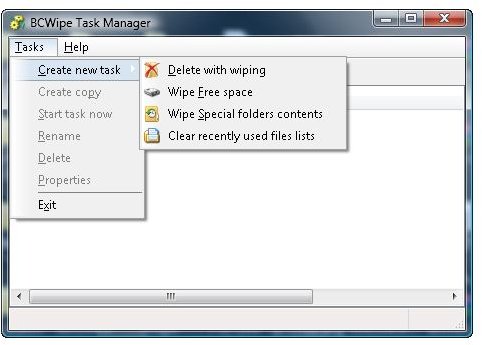
BCWipe‘s GUI is called BCWipe Task Manager and has been designed with the KIS paradigm in mind. The same is true for BCWipe‘s accompanying CryptoSwap utility explained below, yet I fail to see the need for two separate interfaces.
Features (5 out of 5)
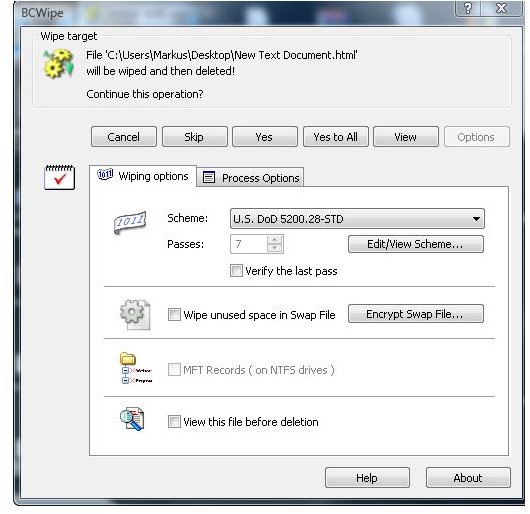
You can launch BCWipe from the command-line prompt, a file or a folder’s context menu as well as from the Windows Start Menu. Right-click a file, choose delete with wiping, and then click options to select or confirm the DoD 5220.22-M eradication standard with which you will be safe in an audit as data cannot be recovered unless, perhaps, by a large funded organization using multi-million dollar high-tech equipment. Alternatively, BCWipe can apply the Peter Gutmann wiping schemes, or 1 pass overwriting, but the later is definitely not secure.
Besides delete with wiping BCWipe can wipe free disk space, slack space (free space within fixed-sized disk cluster units) as well as eradicating traces of empty directories. You can configure BCWipe Task Manager to automatically wipe selected files such as temporary Internet files, cookies, the hibernation file etc when they are not in use. BCWipe’s integrated CryptoSwap utility can be used to encrypt the Windows Page File, also known as swap file.
Observation
If you intended to dispose disks or computers you perhaps want to have look at BCWipe Total WipeOut, or Active@ Kill Disk - Hard Drive Eraser 5.1 touched briefly in Bright Hub’s article How to Wipe an External Hard Drive, which does about the same as BCWipe and BCWipe Total WipeOut combined, however I haven’t tried BCWipe Total WipeOut yet.
Performance (4 out of 5)
Note please that wiping takes a significant amount of time which is the case for any undelete software. To wipe a 1 GB USB stick on a powerful Vista computer BCWipe estimates 12 minutes for a seven pass completion using DoD 5220.22-M, and 57 minutes if the Peter Gutmann 35 pass wiping scheme is used. Again, that’s for one Gigabyte only!
Help & Support (5 out of 5)
The manual does a good job already, and the vendor’s website additionally includes FAQs, tips & tricks, a forum as well contact to support using forms or email.
Price to Value (4 out of 5)
BCWipe for Windows costs $/€ 39.95. “Prices in Euros (€) are for European customers. VAT number is required; without it 22% Finnish VAT will be added. For customers from other countries, prices are in U.S. Dollars ($).” - https://www.jetico.com/online-shop/order.php
Given the weak dollar European customers pay a lot more than those buying in dollars, let alone the VAT! On a dollar bases BCWipe for Windows is very competitively priced.
The Bottom Line
BCWipe provides safe deletion of files and folder as well as wiping of free space. The software and can be tried free; make sure you understand the difference between delete with wipe and wipe disk space.
BCWipe is easier to handle and has less options than Active@ Kill Disk - Hard Drive Eraser 5.1, but its functionality should be sufficient in most cases. If you can buy the software in dollars you currently get more for you your money if you opt for BCWipe.
If, on the other hand, you need more options then Active@ Kill Disk - Hard Drive Eraser 5.1 might be better for you, and I would also opt for Active@ Kill Disk if I had to securely dispose disks or PCs because the sum of the costs for BCWipe and BCWipe Total WipeOutt is higher.
References
- Author’s own experience
- Screenshots by the writer