Kaspersky Anti-Virus 2010 Review: Advanced Web and PC Protection

Written by:  • Edited by: Bill Bunter
Updated Feb 4, 2011
• Related Guides: Malware | Windows XP
4

Kaspersky is known for making one of the best anti-virus on the market. The new version, Kaspersky Anti-Virus 2010, provides new and improved features. Read this review to find what KAV 2010 has to offer.

Introduction

Kaspersky has released the new version of their top-rated anti-virus – Kaspersky 2010. The new version is boasting new features. This article will discuss what to expect with Kaspersky Anti-Virus 2010 (KAV).

Installation and System Requirements
Rating Excellent

The new version of Kaspersky Anti-Virus requires Windows XP, Vista and Windows 7. It will work in 32-bit and 64-bit systems. The vendor noted that safe mode will not work in XP 64-bit and will limitation if run in safe mode using 64-bit of Vista.

During installation of KAV 2010, the installer will display the standard End-User License Agreement. After agreeing with the EULA, another terms of agreement is displayed: Kaspersky Security Network Data Collection Statement in which if you agree, you will be participating in the Kaspersky Security Network by allowing the program to collect selected security and application data. This is similar to SpyNet in Windows Defender or any threat center by many anti-malware vendors that will help them in providing protection signatures for risks in the wild. It is not required to agree to the Kaspersky Security Network because the installation will proceed if you uncheck the box that you agree to the terms of participation in the said security network.

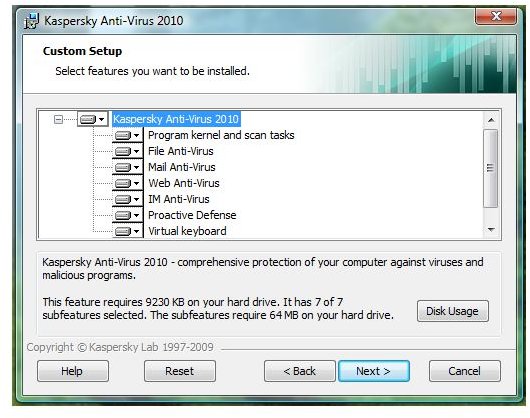
You can customize the component that KAV installer will install: Virtual Keyboard, Proactive Defense, and Anti-virus for File, IM, Web, E-mail and Program Kernel and scan tasks. A system restart is not required to start using KAV 2010.

Features and Options
Rating Good

The features and options in using KAV 2010 are quite extensive but don’t let it stop you in trying the program. Most of the options are very useful and offer what most computers need as protection:

  • File Anti-Virus: Protection by KAV against known malware
  • Mail Anti-Virus: E-mail protection
  • Web Anti-Virus: Network protection to scan web traffic
  • IM Anti-Virus: Scans instant messaging for malicious objects
  • Proactive Defense: Heuristic protection
  • Anti-Phishing: Fraud protection

Extra Tools and features in KAV 2010 are displayed in its Security + window which let you use the following tools:

  • Virtual Keyboard
  • Rescue Disk
  • Browser Tune-up
  • Privacy Cleaner
  • Windows Settings Troubleshooting Utility: To check the security settings in Windows e.g. if Autorun is enabled and if Windows Update is disabled.
  • Special Game mode
  • Browser Helper Object to identify unsafe website - I noticed that this feature is not working. I visited few unsafe website and even search the internet for known malware links but I can't see any visible color coding that it is supposed to display or warn.

Performance, Tasks and Update
Rating Excellent

KAV 2010 lets you rollback to using previous database if the new database is corrupted or providing false positive. This is quite useful since false positive or corrupted download can happen. It’s always recommended that we configure the anti-malware to send copy in quarantine for any threat it will detect.

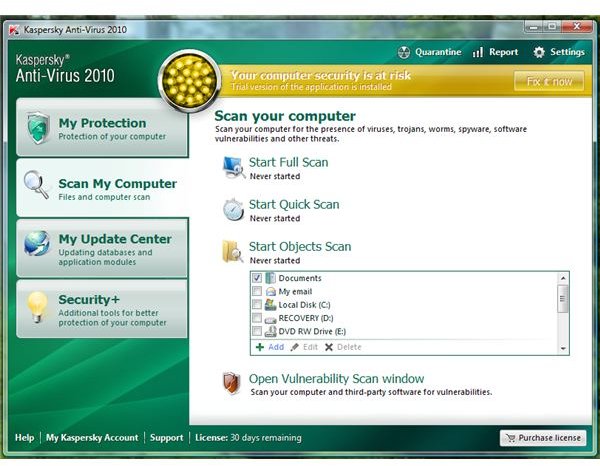
The scan tasks in KAV 2010 are similar to what we expect with advanced anti-virus except that KAV 2010 is also offering Vulnerability Scan. KAV is running with acceptable memory during PC usage and during scanning.

Protection and Detection
Rating Average

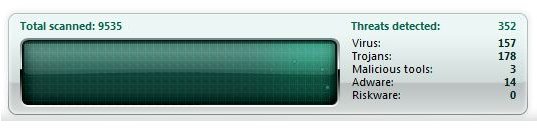
I used 201 confirmed malware samples to test KAV 2010’s resident protection. The malware samples were located in Virtual PC. To proceed with the test, I started transferring the directory that has 201 malware files from Virtual PC to the hosts system where Kaspersky is installed. The resident protect able to detect 159 malware only and left 42 undetected. Running an on-demand scan failed to detect the 42 malware . I changed the settings to its highest protection level but the result is the same.

Price to Value
Rating Good

Kaspersky AV 2010 is $39.95 – a protection for PC and web that is worth investing if you want the extra tools that is not offered by other anti-virus program: NOD32, Microsoft Security Essentials or AntiVir

The Bottom Line

Detection and performance of Kaspersky AV 2010 is average. I suggest giving this advanced protection a try only if a free and effective anti-virus does not meet your needs.

Images
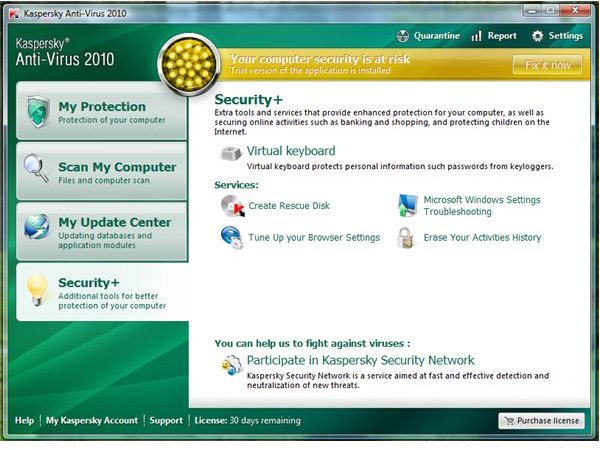
Security + in KAV 2010Custom Installation Method in KAV 2010Scan Tasks Option in KAV 2010Total Detection during test

More Reviews!

Be sure to check out Bright Hub's reviews of other leading anti-virus and security solutions including Norman Antivirus and Antispyware, Norton Internet Security, McAfee Total Protection, Blink Professional and ZoneAlarm Internet Security Suite.


Comments

Showing all 13 comments
 
Ken Holt Aug 18, 2010 4:32 PM
Kaspersky
I got a virus and had to call DELL support. Yet, my Kaspersky indicated everything was running normally. I may switch to another ant-virus program when my contract runs out.
mike Aug 17, 2010 7:46 PM
Kaspersky anti virus 2010
I am having problems with Kaspersky anti-virus. I can not get my password to work and my updates are out of date.
It shows that my database is obsolete to fix the problem but no problem is fixed of course,
have contacted their technical support. I got a respnse but no assistance in solving the actual problem. I think Kaspersky is a waste of money and I will have to purchase another anti-virus program.
When called a toll free number supposedly was them but offered me to pay 149.99 to remove my various. The Russians must get their act together.
ken holt Jul 10, 2010 9:58 PM
kaspersky ant-virus
I am having problems with Kaspersky anti-virus. I can not get my password to work and my updates are out of date. I have contacted their technical support. I got a respnse but no assistance in solving the actual problem. I think Kaspersky is a waste of money and I will have to purchase another anti-virus program.
anand agarwal May 28, 2010 2:26 PM
i have htc 3450 mobile
pls sugest me which one to purchace
Christy May 9, 2010 10:10 PM
Spending my hard-earned cash to buy cheap software...
Risks are always part of the buying exeperience, but it's important for us buyers to research or review more about the products we want to buy, and the sellers we wish to buy from. It's never that easy or quick to spend our hard-earned cash to buy cheap software from the internet. Nonetheless, companies like eBay, Amazon and BuyCheapSoftware have been around for quite awhile, and I have personally bought from these websites. As for my experience with BuyCheapSoftware, my order and the delivery of the product has been flawless. They delivered it on time, and customer support has been very helpful when I called them. Then again, this is just my personal opinion on the matter.
GARY POUCK Mar 15, 2010 6:12 AM
PERFORMANCE PB WITH XP PRO
I was very happy with Kaspersky IS 2009. But I'm very unhappy with KIS2010 regarding huge impact on my PC performance (XP Pro). Some time I'm unable to use it for a while before KIS gives the hand back to me ! Support unable so far to solve it. I guess this is a design (or marketing priority oriented on Vista & MS 7)?
Donna Buenaventura Dec 29, 2009 4:14 AM
RE: Kaspersky Anti-Virus 2010 Review: Advanced Web and PC Protection
Hi David,
That type of license issue is known problem not only with Kaspersky. Many people has become victim of cheap software via ebay and other online store that is not recognized or not recognize yet to be related to official affiliate or reseller by any software vendors. In Kaspersky forums, their moderators are always advising people to not to risk the money to buy cheaper software until it has been verified as safe to buy and there are cases that Kaspersky support has helped customers by giving another license code after verification or investigation that the key or purchase is legit or at least, Kaspersky is familiar about the site.

Happy Holidays!

Donna
David Usher Dec 28, 2009 11:10 PM
Kaspersky disables software bought from "non-authorized" vendors
Kapersky has a rigid distribution system and does not support software that is not purchased from an "authorized" sales outlet such as Kapersky.com or Best Buys. There is no way of telling in advance if a website is "authorized" or not. They have only a handful of "authorized" sellers. Kaspersky will disable your purchase if they don't like who you bought it from.

For example, BuyCheapSoftware.com sells manufacturer software that has been trans-shipped back to the U.S. from overseas distributors -- where software is often sold much cheaper.

This can result in your software being disabled.

A case in point: Kaspersky Antivirus 2010, which I bought in late '09 from BuyCheapSoftware.com.

Kaspersky's internet-based reg code authorization system is capable of detecting trans-shipped software. It will register your software initially, but will disable itself later (Kaspersky apparently runs occasional checks of IP's against the region of the registration code).

Kaspersky claimed I bought "illegal software" and refused to honor my purchase I was confused by their assertion, and did some sleuthing to isolate the source of the problem. I figured out that my software was burned in Malaysia by Kapersky's Singapore distributor (antivirus365.net) for the Asian market. antivirus365.net is an authorized Kaspersky distributor for several Asian countries, and they are apparently trans-shipping software to the U.S. at lower prices.

Legally speaking -- Kaspersky's internal distribution problems do not make my software "illegal", nor does it entitle them to disable software. But that is what Kaspersky does. I raised hell with Kaspersky and escalated to higher management twice before they gave me a new reg code.

Secondly, while Kaspersky is great software, I cannot recommend it because there is no access to human support on their website and you have to do a lot of sleuthing to get to a human being.
johnny wright Dec 18, 2009 8:34 PM
Kaspersky 2010 - 3 user version
Using windows7 and IE8 almost every time I use Kaspersky I get a message that says database is corrupt. Didn't have this problem with windows xp home and Kaspersky 2009. So far haven't been able to obtain a fix for this problem- everytime I have to wait for Kaspersky to download an upddate.
Donna Buenaventura Nov 5, 2009 3:09 PM
RE: Kaspersky Anti-Virus 2010 Review: Advanced Web and PC Protection
Yes, Keypee. We got KAV vs NAV already http://www.brighthub.com/computing/smb-security/articles/52648.aspx so I'll do KIS vs NIS... this month :)
Keypee Nov 5, 2009 1:42 AM
RE: Kaspersky Anti-Virus 2010 Review: Advanced Web and PC Protection
Hi Donna,
Thanks for the reply. Looks like Daniel B have already published an article on KAV vs NAV 2010.
But I would love to see your review, since you have a simple and detailed review on such articles. Hope to see KIS vs NIS 2010 soon from you.
I have NIS 2010 on my laptop and I'm pretty satisfied with it. Haven't tried KIS until now.
Donna Buenaventura Nov 4, 2009 4:36 PM
KAV vs Norton
Hi Keypee,
I'll see if I can do that this month or December :)

Donna
Keypee Nov 4, 2009 8:58 AM
Comparison
Hi Donna,
Could make an article regarding the comparison on Kaspersky and Norton IS and mention which one of them is the best according to you.
 
blog comments powered by Disqus
Email to a friend