A challenge that many small business face is where to invest capital in relation to information security. Should they invest in skilled employees, smart security software, some combination of both? Panda’s PMOP offers a compromise worth looking at.
INTRODUCTION
There are many things to consider when choosing a security software suite to manage your small business environment. With the increasing costs of doing business in today’s unstable market, you may find your options shrinking. Whether that’s because of fiscal reasons, cut backs in personnel, or a little of both, the decision can be a difficult one. Over the past decade, the concept of Software as a Service (SaaS) has become more popular for this very reason. You may also hear the catch phrase “cloud computing.” Basically this means the software is centrally located and managed by a service provider or administrator. Panda Managed Office Protection (PMOP) is such a service. PMOP offers standard antivirus, antimalware, and firewall services for PCs and servers by means of remote installation and centralized web management.
TEST MACHINES
The following specs are for the test machines I used for this review:
-
Dell XPS 410
Advertisement -
Intel Core2 6600 (2.40GHz)
-
2.00GB RAM
Advertisement -
250GB Hard Drive
-
Microsoft Windows XP Media Center Edition (SP3)
Advertisement -
Dell Mini 9
-
Intel Atom N270 (1.60GHz)
Advertisement -
2.00GB RAM
-
RunCore 16G-C SSD
Advertisement -
Microsoft Windows XP Home Edition (SP3)
INSTALLATION (5 out of 5)
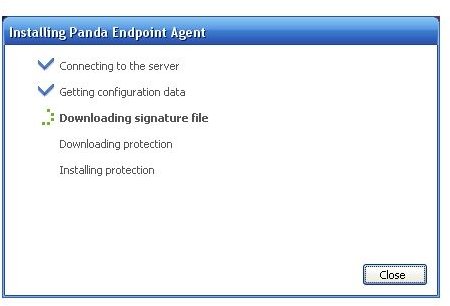
Installation and setup was very simple. I like simple; especially when it comes to installing and configuring security software and services. There were two parts to this process. First, the creation of the Administrator account. Second, the installation of the Endpoint Agent (i.e. client software). The Administrator account is created on the secure PMOP web page. There are multiple configuration options available making the management piece very customizable. The Endpoint Agent can be installed remotely or by the end user. I chose the latter method and the installation process took less than a few minutes with no input required.
GUI & PRODUCT FEATURES (4 out of 5)
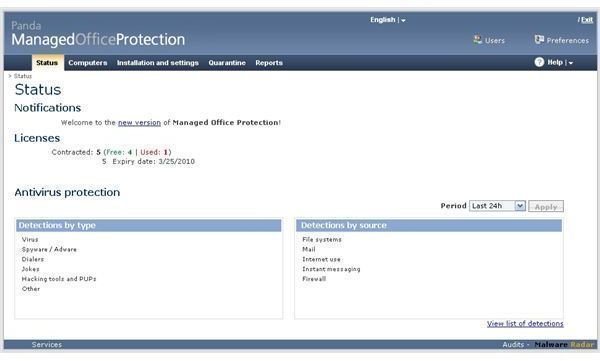
The graphic user interface in the Administrative web console is very user friendly. If you can navigate a web page, you can navigate the PMOP Admin Console. A great feature of the admin console is the ability to group machines as well as create security profiles that control the Endpoint Agent protection levels. These configurations are transparent to the end user because the Endpoint Agent is extremely stripped down in terms of what the end user has the ability to do. For those administrators that like overall span of control, this is excellent. The end user has the ability to perform basic functions such as quick scans and email scans but that’s about it.
The Status tab in the admin console gives you a nice once-over view of license use and expiration dates. This tab also provides you with detection history/trending graphs for Detections by Type and Detections by Source. In addition to these graphs, there is an entire feature set dedicated to reporting. These reports are basic but adequate for the small business environment. Endpoint Agents can be configured to send quarantined items to Panda for disinfection (for repair) or elimination.
Quick access to PandaLabs’ Virus Encyclopedia can make troubleshooting possible infections a much less daunting task. While quarantined files are being disinfected, you can be brushing up on the infection source and make appropriate adjustments to your security profiles to strengthen protection against future attacks.
PRICE TO VALUE (4 out of 5)
Licensing fees for SaaS seems to vary based on a number of factors. But from what I’ve seen offered by other services, Panda Managed Office Protection is about average. Subscription fees per license as of 5/11/2009:
- 1 Year US $74.11
- 2 Year US $111.17
- 3 Year US $148.23
As far as price-to-value is concerned, that really depends on the end user experience as this is a subscription service. In my experience with Panda Security, I have experienced nothing but exceptional service. For the peace-of-mind that comes with “giving up” many of the administrative functions that go with managing a security service, I would gladly pay the above subscription fees.
CONCLUSION
Many small businesses can lower their IT operating costs by doing the following:
- Reduce resource consumption
- Automate common tasks
- Eliminate complex tasks
From an IT security perspective, Panda Managed Office Protection gives you the ability to do all of the above. By streamlining the end client software, they have reduced resource consumption. Through the use of machine grouping and security profile creation, you can automate common tasks. And by offering post-quarantine disinfection services, you will eliminate complex tasks. So if you’re ready to focus on more critical business activities, while someone else handles the security, PMOP may be a perfect fit. Click HERE and give it a try!
Be sure to check out our review of Panda’s consumer SaaS solution: Panda Cloud Antivirus: Security in the Cloud or Pie in the Sky?


