Looking for the best free spam blocker? MailWasher is an anti-spam program that stops spam in its tracks BEFORE it reaches your email program. Read on to find out more in Bright Hub’s review of Firetrust MailWasher.
Introduction to MailWasher’s Free Spam Blocker
Spam! We’ve all had it happen at least once. Open your email program and suddenly it is awash with huge numbers of spam mails! This happened to me only once, years ago, on my first computer with Windows 95. I posted a question of a Help board and somebody recommended a free spam filter called MailWasher, which stops spam BEFORE it gets onto your computer by allowing you to check your mail while it is still on your server, BEFORE, it is downloaded to your computer. I installed it, used it faithfully and within 3 weeks I was spam free and have been virtually spam free ever since. I was hooked! I continued to use that first version of Mailwasher and installed it on each new computer with continued excellent results. What began as a solely free program and has upgraded over the years, and is now offered in both Free and Paid versions. I decided it was time to try out their newest version to see if it was still the best free spam blocker solution I could get.
The newest version is compatible with all versions of Windows from ’98 thru Vista. It also works with Linux if you also install Wine for Linux.
Installation and Setup (5 out of 5)
Download and install is fast. Size is 7.0 MB. Set up couldn’t be easier. Once installed the free spam blocker program requires only 4MB of space and 4MB of RAM. The paid version, MailWasher Pro uses the same space and RAM the the free version.
To quote from Mailwasher website ;
MailWasher is probably the easiest anti-spam software to use. We took the view that if we can’t understand how to use a piece of software in under 5 minutes then it’s probably always going to be hard to use. Why try and learn a whole lot of new icons and procedures? You want a program with a minimal learning curve, is easy to use and looks attractive.
This really says it all. It couldn’t be easier. Download and then doubleclick to install the program.
When the program opens all is very clear and precise. Once installed, the program will ask if you wish to Import the settings from your email program to Mailwasher. This will automatically Set Up Friends List. so that when you receive mails from your Friends List they are automatically marked as good. This is a big plus that helps you avoid deleting or blocking a mail you wish to receive.
The program works independently of your email program so it really doesn’t matter what email program you use. Just click Tools, Email Accounts, Run Wizard. The Settings Summary window displays with the Account Settings. Select the accounts you wish to import and then click the Accept Button. The FREE spam blocker version only works for one email account, while the PAID version works for multiple accounts. MailwasherPro will import all settings except the password for the account, since this is encrypted. The Wizard will then move you to the Inbox Tab. You have to enter your password manually. If you don’t want to sign in each time you use the program you can tell it to remember you. Supported mail protocols are POP3, Hotmail, MSN , AOL and IMAP. Settings for AOL, Gmail, Hotmail and Yahoo webmail are available in the Frequently Asked Questions section on the Mailwasher Website.
Next you will set up Spam Tools. This gives you the ability to choose exactly what you want Mailwasher to do with Spam. You can have it just delete it, with the Free version it is just Deleted, but with the paid version you have a Recycle Bin where the mail is held for up to 28 days. This is especially good, in case one or your friend’s gets a new mail address and you mark it as spam and delete it but then realize it later it isn’t spam. The mail can be restored from the Recycle Bin, the new address can be added to your Friend’s List and allowed to move on into your mail program.
You can also enable bouncing of messages from this account if you want to enable this function, and then enter your Email address and your SMTP server address.
Once you have made your selections then just minimize Mailwasher to the system tray and wait for notification from MailwasherPro that new mail has arrived on the server. Notification comes via an alert sound and also the Mailwasher Icon in the System Tray will display little bubbles to let you know that Mailwasher has mail to filter.
User Interface (5 out of 5)
Mailwasher’s application has the clearest User Interface program of any program on my computer which is another reason that it’s the best free spam blocker tool to use. Buttons are large, clear and very understandable. One thing especially that I like is you don’t have to search all over the program to find a way to change settings, the Settings Button is right there on top in Plain Site so you can quickly change any settings you want without having to search through the entire program to find it.
Easy to Use Spam Filter Setup (5 out of 5)
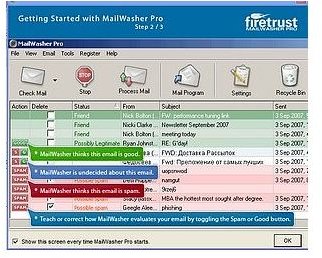
Mailwasher is so simple to use you will never feel you must be a computer expert to use it, another reason why it’s the best free spam blocking tool. A first time computer user will have no problems using this program from day one. When you open the program each day it checks your mail immediately. If all good mail, which is marked in green, comes in then you just click the Mail Program button, your email program opens and the mail is downloaded from the server to your computer. If there is spam it will be marked in Red and check marks will all ready be in the Delete, and Bounce boxes, depending on how you set this up, then you just click the Process Mail button. The mail is gone and your email program Does Not open. There could also be a mail that Mailwasher isn’t sure about so both the Good and Spam buttons will be there. You decide if this is Good mail or Spam mail by clicking the appropriate button. Mailwasher will then Remember this setting for all other mails from this sender. There also is a preview pane which you can choose to use or not. Sometimes this makes it easier to decide whether you want a Good mail to go on into your mail program or not. We all have had that experience of somebody sending a large mail that just doesn’t want to download to the computer, or just plain “jams up the works” so that no other mails will download. Mailwasher tells you the size of the mail, if there are attachments and lets you decide on whether to down load this mail or not. You can choose to Delete the mail from the server. This doesn’t change the setting of a Good mail to bad, it just allows you to delete it before it could download to your computer.
How Well Does MailWasher Work? (5 out of 5)
Mailwasher works exactly the way it is supposed to work and that is extremely well. It DOES STOP Spam, without a doubt. As I stated earlier, I began using Mailwasher years ago after a flood of spam, literally hundreds of spam emails a day. Now it doesn’t stop it immediately, it can take several weeks but it DOES WORK. Back then I began with probably over 200 spams a day. I installed and began using Mailwasher and each day the numbers decreased until finally, about three weeks later I received NO SPAM and that continues to this day. I truly receive no spam mail at all. One of the reasons that it DOES WORK is that it can and does bounce spam back to the sender. Many people will claim that bouncing doesn’t work, that it just tells the sender they have hit upon an active and real email address so they will keep sending the spam. I tested MailwasherPro spam bouncing myself, just to see what kind of bounce mail a spammer would receive using Mailwasher. I used three different accounts I have used off and on over the years that I can still access and sent myself a spam test mail from each of those addresses. When they arrived in Mailwasher I marked each as spam, and those addresses automatically went to my Blocked Mail list, and bounced them back to the sender. Everyone of those three accounts received the mail back with the following:
Subject Line: Returned Mail: User Unknown. The message then says; The following addresses had permanent, fatal errors, then lists the mail account I set up to use through MailwasherPro.
So it DOES BOUNCE back. Now of course this wouldn’t bounce anywhere for those spammers that use multiple addresses or fake addresses but for those with real addresses they will get them back. For those fakes, yes, you will probably get some more from those but each time MailwasherPro picks up a mail with these same characteristics it will be marked as spam, just hit Process Mail and it is gone.
Another benefit to Mailwasher is many email providers offer their own spam blockers, which can be good but one drawback to this is they set up their own criteria so some times a legitimate mail may be marked as spam by your email provider, moved to the spam file and you will never receive it or even see it if you never use their webmail service. I have the ability to turn this service off by my provider, so that all mail I receive can now go through Mailwasher. This way I am assured that important mails will not be removed before I can choose to receive them.
Now occasionally, because of it’s aggressive filtering Mailwasher can generate a false/positive and mark a legitimate mail as spam but this is easily overridden by the user by just marking this mail as good. MailwasherPro will learn this setting and remember it for the future. In other words the user truly is in charge, not the program. Another Plus in my book.
Help and Support (5 out of 5)
Help and support is superb. Just click Help on the program and you have several options from which to choose; Help Program takes you to the Help File which is installed with the program. Information is precise and clear, most problems can be solved by going through the various pages in Help. Need more help? Choose FAQ, this will take you directly to their web based FAQ pages.
Firetrust is one company that quickly responds to questions from it’s users, with a personal email, not one of those automatically generated “we value your business and will respond within 48 hours” mails but a real personal email, from a real person and not two days later but within 24 hours.
Price to Value (5 out of 5)
Mailwasher ranks consistently higher than other spam blockers by users and professional reviewers alike. It offers both Free and Paid versions, the paid version at $39.95 and is lower priced than most other paid programs and enables use with multiple email accounts. The Recycle Bin is also only available with the paid version, as is 7 day a week tech support and no advertising banner at the top of the program. Otherwise the paid and free versions are nearly identical, program interface and set up is identical with the exception of setting up additional accounts and Recycle Bin in the paid version. For the home user, with a single email account to manage,the free version is certainly an excellent program to not only filter out spam but stop it all together. For those with multiple accounts who would want the paid version the price is certainly money well spent. Mailwasher is one of the few anti-spam products which truly works independently from the user’s email program and one of the few that works with almost all email programs and webmail too.
Conclusion (5 out of 5)
Finally, Mailwasher, whether the Free or Paid version, is the Top of the Line for controlling spam and stopping it all together. It DOES work and works easily and well. I have recommended it countless times and have seen it work exactly as advertised each and every time. I give this program 5 stars straight down the line and consider it the best free and paid spam blocking tool available.
To download the Free version, click here . To download the Pro version, click here .
More Reviews!
Would you like to read more reviews? Look around Bright Hub and you’ll find reviews of numerous other leading security solutions including Norton Internet Security , Kaspersky Internet Security , ESET Smart Security , McAfee Total Protection , Blink Professional and ZoneAlarm Internet Security Suite .


