For home offices, small offices or small businesses, nothing is more important than ensuring that your network of computers has optimum protection against malware. Is Returnil Virtual System up to the task?
About
What Returnil offers that other anti-malware products don’t is the ability to fully recover from a harmful attack against your computer. Even if your computer is equipped with an active antivirus program, paired with a firewall, not everything can be detected and your computer can still be under attack. Enter Returnil. With its effective system protection, you can simply undo harmful activity to your computer simply by rebooting. On top of that, you can store files onto its virtual drive. This is particularly important for home offices and small businesses, but how effective is it?
Installation (5 out of 5)
On my aging 2003 laptop, installation was a breeze. It walks you through set-up through relative ease. The only customization you really need to do is decide how much space you want to put aside for your virtual drive. Why a virtual drive? Because of how the program works, whenever you turn the computer off or do a reboot, any new documents, files or programs that you save to the computer will otherwise vanish. By storing files you want to keep in the virtual drive, these files will not be lost during a reboot.
There are not a lot of files or anything overly complicated to be installed, so having new software available in just minutes is something that is encouraging. That’s how quickly you can get to protect your computer.
Interface & User Friendliness (4 out of 5)
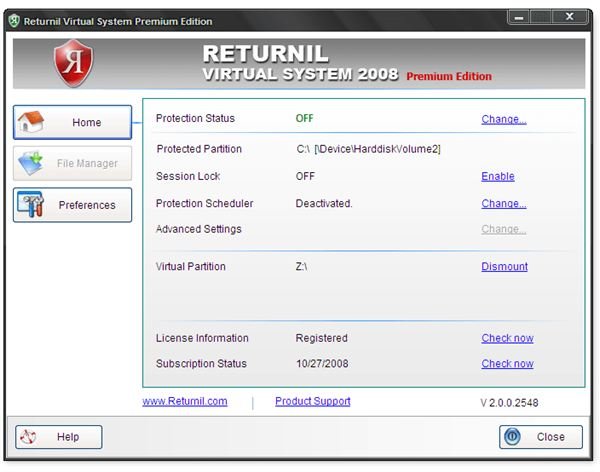
Returnil’s program doesn’t suffer from an incredibly long list of options, preferences or anything else that can cause clutter with other anti-malware programs. It is actually very simple. You can activate or deactivate system protection, mount and dismount the virtual drive, and other options simply with just a click of a button. It may not seem like that big of a deal, but when there’s a very tiny learning curve, that makes it especially easy for home offices and small businesses that don’t want to spend a lot of time learning and fiddling around with settings and preferences to make sure the program works the way they want it to. It is essentially turn on and go.
Effectiveness (5 out of 5)
The program does exactly what it says it does: protects your machine. I had run a few tests of storing documents, files, music, video clips and other items on my desktop. Upon reboot, they were all gone. Just like that. When storing the same files in the virtual drive, they were still there after the reboot, just as the program had said it would. Best yet, this program is incredibly light on resources. An aging computer was used to run these tests and although there are other programs on my computer that are steady on resources, this is incredible. The use of resources is particularly important, particularly for users who are interested in green computing and using less energy.
Value (5 out of 5)
Returntil offers some discounts if you need to install this program on more than one computer. But for $24.95 US, you get a 12-month subscription. That’s fairly inexpensive compared to other anti-malware software that will ask for $30-40 for a yearly subscription, sometimes even more. In comparison, the cost for this program is very reasonable.
Overall (5 out of 5)
Every small office or small business can really do well with the assistance of Returnil Virtual System. The virtual drive is incredibly handy to store documents, and the thought of rebooting the computer to remove a harmful attack is possibly the easiest way to recover, as opposed to spending several minutes, sometimes hours, scanning your computer for potentially harmful files. On top of that, installation was very easy, the program is really easy to use and will use very few resources to do one simple task.
Returntil Virtual System is well worth the cost for peace of mind. It’s a simple idea, but it is incredibly effective and is the best way to protecting either a home office or a network of computers in a small business. Highly recommended.
For additional information, visit Returnil’s website .
More Reviews!
Would you like to read more reviews? Look around Bright Hub and you’ll find detailed reviews of numerous other anti-virus solutions including Ad-Aware Pro , a-squared , AVG Free , Avast! Free , Norton Internet Security , Kaspersky Internet Security , ESET Smart Security , McAfee Total Protection , Blink Professional and ZoneAlarm Internet Security Suite .


