The Best Free Anti-Spyware & Anti-Virus Protection
Microsoft Downloads to Keep Your Computer Safe
To begin with, we’ll talk about the freebies from software giant, Microsoft, whose operating system is used on more than 70 percent of computers worldwide.
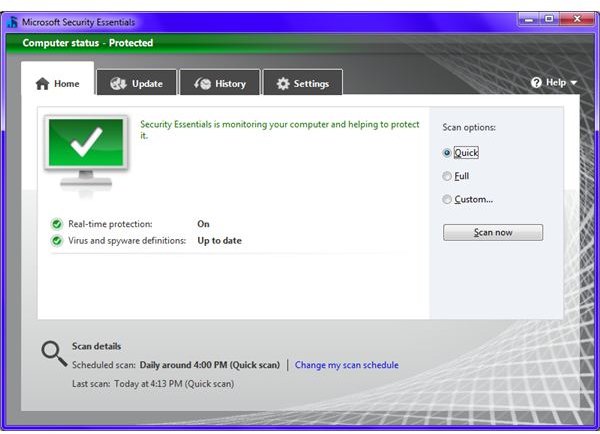
Microsoft Security Essentials
Microsoft Security Essentials (MSE) is replaces OneCare as MS’s protection solution. OneCare included a firewall, while MSE. However, OneCare was subscription based software and MSE is free for use on genuine Windows installations. It also includes the Windows Defender anti-spyware discussed below.
MSE takes few minutes to install and is easy to use. The only knock is the aforementioned lack of firewall, which is true of many free security products. It’s also a moot point since MSE is meant to run alongside Windows Firewall, which comes with the OS. Still, you can turn off the Windows firewall and use MSE with some other firewall. If you ask me, I would recommend one from ZoneAlarm or Comodo. Both are free to use while offering robust protection.
Microsoft Windows Defender
MS also has free anti-spyware. It comes preloaded on Windows Vista and Windows 7 but if you are using XP you’ll have to download Defender from the Microsoft website. If you are using Microsoft Security Essentials, you need not download Windows Defender as the latter is included. Like Essentials it is easy to use (you can largely install and forget it). It offers you real time protection against malware. You can also set a schedule for the software to scan your system on a regular basis.
Microsoft Malicious Software Removal Tool
Known as MSRT for short, you can get this product from Microsoft if your Windows installation is genuine. To download the MSRT, visit the Windows Update website. While the Express Install option will automatically install it, and several other updates, to your computer, you can also select Custom Install if you wish to install only MSRT or the updates for it product.
MSRT is updated monthly and updates are available on the second Tuesday of each month. Make sure you have the latest updates (manually by visiting the Update site or set the Windows Updates to Automatic in Control Panel).
MSRT runs in the background to scan your computer in an unobtrusive way and will only alert you if it finds someting. To start it manually (say you think something is wrong), type MRT in the run dialog (Windows Key + R).
Comodo Solutions
Comodo is a company that has supplying computer security products for years. Right from paid suites for all round protection they also have free anti-spyware, anti-virus, firewall, and other security software.
You can download the Comodo Internet Security suite without paying anything. Note that there are two suites available – One is called Internet Security Pro and it is a paid software and service. The one called Comodo Internet Security is free for everyone. Being a full Internet Security package, the Comodo Internet Security suite contains an anti-spyware, an anti-virus, and a firewall. All three combined offer full protection to your computer.
I rank Comodo firewall as second strongest in the world, next only to Zonealarm. Similarly the Comodo anti-virus is capable of providing real time protection. However, the interface of Comodo products is slightly hard for newbies. Another downside is that there is no customer support for any free product like Comodo (to my knowledge) except for Microsoft Security Essentials. All you can expect from others is FAQs and online discussion forums. With a genuine retail Windows installation though you can contact Microsoft Customer Care directly for MSE issues.
If you do not want to download the entire Security Suite from Comodo, you can download only Comodo anti-virus. The package also contains the Comodo firewall but you may opt out by unchecking the firewall check box. Similarly, you can use the same package to install only the firewall by unchecking the anti-virus part.
Free AVG Anti-Virus Protection
I would rate AVG as the second best (next to MSE) free anti-malware sweet. Like MSE, AVG also offers you comprehensive protection against all sorts of Internet threats.
The downside: as with many free security products, there is no built-in firewall and no customer support. Running AVG in conjunction with ZoneAlarm or Comodo Firewall would solve this issue.
For more details on AVG, the Anti Virus Guard and its comparison with other products, check out “AVG – A Comprehensive Guide”.
In short, if we compare AVG and MSE, they are near equals. The only difference that makes me rate AVG as second to MSE is the lack of online customer support.
References
Microsoft Online Scanner, https://onecare.live.com/site/en-us/center/howsafe.htm
Microsoft Security Essentials, https://www.microsoft.com/en-us/security_essentials/default.aspx
Microsoft Windows Defender, https://www.microsoft.com/downloads/details.aspx?FamilyId=435BFCE7-DA2B-4A6A-AFA4-F7F14E605A0D
Comodo Antivirus, https://www.comodo.com/home/download/download.php?prod=antivirus
Image of Microsoft Security Essentials by Author