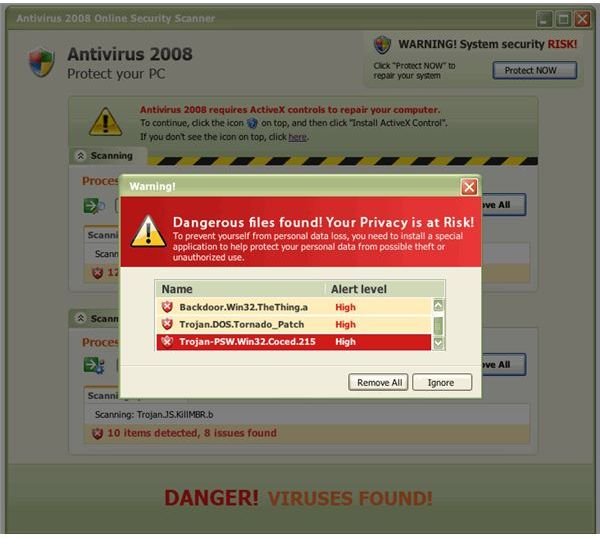
Who would ever know that finding a legitimate security tool would be such a big pain in the neck? With all of the “scan with this” and “protect with that” and the ever-popular “you may still have problems even with,” the whole situation may be totally confusing. So what’s a person to do about it?
Why Discuss This?
P. T. Barnum said it best when he dropped these words, “There’s a sucker born every minute.” Barnum’s words still ring true today, especially in terms of securing your computer from hackers, corruption and identity thieves.
Let’s put it this way, there are some rather nasty security tool decoys out there within cyberspace. Some play games with legitimate computer protection software identities, some take advantage of human nature to mislead the masses via search advertising and infomercials and most of them use at least a few tricks to grab you. I intend for this guide to be a reference for what to avoid, what is totally safe and list good tips for getting around the most despicable traps out there.
What to Avoid?
First things first: what should we avoid while trying to download a free spyware and virus protection software tool? The long and short begins with name recognition: if it’s something that doesn’t make sense as a known security tool, stay away from it. Anything that doesn’t have a reliable security name behind it should be regarded as an obvious fake unless we have seen otherwise (ParetoLogic being one surprising example ). Anything that plays on an established name for parodial effect is also to be avoided. Targeted security tools have included Spybot Search & Destroy (by using a look-alike name) among others. Especially be on the lookout for something that offers to scan and remove malware, but then takes only seconds and asks you to pay for the removal of supposed,“issues.”
But perhaps the best tool of all is your own common sense. If anything says “free scan and removal” or has misleading or non-sensical advertising, then it’s probably not a good idea for anyone to be using it in the first place. If you see a TV ad that says that “even if you run security software, you may still have viruses entering your system” or the effective equivalent, forget it. That is usually false fearmongering (and usually it’s just promoting scareware). Let’s put the record straight, anything that looks or sounds too good to be true is probably just that.
In fact, practically any one of the scammer tricks listed below (as listed in a FTC bulletin ) can serve as yet another series of red flags:
- you may get ads that promise to “delete viruses or spyware,” “protect privacy,” “improve computer function,” “remove harmful files,” or “clean your registry;”
- you may get “alerts” about “malicious software” or “illegal pornography on your computer;”
- you may be invited to download free software for a security scan or to improve your system;
- you could get pop-ups that claim your security software is out-of-date and your computer is in immediate danger;
- you may suddenly encounter an unfamiliar website that claims to have performed a security scan and prompts you to download new software.
Continued: How to separate what’s entirely safe apart from the worthless junk
What Should We Use?
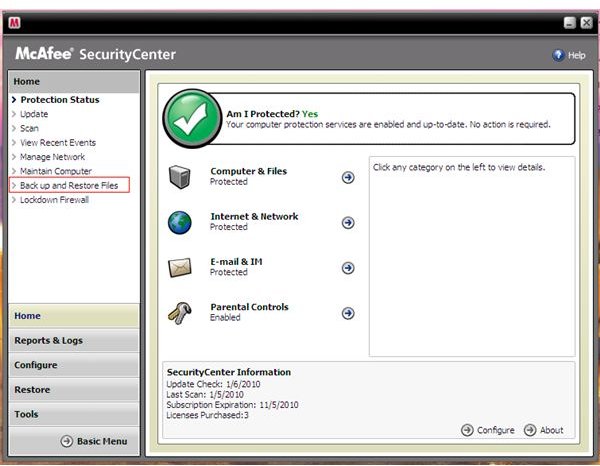
Now that we have identified the red-flag issues, here’s what you should look for. As I stated before, it’s all in the name. Stick with the big ones and you should be fine. Additionally, look for anything that Internet Explorer will not flag as an unsafe or unsigned download that it will not allow to run if the option to do so is selected. The unsafe part applies only to version 8 instances, and the information should be located on the download progress window. If it says “did not detect an unsafe download” you’re in the clear: otherwise, follow the ancient “caveat emptor” rule and take caution.
Similarly, you should take caution in visiting websites using links in search results. Agan, if a scanning session initiates in your browser and you’re prompted to download immediately upon loading one of these, you could be exposing your computer to endless trouble regardless of whether or not you approve the download (see below for a good way to get out of such a trap). Also be sure to avoid “hacks” and “warez” sites – visiting these will likely force background downloading even if you don’t get prompted to download anything to begin with! In either case, these problematic sites usually do so via established or quickly-located security holes in the browser itself, or even in the Windows system as a whole. Tools like McAfee Site Advisor can help sort out the good and bad, and some legitimate security downloads – AVG Free , for example – will allow you to install a toolbar that does the same exact thing, among other benefits. Check out some reviews on known vendor names with legitimate downloads that detect spyware/virus attacks and the like – including a few good (and free) spyware/virus protectors available for you to download – before even thinking about going for a blind jump, such as:
What if I Do Get Stuck With a Suspicious Download Prompt?
If by some devious chance you do get stuck facing a downloader trap while trying to locate and download a free spyware and virus protection software suite, you may as well open the task manager and use it to strike back as follows. First, ring up the processes list, select iexplore.exe, hit End Process and confirm (repeating for each Internet Explorer process if needed) or substitute firefox.exe accordingly in case of a Mozilla-targeting situation (which may not be as common but could be a potential situation regardless). Old-school Windows users stuck on 9x/Me installations will have to use Ctrl+Alt+Del to bring up their process killer to escape whatever traps they may face, but the procedure is similar regardless (and on 2000/XP and later, you can even bring up a failsafe means to access the task manager with this method).
Using a Mac instead? Just hit Command+Option+Q+Escape and you should be good to go. Once you bring up the browser again, don’t restore your prior session if asked or you’ll literally be right back where you started! Rather, you should start a whole new session entirely (IE8 users will need to hit Go to your home page, but the effect is the same regardless).


