Installation Issues: Malwarebytes Won't Install
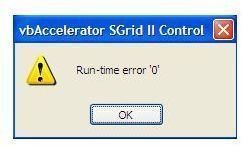
Why Malwarebytes Anti-Malware failed to install?
When a program like Malwarebytes won’t install, you will be presented with an error code. The error code will help us identify the cause of the failed installation. Example error codes are as follows:
- Code 2 Error, mbam.exe not found
- Run-time error 0 and run-time error 440
Note: Some end-users will not see an error code. Instead, nothing happens when installing Malwarebytes. The lack of error codes does not mean that you should not install MBAM. Just try the solutions below.
How to solve Error code 2, run-time error 0 and 440 in MBAM?
Solution to Code 2 Error, mbam.exe not found - Rename the set-up file of Malwarebytes. Example: Rename mbam-setup.exe to myhero.exe. Try to install MBAM again. If you are not comfortable in renaming the installer, you can download the installer that is renamed already by Malwarebytes.
The cause of the above error is malware that blocks the installation of Malwarebytes. This type of attack by malware is one of the known issue that some virus removal tools are facing. Renaming the installer should do the trick so you can install MBAM or another scanner’s set-up file.
Solution to Run-time error 0 and run-time error 440 - When installing MBAM, register the following dll files using the command console in Windows:
- regsvr32 mbamext.dll
- regsvr32 ssubtmr6.dll
- regsvr32 vbalsgrid6.ocx
- regsvr32 zlib.dll
Another solution is to copy in a notepad the following command (no spacing for each entry):
regsvr32 “C:\Program Files\Malwarebytes’ Anti-Malware\mbamext.dll”
regsvr32 “C:\Program Files\Malwarebytes’ Anti-Malware\ssubtmr6.dll”
regsvr32 “C:\Program Files\Malwarebytes’ Anti-Malware\vbalsgrid6.ocx”
Then save it as MBAM Fix.bat then proceed by executing the .bat file. Note that if you are using Windows 7 or Vista with UAC enabled, you need to right-click the MBAM Fix.bat file and choose to “run as admin.”
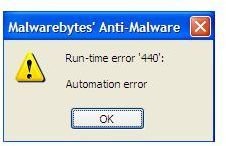
The cause of run-time error 0 and 440 is either that aforementioned files are corrupted or your antivirus program interfered with the installation.
Other Solutions
If Malwarebytes still won’t install, you should try to clean up the system using CCleaner, temporary disable your antivirus program and run the MBAM clean-up utility.
There are times that renaming mbam.exe will not help, and if you experience this issue, try to rename it as mbam.com or explorer.exe. The reason you have to do this is to bypass the virus or any malware that programmed to block or stop the known filename of many legitimate and trusted anti-malware program like Malwarebytes.
If you continue to have issue when installing MBAM, try scanning the computer using TDSSKiller by Kaspersky because there are incidents already in which a TDSS trojan/rootkit infection has blocked installation of MBAM and other security tools.
You can always request free support in Malwarebytes support forums if any of the above solution will not work.