What Does a Phishing Scam Look Like?
Phishing Scams
Phishing scams are used to steal password and login information from unsuspecting users. Sometimes a phishing scam can be used to trick people into giving up their online banking and credit card information. Often they are used to steal login information for social networking sites like Facebook or MySpace in order to post spam and other ads. No matter what the intent, phishing scams pose a huge threat to the intended victim’s personal and financial information. The key to preventing yourself from becoming a victim is knowing how to tell if you are being phished. In this article, we’ll answer the question of what does a phishing scam look like.
What Does a Phishing Scam Look Like?
What’s really sad is that in my research for this topic, I only had to look so far as my own email account. I went into the Junk folder of the Hotmail account that I’ve maintained for many years and there were two phishing emails that had been sent in the past few days.
Facebook Phishing Example
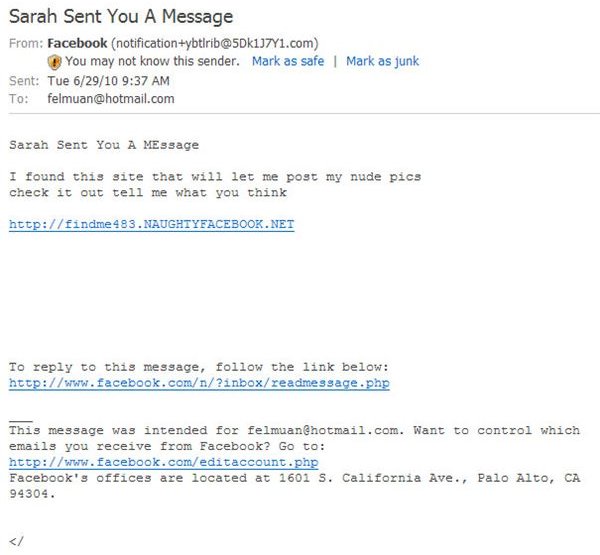
Included here is a screenshot of a Facebook phishing email I recently received. At first glance, it looks like the type of email you get from Facebook whenever someone sends you a message. When I opened the email, it was pretty obvious to me that it did not come from Facebook.
Bad To/From Email Address
For starters, my email address is not felmuan@hotmail.com. That should be your dead giveaway. If that’s not enough, look at the From: email address. After the @ is the domain from which it came, and it should be from Facebook.com or Facebookmail.com or something similiar, and not just a bunch of random letters and numbers as seen here.
Misspelled Words and Typos
If you look at the top of the message, it says “Sarah has sent you a MEssage.” Notice the first two letters of “MEssage” are capitalized? That’s a typo. A legitimate message from Facebook wouldn’t look like that.
Message Content and Links
Phishing emails will almost always include a hyperlink of some kind. This is where they get you. If you click on the link, there is no telling where you will be directed. In the case of this email, I’m pretty sure it’s some kind of adult entertainment site, but I sure as heck am not clicking the link to find out.
At the bottom of the message are links to actual Facebook pages, and those could have easily been copied and pasted over from a real Facebook email. This is what tricks a lot of people because the bottom half of this email looks legit, but you have to realize that if there is any question about any part of the whole email - even if some parts look legit - then you’d best not click on any of the included links. Don’t bother replying to the email, either.
Other Phishing Scams
If you’ve had an email account long enough, then you will eventually get spam mail that includes phishing attempts and other scams. This doesn’t mean you are being specifically targeted, though. What’s happening is that phishers are getting the same email lists that spammers use. Your email address just happened to be on a mailing list because some other website gave it to them.
The keys to spotting a phishing email apply to all phishing attempts as they do with the Facebook example above. Always look at the From: address to see where it is coming from, and pay special attention to the domain name. If the email looks like it came from your bank, then the domain should be your bank’s domain.
In the case of a bank, you could always call them to verify if there is a problem with your account. You should always keep an eye out for misspelled words and typos, because they are frequent in phishing emails since many of them come from other countries and their poor grasp of the language is obvious in their wording. Finally, just look at the content of the message. If it has a suspicious hyperlinks or tries to get you to “act immediately” or have your account shut down or something similar, then that should raise some red flags.
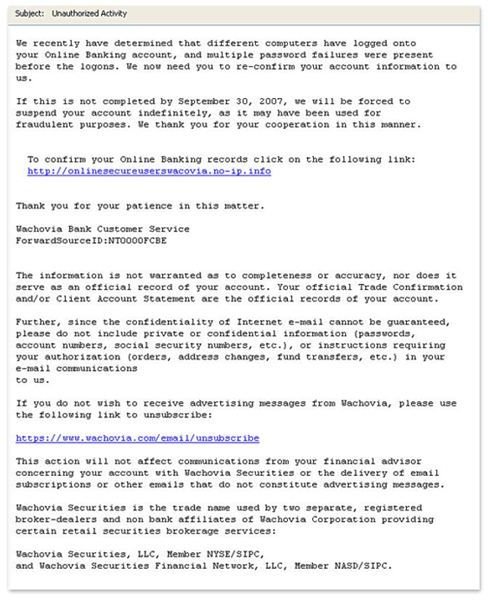
For one last example, take a look at this screenshot of a phishing email that targeted Wachovia bank customers. The dead giveaway here is that the link is not going to Wachovia.com, but instead something at no-ip.com. Why would Wachovia bank redirect customers to some outside website for online banking? Think before you click!
(Image credit: Wachovia.com)