How to Use SDelete

Written by:  • Edited by: Bill Bunter
Updated Jan 24, 2012
• Related Guides: Windows | Comodo

Learn how to optimize your hard-disk and securely delete files using SDelete.

Using SDelete to securely delete files that you don’t want to be recovered and to optimize the hard-drive by wiping its free disk space is easy as 1-2-3! There is no special requirement in using SDelete other than running it with administrator account or privileges.

How to Securely Delete Files Using SDelete

There are very simple command line in using SDelete to shred files securely:

-p passes Specifies number of overwrite passes (default is 1)

-s Recurse subdirectories

An example command line to securely delete the entire folder and its sub-directories is as follow:

sdelete –p 3 –s C:\Users\Donna\AppData\Local\Opera\Opera\profile\cache4

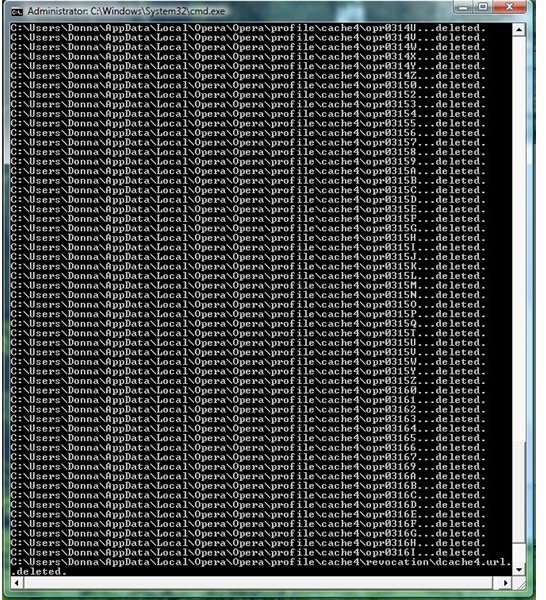
The above will delete entire contents of Opera browser’s cache, including the sub-folder in cache4. If you will not specify the number of passes, SDelete will use the default 1 pass only.

Sample Deleted Files in Opera Cache Folder 

You can add SDelete in Send To or Context Menu in Windows if you will use a script. An example of this scripts is posted in SDelete forums.

Tip: It’s always recommended to delete files securely and wiping free space in your hard-disk, if you don’t really need them ever again. Secure deletion and wiping the free space will help protect your privacy because the deleted files can no longer be recovered by any local attackers or can help protect your privacy against spyware or adware.

How to Wipe Free Disk Space Using SDelete

Wiping the unused space or free disk space of your hard-disk is important to help optimize the hard-disk. It is also a method to wipe previously deleted files. SDelete can also wipe free disk space using the following command line:

-c Clean free space

-p Passes Specifies number of overwrite passes (default is 1)

-z Zero free space (good for virtual disk optimization)

An example command to wipe the free disk space of your local dirve (system drive, another partition or hard-drive):

sdelete –p 3 –z C d:\

The above will not delete any files but will wipe previously deleted files and unused space in the hard-disk. The said command will wipe the free disk space in Drive C using 3 passes. If you rather use the default pass, you can simply enter the following command: sdelete –z C:

Tip: It’s recommended in wiping the free disk space after using the secure deletion command. This will allow SDelete to wipe also the previously deleted files. You can also enter a command to secure delete and wipe a free disk space but it’s only applicable to the entered path.

Read more articles and reviews!

Check out the article The Best Free Disk Wipe Tools to find out other privacy cleaning programs is available. If you rather see a reviews on privacy utilities, see CCleaner, Undelete 2009 and Comodo System Cleaner.


Comments

Showing all 11 comments
 
Carly Jan 24, 2012 4:39 PM
RE: How to Use SDelete
Thanks for pointing that out. We have corrected the article.
Guest Jan 24, 2012 12:57 PM
RE: How to Use SDelete
The article has a typo in the syntax for wiping the free space. -z, and -c are transposed. I.E. -z is zero disk space (for virtual drives), and -c is clear free space.<br><br>Also the command needs to use the drive letter with \ after. So the proper syntax to wipe a data drive free space would be "sdelete -p3 -c d:\"
some guy Nov 14, 2011 6:07 AM
RE: How to Use SDelete
said the same to me. i just wrote sdelete -z D:: and it worked
Punks111 Oct 25, 2011 12:01 AM
RE: How to Use SDelete
For me it doesn't work... it says: <br><br>invalid drive letter: Cargument must be formatted like d:
Anonymous May 4, 2011 3:38 AM
RE: How to Use SDelete
for disk digger guy.

"Note that SDelete securely deletes file data, but not file names located in free disk space"

Taken from http://technet.microsoft.com/en-us/sysinternals/bb897443
Trond Endrestøl Apr 29, 2011 7:48 AM
SDelete is not pedagogical
-z for Zero free space and -c for Cleanse free space would be less confusing than the current assignment of switches.
David Floyd Nov 22, 2010 3:16 PM
SDELETE does not work
For those who say SDELETE does work, please do this. Download free DiskDigger. It's a simple to use program and within a few seconds it will show you all the files (second option) that stll reside on your hard drive.
Donna Buenaventura Oct 3, 2010 12:30 AM
RE: How to Use SDelete
No, Spark. It does not require .NET Framework 3.5. If you are using in Vista or Windows 7, you have to launch the command prompt as "admin". Right-click cmd.exe then run as admin.
Spark Oct 2, 2010 11:07 AM
Sdelete Not Running on Certain Systems
I have sdelete, and is working fine, when I call it from my development system, However, it does not work on other systems. I think it requires .Net Framework 3.5? Is there any such requirements or not???
Sarah Oct 15, 2009 9:25 AM
SDelete Usage
Mine would not take the following to wipe the C: drive.

sdelete –z C:

I had to include the number of passes, even just to use the default, to get it to work.

sdelete -p 1 –z C:

Anyone else have this problem?
Duncan Sep 7, 2009 4:18 AM
Logging results from sdelete
Hi,

I will be really impressed if you can show me how to reliably log the results from the freespace wipe command to a log file having run the sdelete command from within a batch file. >> logfile.log gives erratic results, sometimes it just logs 0%, sometimes 64% sometimes it logs perfectly.
 
blog comments powered by Disqus
Email to a friend


