If it is the first time you’ve forgotten or otherwise lost your Windows password, it can be a very stressful experience. How will I log in? How do I get my password back? Can I retrieve my lost Windows password? I won’t have to reinstall, will I? You can reset or get back your password–Here’s how.
Forgot Your Windows Password?
Many of us have done it-forgotten our password. Fortunately there are several ways to regain access to Windows and to reset our password. Now the simplest way to get the ability to log in isn’t to recover the password, but to reset it. There are several built-in ways to reset the password. Let’s look at them.
Account Recovery for Beginners
There are several ways to regain access to a Windows account you’ve forgotten the password for. This first suggestion is one of the simplest. If you are using XP, XP Home, or XP Media Edition and if you know the password for the Administrator account or another account you have granted Administrator access to:
1. Log in as the Administrator
2. Click on Start-->Control Panel
3. Double-click User Accounts
4. Click on the account you need to reset the password for
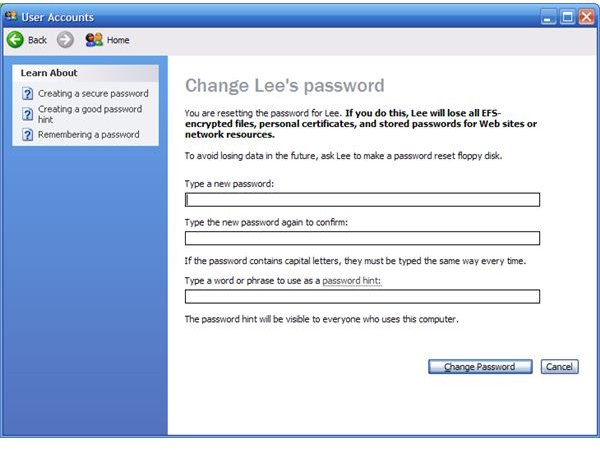
5. Click on “Change the password”
6. Type a new password in the first field, type it again in the 2nd field to confirm, and provide a hint in the last field.
(Note that this process is different in XP Pro, but the idea is the same)
7. Click Change Password and exit. Log off and log back in as that user with your new password!
Another Fix for a Lost Password
If you don’t know the password for any account in the Administrators group and are using a Windows XP based OS (XP or XP Professional) try this:
1. Put your Windows XP setup CD into your CD drive and start or restart the computer.
2. Either go into your system’s boot options and set it to boot from CD, or you may be able to just press a (specified) key to boot from CD.
3. Windows Setup will perform some setup checks and load some files. You will see information about this. Be patient.
4. When prompted, press Enter to setup Windows, then press F8 when asked to accept the Licensing Agreement.
5. You will see choices listed, pick your install of Windows from the list, then there will be several options. One will be “Repair”. Choose the Repair option. The Repair option will check the system and copy some files, then eventually reboot. Be watching for this.
6. When you see “Installing Devices” at the bottom of your screen, press Shift and F10 together. This will start the Windows command console.
7. At the prompt, type nusrmgr.cpl and press Enter. The User Accounts manager will start.
8. Find the account that you have lost the password for and click on it. Change the password as described above. Close the User Accounts manager and exit the command console.
9. Let the Repair process continue. You will be asked for the Windows Product ID Key, so be sure you have it.
9. When Windows starts after Repair is completed, you can log in to your account with the new password.
Other Options
There are password cracking options out there if you don’t remember any passwords on the system and don’t have a Windows install CD for some reason. I don’t recommend them except in extreme cases, as they take more time and knowledge than the options discussed above. Hopefully one of the methods described will help you retrieve access to your Windows account.


