You may find yourself in an unfortunate circumstance having accidentally deleted a PST file. Maybe you were doing some spring cleaning. Whatever the reason, you’re going to want to recover the file. This article will show you how to use a free file recovery program to recover your PST file.
How data recovery programs work
Data recovery programs scan your file system for recently deleted files and also the surface of the hard drive for files marked for deletion. Just because you deleted a file and emptied the recycle bin doesn’t mean the file is gone forever. The OS marks the file for deletion, but the data isn’t really removed from the hard drive until it is overwritten by another piece of data. For this reason, you stand a good chance of recovering your deleted PST (or any file for that matter). The sooner you realize your mistake, the better the chances of recovery are.
This article will be using Recuva to recover our deleted PST file.
Additional information can be found on Brighthub -
Recovering the PST
- As soon as you realize you need to recover a file, stop using your PC for anything else in order to preserve the data you wish to recover.
- Download and install Recuva to a removable disk or USB memory key. Do not install the tool to the same drive or device that has the file you’re trying to recover.
- Start Recuva and click Next past the splash screen.
- On the File Type screen, select “Other – all files”.
- On the File Location screen, select the location where you think the deleted file is. If you aren’t sure, select “I’m not sure”.
- On the summary screen, you have the option of running a deep scan. If you recently deleted the file, the basic scan should work fine. If the scan doesn’t find your file, you’ll want to run the wizard again with the deep scan. Click Start.
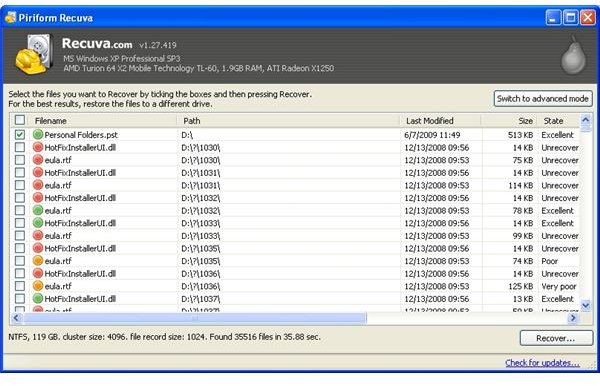
- After the scan has finished, scroll through the list of recoverable files and select the PST as shown in the figure.
- Click the Recover button and choose a location to recover the file.
You can now go back into Outlook and load up your PST as you had before it was deleted.
If you haven’t already, you’re going to want to backup your PST (and other files!) to somewhere safe. With the proliforation of online\cloud based backup services, there isn’t any excuse for not backing up your data. Check out iDrive, Microsoft Live Mesh or Brighthub’s article on the topic for more information.


