Free Antivirus Shootout: Avast vs AVG vs AntiVir – Part 2

Written by:  • Edited by: Bill Bunter
Updated Aug 3, 2010

In Part 1, we described the installation process, user interface and administrative requirement in using Avast, AVG and AntiVir. In this article, we will check the limitation, updating, memory usage and scanning performance of the said antivirus programs.

Fast and Frequent Updates is better!: AVG (Fast) and AntiVir (Frequent)

Incremental updates are quite helpful so we don’t have to download huge file size of detection signatures all the time and it will provide fast prevention on new malware and its variants. Luckily Avast, AVG and AntiVir are offering incremental updates. None of the free antivirus will offer fast updating server but I noticed that AVG’s free update server is faster than Avast and AntiVir. This depends on type of connections and location though. Alwil provides frequent updates than Avast and AVG because the average number of detection updates by AntiVir is 5 while AVG and Avast have 2 average daily updates.

Limitations in Free Antivirus Programs: Avast

Both Avast and AVG do not offer creation of new antivirus task (e.g. new scan and update schedule). AntiVir will let you add a new task to scan the system or update the program while AVG only allow editing the default scheduled scan.

Rootkit detection is not included in AVG unlike with Avast and AntiVir: Both will try to look for rootkit on a system. Avast and AVG include e-mail scanner and web shield that AntiVir is lacking.

Quick, Full and Custom Scanning: Avast and AntiVir

AntiVir and Avast will let us run a quick, full and customized scan while AVG will only allow us to run a full system scan or custom scan. Running a quick scan is what many people would like to use because it does not make sense to run a full system scan on daily basis especially if the real-time monitoring against malware is active all the time and if we would like only to check if the new and updated definitions can find malware in the active processes or critical areas in Windows.

Note that the Fast scan in AVG is not a quick scan rather the memory usage to use by AVG. Choosing fast scanning in AVG will use more memory but will finish the full system scan faster than normal scan time.

All of these 3 antivirus programs will let you right-click a file, folder or drive to run a scan. Note that only AntiVir and Avast are offering boot records scanning.

Like some other antivirus program, AntiVir, Avast and AVG will not scan all file extensions by default which means you need change the default settings to scan all file types or extensions so that malware that will hide their extension or duplicate the extension will not be overlooked by any scanner.

Scan Timing and Virtual Memory Usage: AntiVir (scan) and AVG (VM)

Since AVG do not offer a quick scanning, I have no choice but to only compare the scan performance of these 3 antivirus programs using a full system scan:

  • Avast did the job in 36 minutes with 95MB of Virtual Memory Size (VM)
  • AntiVir finished scanning in 28 minutes using 106MB of VM
  • It took 42 minutes for AVG to finish the full system scan taking advantage of 57MB VM size

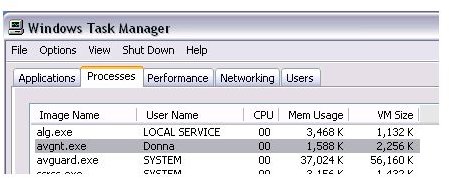
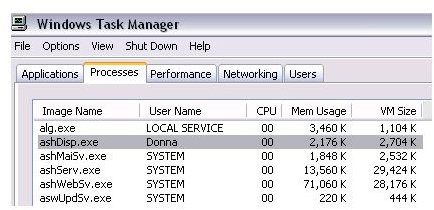
While the PC is idle, the VM for Avast is higher than AVG and AntiVir:

  • Avast is taking 63MB of virtual memory
  • AntiVir is using 58MB VM
  • AVG is running with 35MB VM


Comments

Showing all 11 comments
 
Who Cares Apr 1, 2011 3:35 PM
Some People Are Idiots
Why do people install 2-5 different antivirus/maleware removal/firewalls on thier sytstem???

I would rather have to deal with 1 virus than 5 AntiVirus programs installed on my system... making it lag, contstantly informing you of something of no importance ect...

Use one or don't use one at all. Don't install a bunch of software that all does the same dam thing people....
Andrey Nov 28, 2010 4:49 AM
RE: Free Antivirus Shootout: Avast vs AVG vs AntiVir – Part 2
Sean, the same too. I like AVG but from one moment I'm trying to watch for processes on my computer because my HDD don't stop work. I've taken program Process Monitor from www.sysinternals.com and saw that processes like avg*** executing very often. I've observed it for some days. After this I decided to install AntiVir. Looks like it looks more stealth than AVG.
Donna Buenaventura Aug 5, 2010 2:14 AM
RE: Free Antivirus Shootout: Avast vs AVG vs AntiVir – Part 2
No, Judy. Antivir is not a scam. http://free-av.com and http:avira.com is the place to get AntiVir by Avira.
There are rogue program that will exploit the name of Avira Antivir so get it from the vendors site only or reputable download site e.g. Filehippo.com, CNET.com and Majorgeeks.com
Judy Aug 4, 2010 8:40 AM
Antivir a scam
I did a google search for Antivir and a number of sites came up saying it was a scam. It infected a friends computer and he had to pay to remove it. Does anyone else know about this?
Al Jun 2, 2010 4:52 PM
Alwil vs Avast??
Can you clarify this sentence?

"Alwil provides frequent updates than Avast and AVG because the average number of detection updates by AntiVir is 5 while AVG and Avast have 2 average daily updates."

This is a little confusing to me. Aren't Alwil and Avast the same thing?
Nicole May 26, 2010 1:36 PM
AVG HOG (i agree)
I totally agree with Sean, AVG is a resource hog to the max! I thought it were my new computers that didnt have the UMPH i needed, when in fact it was AVG. My computers are happy since its gone.

I trust and use AVG always! Its light..its sexy, and its not overdoing it...its really fast!
Randy O'mandy Dandy Apr 5, 2010 7:45 AM
run 2 in the tray
it's wise to run antivir and avast while surfing.they don't interfere with one another and i also let iobit 360 run alongside the other two.i scan daily with avg,avast,antivir,superantispyware,malwarebytes,advanced systemcare 3 and iobit 360.i scan in quick mode with avir and avast and avg.once a month i scan using thorough or complete.avira has caught trojans attempting to download on my machine but enables me to avoid them.i haven't been infected for a long long long time./ btw a very fine free firewall for 64 bit pc's is pctools firewall.i prefer online armor but the creators haven't yet made it compatible with 64bit pc's ..i don't know why,but i wish they would...i like pctools but prefer online armor.at this time it's only 32bit compatble.i recommend it highly to anyone using a 32 bit machine/.
Donna Buenaventura Feb 25, 2010 7:11 PM
RE: Free Antivirus Shootout: Avast vs AVG vs AntiVir – Part 2
Hi Sean,
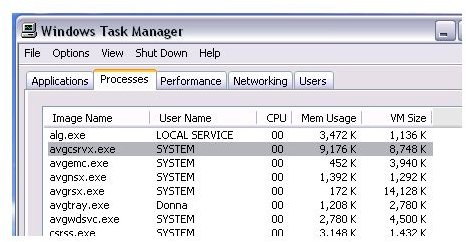
All of the avgcsrvx.exe will only use 38.8MB of RAM during a scan. It only use 4MB when idle. I have not seen it to use up to 90+%. Did you see in the new version of AVG 9? In my next article (to be published this month), you will see the screenshot of AVG's memory usage while idle and scanning. The article is to compare AVG vs. Microsoft Security Essentials :)
Sean Feb 25, 2010 12:43 PM
RE: Free Antivirus Shootout: Avast vs AVG vs AntiVir – Part 2
Hi
Thanks for your article.
But I would check your used memory again, as AVG uses over 100MB, but adds most of it to system process.
Avast seems to be the lowest in resources especially if you turn off, rootkit and other not needed monitors.
I have several 192MB laptops, so the last couple years anti-virus apps act more like virus, hogging resources. Hence I know by experience that AVG is the worst resource hog since ver7.5 on. Shame I like AVG, but hangs systems with even 2GB of memory as avgcsrvx.exe takes 90%+ off cpu checking something?
Tonda Dec 14, 2009 4:52 AM
RE: Free Antivirus Shootout: Avast vs AVG vs AntiVir – Part 2
Hmm these free antiviruses are not bad, but they are also not the best! Look at this best free antivirus comparison - Panda Cloud is the best!
Asomani Nyarko Sep 2, 2009 6:33 PM
RE: Free Antivirus Shootout: Avast vs AVG vs AntiVir – Part 2
It is good to protect your PC always
 
blog comments powered by Disqus
Email to a friend