Which is the best free antivirus software? This article compares 3 of the most widely used solutions: AVG, AntiVir and Avast!
Avast , AVG and AntiVir are the widely-used free antivirus programs on the market, but testing each in order to decide which you should use can be a time consuming process. So, I’ve done all the hard work for you. Read on to find out whether AVG, Avast! or AntiVir is the best choice for your PC.
Best Antivirus Installer: Avast
Installing AVG can confuse some people. The installer bundles a third party toolbar that is not required in order to be able to use the program. Opting to not install the AVG Security Toolbar during installation will not remove any of AVG’s security features. The AVG Safe Surf and AVG Safe Search (aka LinkScanner) will still be installed even if you do not install AVG Security Toolbar. However if you do not want LinkScanner feature in AVG, you will need to use the custom installation instead of the standard method. After installing AVG, the program will display a nag that you can hide

Like AVG, AntiVir will nag you
Avast has a better installer than AVG and AntiVir because it does not nag and does not have bundled software. It requires a system restart though before you can start using the program.
The AVG and AntiVir installers do not require you to enter an e-mail address for they will automatically generate a license key. Avast on the other hand requires registration in order for you to receive the free product key via e-mail.
User Interface: AntiVir and AVG
Most people want programs that are easy to navigate and some people want programs that look good. Avast’s user interface is like a media player , and might not appeal some of you (it’s one of those love it or hate it things!). Additionally, the program’s options are scattered around and it’s not always easy to find what you’re looking for.
AVG’s UI is nicer
Antivirus Status and Administrative Privileges: AntiVir
If you are using Vista with User Account Control enabled, Avast will display the UAC prompt before you can open the program. It does not make sense to see the UAC prompt if you have not changed anything on the setting that requires administrative privileges. AVG on the other hand will only trigger UAC to prompt you if you there is modification on its settings and if you will manually update the definitions.
AntiVir is better because it will not trigger UAC if you open and make any changes on its program settings unless you will manually install any product updates by navigating to the downloaded updated file.
AVG have issue in
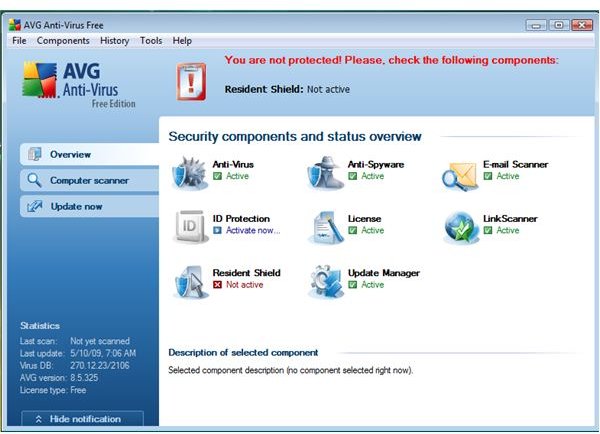
and Windows Security Center in Vista or XP. The resident shield of AVG is often reporting its status as turn-off which triggers Windows Security Center in displaying a balloon and changed AVG icon by showing status alert of the resident antivirus protection.
This post is part of the series: Which is the Best? AVG vs AntiVir vs Avast
People often wonder which free antivirus program is the best to use not only in preventing infection but security software that do not have side effect on the system’s performance. In this series of articles, we will look at some features and function of the popular free antivirus tools.


