Using Opera instead of Internet Explorer and Firefox gives the average user a definite security advantage right from day one. This article covers a few additional ways to tighten the security around the Opera browser.
Introduction
Securing a web browser is more important that most users realise. It is a common mistake to consider an antivirus an adequate defence against the rampant and varied malware doing the rounds of the Internet. An antivirus will stop a virus that has already entered the system from spreading or wreaking havoc. However that is a cure, and as per the old adage, prevention is much better by far.
A few browsers have security flaws in their code, which can then be exploited to a hacker’s benefit. Thankfully this is not the case with Opera, but it is still susceptible to spyware. Bugs can also render a web browser vulnerable.
Opera’s built-in security features
Opera is most certainly one of the most secure browsers available, and that too for free. It incorporates strong encryption, Secure Shell Layer (SSH) and Transaction Layer Security (TLS) for transferring data, authentication to avoid scams like phishing websites, certificate detection to check for expired security measures, among many more.
The features and functionality listed above are all part of the default settings in Opera, and they are all instrumental in Opera’s secure web browsing experience.
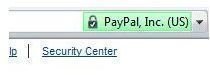
For websites that should have secure logins and sessions, Opera displays a small padlock next to the address in the display bar. This icon indicates that the website is secure, and that the information the user enters is not privy to prying eyes. It would be extremely unwise to enter any data in online banking sites, for example, without checking for the icon first.
JavaScript
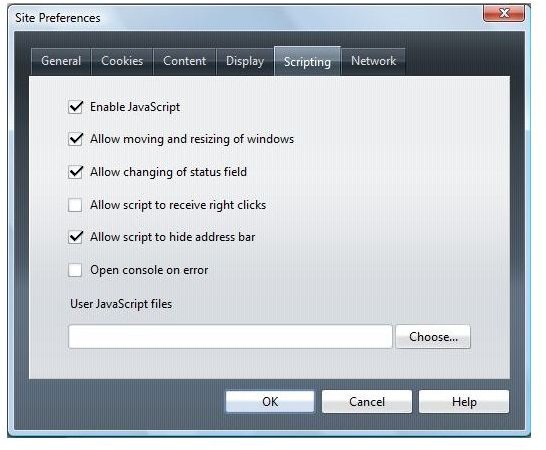
JavaScript is a dynamic web technology, which allows websites to have more interesting dimensions that what a simple text can offer. As with any programming language, JavaScript can be misused to a certain extent; for instance, it can be used to install spyware on a system.
JavaScript should not be entirely discounted as a security threat just because it is not very powerful. Granted many sites require JavaScript to be enabled before anything can be done, however it is easy to toggle the options in Opera to disallow the scripting language to take over the browser in any way.
JavaScript can be turned on and off using the F12 key whilst browsing, and without interrupting the flow in any way. The F12 key brings up Opera’s Quick Preferences menu, setting the changes quickly and with instant effect.
Cookies in an Opera browser
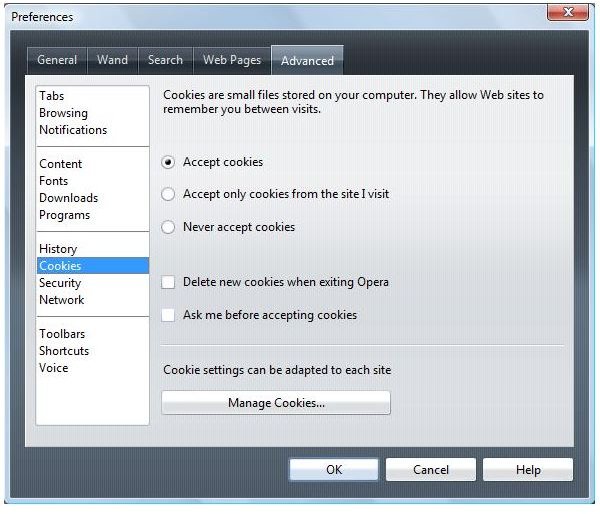
Cookies are a sore point for debate in general, because they are used to track the user’s Internet usage patterns for a myriad of different reasons.
There is no such thing as good cookies, nor, conversely, bad cookies. However, cookies can be misused to gather information, so Opera deems most of the top-level domain cookies as unsafe. Therefore these cookies will not be accepted by the browser regardless of whether or not the user permits them.
The other cookies can be configured in the Edit site preferences menu, which can be found under Tools and then Quick Preferences. Under Tools and then Preferences, there is also an Advanced menu which has a greater level of customization for Cookies. Here the user can toggle the ‘Use cookies to trace password-protected pages’ which is an excellent option to remove password-protected pages from the cache altogether.
File downloads and types
There are a number of file types that are fairly harmless, because they cannot possibly carry any sort of malware. A malicious program would have to be in an executable file of some sort. Being aware of the dangerous file extensions will go a long way in protecting a system.
Malware requires some sort of executable code to run, and therefore infest a system. These come in a variety of disguises; some not as obvious as the others. Of course, the standard executable file extensions like .exe, .bat and .com are prime suspects. However there are others as well: .vbs, a Visual Basic Scripting file; .pif and .cmd, which can control DOS applications.
Even .doc, .ppt, .xls and .rtf files are dangerous. This may seem odd, until one remembers that all the Microsoft Office applications have the option of macros and embedded Visual Basic scripts. Those are types of code as well, and as a result, risky also. The rich text format or .rtf files are essentially Word documents with changed extensions so should be treated in much the same way.
When downloading any sort of file, it is best to avoid ones that require an application to open it. Text files or HTML files are safe ones to work with since they do not have any scripting or code that could potentially harm the system.
Conclusion
Initially, in their 9.5 release of the browser, Opera was to include built-in malware protection through the aegis of Haute Secure. The idea was to increase the level of user protection by stopping downloads of rogue and malicious software right at the very source. The new detection module was better than most malware protection, as it did not use a set of blanket rules for all the sites that may have malicious content; on the other hand, it evaluated each site on an individual basis, blocking only those that actually have questionable content.
As of July 2010, the Haute Secure model seems to have been replaced with one by AVG. AVG is a popular antivirus freeware with a formidable virus database. Opera has decided to use that resource to prevent users from unwittingly accessing malicious websites. The database is powered by tips from AVG users, and therefore every time malware is detected, the browser displays a timely warning.
Opera has made a concerted effort to address the ever-present threat of malware by incorporating these modules into its browser. However, in spite of Opera being an excellent web browser with great security features, it has not gained widespread adoption on personal computers. The other editions of the browser, like the mobile versions, have been significantly more successful.
More Web Security Tips!
For more web security tips, see our articles How to Control Cookies in Internet Explorer , How to Block Third Party Cookies in Internet Explorer 7 , How To Check If a Website Is Safe , and Using ZonedOut to Manage Internet Explorer Security Zones .


