One of the most common password attacks is a Man in the Middle (MITM) password sniffing attack. See how its done and how you can protect yourself.
Introduction to Sniffing
One of the most common attacks on local networks, especially in cafes is a man in the middle (MITM) attack. An attacker poses as the network’s router through ARP poisoning and then captures or modifies packets. If the concept of ARP poisoning is completely new to you, I advise that you read up on it before continuing. In a nutshell, the attacker spams the network with packets saying that it has the IP address of the router. This means that when devices on the network want to send packets to the router, they will instead send them to the attacker. This gives the attacker two way control. They can browse through whatever packets are sent to and from the router and can modify them. This tutorial focuses on the former.
One of the most interesting pieces of information sent through the packets the attacker intercepts are passwords This tutorial will show you how to intercept these passwords using a wonderful program called Ettercap .
Starting Out With Ettercap
Note: This tutorial assumes your using a linux or unix system (and you should be if you do anything involving security) as Ettercap’s GUI is simplest to run under *nix systems.
The first thing you will need to do is download and install Ettercap.You can download it here . If you want an even easier way to run Ettercap (and an abundance of security programs) you should check out Backtrack - my favorite security distro.
Now lets start Ettercap!
ettercap -G
-G tells ettercap to run in it’s GTK GUI mode, which is the most useful for now.
If you’re using Ettercap on a network with WEP key protection you will have to use the W option, if you want to decrypt packets (you do).
ettercap -W key_length:string_or_passphrase:wep_key -G
where key_length is the length of the WEP key (64, 128 or 256), string_or_passphrase is p or s for a passphrase or string respectively and wep_key is the WEP key. An example run:
ettercap -W 128:p:b3b321e20a1865fed976337d82 -G
The GTK GUI for Ettercap should pop up.
The Fun Begins
We’ll only be able to sniff a network on the same subnet as us. The subnet is usually 255.255.255.0 so click on Options » Set Netmask and enter the subnet of your network. Now lets start sniffing. Click Sniff » Unified Sniffing and enter the network interface you want to use. If you don’t know what you want this to be, try the default value and if that doens’t work run ‘ifconfig’ and ‘iwconfig’ and check what wireless devices are in use.
Now we need to scout for hosts on the network. Click on Hosts » Scan for hosts and wait for it to finish. Then click Hosts » Host List. This will display a list of hosts. Now you need to define targets for the MITM attack. The router should be added to Target 1 and any other hosts you want to ARP poison should be added to Target 2. This is done by clicking on the host then clicking on either Target 1 or Target 2.
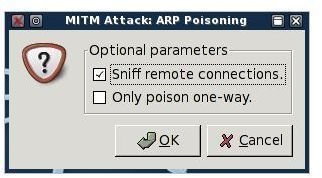
Once you’ve defined your hosts, we need to ARP poison them before we start sniffing. As previously stated this is done by spamming ARP responses that say the routers IP address belongs to our physical address (MAC address). Click on Mitm » Arp poisoning… to begin. In the next dialogue be sure to check Sniff Remote Connections (or we won’t be able to), then click OK.
Now we can start sniffing. Click Start » Start sniffing to begin.
Now what?
As soon as someone enters a username and password for almost any online service (think gmail, msn, icq, irc, ssh, to name just a few) it will appear in Ettercap’s output window (at the bottom). If they don’t, then something was configured wrong (did you check ‘Sniff remote connections’?) or nobodies accessing any services.
Protect Yourself
What can you do to protect yourself the next time your in a cafe or on any wireless network?
The best thing you can possibly do is to not access any password protected accounts when you think there is ANY chance someone could intercept it. The next best thing is to access only services that make use of Https which encrypts traffic between a user and a server. There are workarounds for attackers to decrypt your https sessions, but it will probably be more trouble than they’re willing to go to.
This is the simplest feature Ettercap has. Through the use of plugins like dns_spoof it can become a far more invasive tool. Expect a tutorial soon and more tips to protect yourself against MITM attacks soon!
More Tutorials!
If you enjoyed this article, be sure to check out Bright Hub’s Ettercap DNS Redirection , WIFI WEP Cracking and Wireshark Sniffing tutorials!


