Want to watch TV on your Mac? The Tubestick Hybrid by Equinux might be for you. You can watch and record TV on your Mac and even see those recordings on the go.
Tubestick Brings TV to Your Mac
Recently, I wrote two articles about watching TV on your Mac and TV on your iPod . In each I mentioned products by Equinux which I had not had the opportunity to try, but wanted to present as an option. Well, I have now tried the products from Equinux and that is what this review is about.
At the center of the Equinux solution is the Tubestick Hybrid. The Tubestick Hybrid, along with the required and included software, called The Tube, will let you watch and record TV on your Mac. The sources for the TV can be over the air digital and HD broadcasts or via cable connection with or without a cable box (depending on your provider). Over the air broadcasts are received through the included antenna which makes this great for travel. No need to mess with wires in your hotel room. Just use the antenna hooked to the Tubestick and your laptop.
The Tube is the software that you watch the TV through. You can do more than watch TV through The Tube. You can view program listings and schedule recordings. The program listings work great. You are asked for your zip code and then the provider/source of your TV and the software pulls up the correct listings. There are several other features in the software including the ability to chat with friends watching through The Tube at the same time. If you have friends with the software this could be a pretty cool and fun thing to do. I would love to chat with friends while watching the latest episode of LOST.
Setup is easy and painless. You can connect the Tubestick through a coaxial connection (adapter included), RCA cables (again-adapter included), or with the over the air antenna. Once the hardware is connected and the software is installed, the rest of the setup happens through The Tube. In the software you pick the device you are using, configure connection settings, and configure location settings. It will then scan for channels from the source. When using the over the air antenna the software continually wanted to scan for channels when I started the software. This was more than a bit annoying. However, the antenna did pick up all of the over the air channels from the major broadcasters in my area when placed in the correct location in the room. It was very sensitive and moving it one foot in the wrong direction lost reception for a few channels.
Signals from my cable box worked fine, since it does not rely on a signal to an antenna.
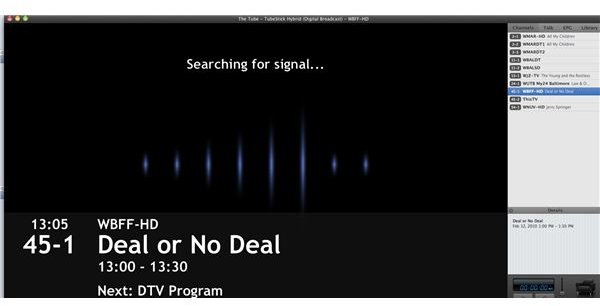
Once everything is going, you pick your channel and you are watching TV. Channels, recordings, chat, and listings can be found to the left of the picture, unless you choose to view at full screen. I found the picture quality to be fantastic. HD or just digital showed a great picture.
To record a show you can schedule a recording through the listing or just hit the record button at the bottom of the screen. The one bad thing about hitting record is there is no way to set it when to stop. You can’t set it to stop recording in thirty minutes, for example. You have to physically stop the recording.
Another problem with recording happens for those with a cable box. If you have a cable box you have to set the box to the channel you want to record. The software will not change the channel for you like it would if you were setting recordings for over the air connections or direct coaxial cable connections to the wall. Everything will still work fine; you just have to remember to change the channel before recording starts.
I have an Elgato EyeTV Hybrid hooked to my computer for TV and that software will work with something called an IR blaster. The IR blaster sends a signal to the cable box and changes the channel when the recording happens. That has some issues too, but I would definitely like to see this ability in The Tube software.
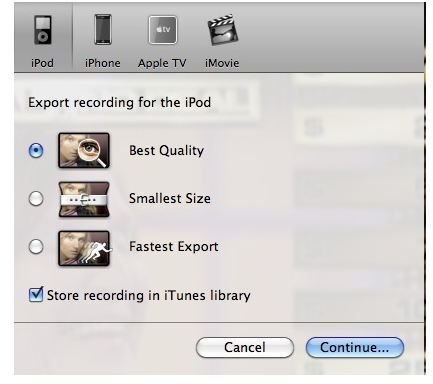
Once you have your recording you can play it back within The Tube. You can also export it to iTunes for viewing there, export to iTunes in iPod format, or export to iTunes in AppleTV format. You can even export to iMovie for editing and exporting into various formats. While you can export to iMovie for editing, it would be nice to have an editor built right into The Tube software itself.
Watch Your Recordings On The Go With Tube2Go And On Your iPod Touch or iPhone

As I mentioned on the previous page you can export your recordings to iTunes in iPod format. This would allow you to load your recordings onto your iPod to take with you. If you don’t have an iPod or if you don’t have enough room on your iPod you can use TubeToGo. TubeToGo is fantastic and one of my favorite features of The Tube and the Tubestick Hybrid.
TubeToGo allows you to send your recordings to your MobileMe account or an FTP server and watch those recordings through a web browser on a computer (or iPod/iPhone) connected to the Internet. You just have to access your specific assigned website and use your ID and password. The recording will start instantly. Of course, the speed of your connection will determine how fast the show downloads.
If you have an iPod Touch or an iPhone you can use the TubeToGo app ($.99). This app allows you to access your uploaded recordings and watch them on your iPod Touch or iPhone without using Safari. It works great, and I was pleasantly surprised at how well it worked.

On another note, there is a second app for The Tube that does not work so well. LiveTV ($4.99) is an app that is supposed to stream live TV from your computer to your iPhone or iPod Touch on the same wireless network. When I tried the app it was very disappointing, but not surprising. I have a second generation Touch and the picture was very choppy and the audio out of sync. I said not surprising because I have had the same experience streaming live TV with another product and app by Elgato. If you buy the TubeStick Hybrid I would skip this app for now, but definitely go with TubeToGo.
My Conclusion On The Tubestick Hybrid (4 out of 5)
Overall, I was very happy with the Tubestick Hybrid and The Tube software that goes with it. While it is lacking some features like in-program editing, it is definitely an option worth looking into. If you have an AppleTV , this device it could even be a replacement for DVR and that monthly DVR charge.
At a price of $129.99 it is a little pricey, but even with similar products by other companies. However, if you act fast you can get it for $59.95 through the Equinux website for the month of February 2010 in celebration of the Olympics. This is a fantastic deal and I highly suggest jumping on it.
System Requirements: An Intel mac with 1GB of RAM, at least 2GB of storage, OS 10.4.10 or higher, and a USB 2 port.
For more information visit the Equinux website .


