Scrivener Review: Writing Software for Mac
Scrivener: A Brief Overview
Scrivener is a writing software that runs on the Mac platform. It can be used by different types of writers - from novelists and scriptwriters to playwrights and comic book authors. It has built-in templates and an export function. And, you can find different ways to plan and to organise your writing project using Scrivener.
Some additional notes:
- Created by: Literature and Latte
- Requirement: Mac OS X 10.4 (Tiger) or above
- Compatibility: Universal application for both Intel and PowerPC Macs
- Cost: Free 30-day Trial, pay US$39.95 for a license, additional 12.5% discount available to students
<strong>Check out Scrivener at Literature and Latte</strong>
Some Scrivener Features
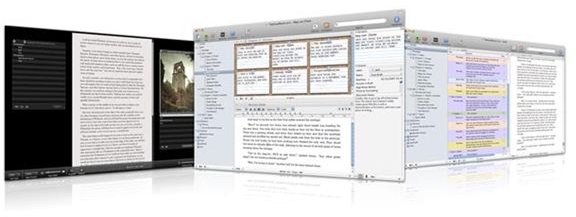
Here are some of Scrivener’s really great features:
- Templates - Scrivener comes with templates for the novel format, film scripts, comic books, radio script, and plays.
- Export Function - You can easily export your work to MS Word, or other files (including Final Draft, for scripts).
- Research notes - Add image files, PDF documents, movies, sound files and web pages in to Scrivener and have your research notes handy within the programme. No more hunting around for these notes!
- Cork Board/Index Cards - Each document you begin becomes an index card note. You can easily refer to these index cards via a cork board view. If you need to shuffle documents or scenes around, just drag your index cards.
- Outline View - You can easily create and work with your outlines in Scrivener. You can even add notes and color codes to each section for easy reference.
- Snapshots - Whenever you’re editing your draft, you can take a ‘snapshot’ of your existing draft so that you can refer to them and/or revert to a previous version of your manuscript. Especially handy whenever you change your mind about your revisions.
- Full Screen Mode - If you need to block everything else out of your computer screen, switch to full screen mode so you don’t get easily distracted and you can just get the writing done.
Pros and Cons of Scrivener
Pros
- Useful for different writing projects - novels, comics, research projects, non-fiction work, and scripts
- Clean, beautiful interface
- Caters to linear and non-linear writers/thinkers
- Great way to organize writing projects - able to add different types of files in to research folder
- Value for money
Cons
- It does not have some of the features that may be found in similar writing software (e.g., writing aids - such as character profile templates and plotting guides, built-in submissions tracking, etc)
- A better way to organise and label the research folder (e.g., separating research notes from character profiles, etc)
Bottomline Review of Scrivener (4 out of 5)
Scrivener is an excellent writing software for the Mac platform. It has several features that help to make your work as a writer easier and smoother. Since it has a built-in exporter to specific manuscript formats, it helps to get some of the worries out of making sure that your manuscripts look professional.
It has a great, easy-to-understand interface. Clean and well-organized. It is definitely worth looking in to for writers who can use a better way of writing other than just using the old wordprocessing software.
For what it can do, Scrivener is definitely well worth its price.