A new way to speed up your Mac’s apps.
Did you know that Mac OS X has a default setting in which all processes have an equal priority in the CPU? This means that even applications that might need more processor speed won’t get it (unless they are the only app running at the time). But if you want to run more than one app this can be really annoying. Speed Freak (like Fermata, both developed by Big Fat Stinking Software ), fixes that. If allows you, the user, to override the default setting and allow a higher level of CPU priority to the applications that need it, therefore increasing their speed as well
Download and Installation (4 out of 5)
Speed Freak is a freeware utility that can be found at the Big Fat Stinking Software website (you’ll have to scroll down). It runs just fine on my Macbook (which is running Mac OS X 4.11). Once the file is downloaded and mounted on your desktop, you simply have to copy it into your applications folder and voila! It is on your Mac and ready to run.
Features (4 out of 5)
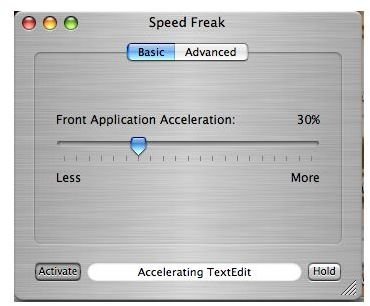
Speed Freak has two settings: Basic and Advanced. In the Basic setting you can choose to change the Front Application Acceleration by the use of a sliding scale. Once you have decided how much you want to increase the CPU priority of said application, you must activate it with the use of your administrative User Name and password. Once it is activated, Speed Freak will tell you which app is currently being accelerated since it changes depending which is in use at the time.
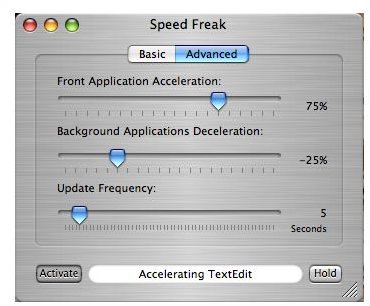
The advanced settings are similar with just a bit more specialization involved. You have Front Application Acceleration and Background Applications Deceleration (slows down apps not in use), both controlled by a sliding scale. You also have Update Frequency and a sliding scale of time. You need your administrative User Name and password to activate this one too.
There is also a preferences menu that is has some nice options, including accelerating apps on launch of Speed Freak.
Speed Freak Basic and Advanced
Usefulness (5 out of 5)
Speed Freak does not claim to speed up games with lots of graphics or anything fancy like that, so don’t get your hopes up. However, if you are like me and run many different applications at a time, it makes sense to prioritize the one you are currently working with. By simply launching Speed Freak and activating it, that’s exactly what you can do. It is a simple way to have that much more control over your Mac. Very useful, indeed.
Overall (4 out of 5)
While I didn’t notice a huge difference in terms of leaps and bounds when it came to speed, I still highly recommend Speed Freak, especially if you like running multiple applications. It’s free and easy to use, why not give it a try?


