Mailplane is a shareware application that can access multiple Gmail accounts from a single window. It’s a dedicated Gmail browser that provides a streamlined user interface and a host of features that enhance the Gmail experience.
Mailplane delivers
Mac users who rely on Gmail have a few choices for accessing the service. Some users keep a second browser open - another instance of Safari, for example - or they install Firefox.
For Mac Gmail users who have multiple Gmail accounts, browsers don’t provide much help. Some users set up Mail.app to retrieve their messages from Gmail accounts with IMAP or POP, but Mail.app doesn’t provide access to Gmail search and labels.
Mailplane is a shareware application that can access multiple Gmail accounts from a single window. It’s a dedicated Gmail browser that is written by Swiss programmer Ruben Bakker .
Installation & Setup (4 out of 5)
What’s Hot
Installing Mailplane is easy enough. Download the installation package from mailplaneapp.com and follow the usual steps to install a Mac application.
During the install process, the user can input the username and password for a Gmail account. Mailplane will support Gmail accounts. Gmail account information is saved in the Mac user’s account folders, so other user accounts on that Mac cannot access those Gmail accounts in Mailplane.
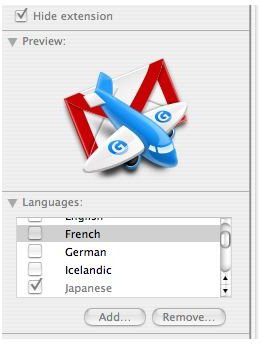
Mailplane supports 15 non-English languages , including Spanish, Japanese, German, French and Korean. [See Image 7] Mailplane can use the Mac System Preferences International setting to pick the appropriate language. Users can override this setting by going to Finder and using Get Info (Cmd-I) on Mailplane.app, and then selecting a specific language in the dialog box.
What’s Not
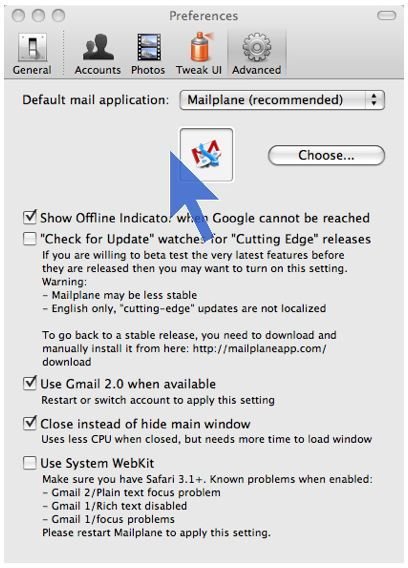
Because Gmail continues to add features, Mailplane’s developer has an aggressive revision cycle. Users can opt-in to receive beta updates to Mailpane by selecting the “cutting edge” option in the Perferences, Advanced dialog. [See image 4] This isn’t a good idea for non-English language users, as the cutting edge revisions aren’t localized into other languages.
Selecting the Webkit option will allow Mailplane to use the open source Webkit browser engine . That’s the same software code used in Safari. Unfortunately, every update to Mailplane will toss the previous Webkit version into the Trash can. Selecting the Secure Empty Trash option in the Finder results in a long disk wiping process, simply because the Webkit contains several hundred files.
Cocoa Gestures and CocoaSuite users will have to disable the mouse gestures features in those apps to run Mailplane.
User Interface (4 out of 5)
What’s Hot
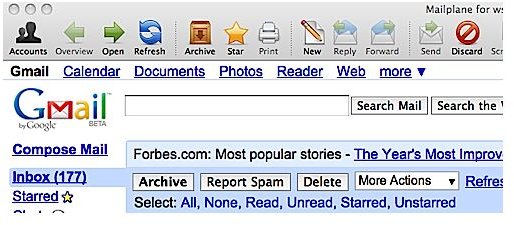
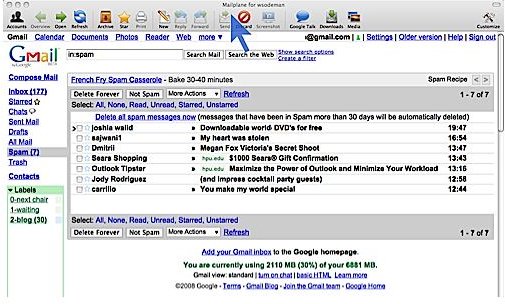
The main benefit of Mailplane is the convenience of accessing multiple Gmail accounts in a single browser window. [See Image 6] The Mailplane toolbar across the top of the screen resembles an email clients toolbar, with options to open, refresh, delete, archive and take other actions on the current message. [See Image 1]
Most Gmail keyboard shortcuts are supported in Mailplane. For example, typing R starts a reply to the current message. C will open a new message window. In fact, Gmail users should enable keyboard shortcuts on their Gmail accounts, or Mailpane’s toolbar and menu won’t work properly. This keyboard shortcut option is available in Gmail’s Settings, General page. Chatting through Google Talk is also supported.
Mailplane also maps several Gmail features to the app’s menu and the keyboard. For example, it’s possible to star the current message by pressing Cmd-*.
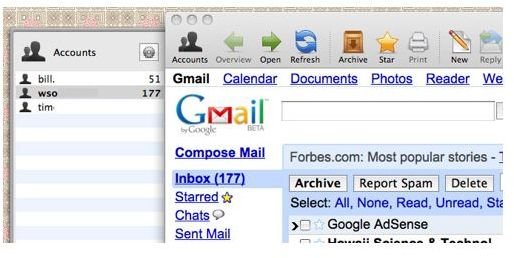
There’s an Accounts icon in the toolbar that opens an Accounts drawer on the left side of the screen. [See Image 2] For users who add more than one Gmail account to Mailplane, the Accounts panel is essential. Each Gmail account is listed, along with the number of unread message in the inboxes. Double-clicking on a Gmail account makes it active in Mailpane’s main window.
Growl support is built in to Mailplane. Growl is a widely supported free helper application that makes application and system announcements. Growl will display the sender, subject and initial lines of a message in a bubble - the user can click the Growl bubble to display the incoming message. Mailplane can also beep or play a tone when an incoming message arrives, as long as the user is logged into one or more Gmail accounts.
Product features (5 out of 5)
What’s Hot
Beyond the keyboard shortcuts and multiple account access, there are other features that enhance the Gmail experience. To add an attachment to a new message, simply drag and drop the file(s) to the Mailplane window. A new message window opens, with the files included as attachments. Drag and drop also works with composing a message.
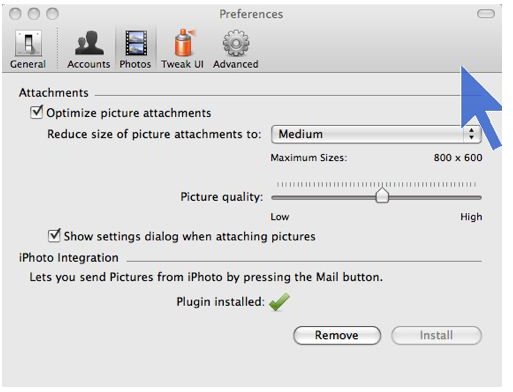
If the attachments are photos, Mailplane will display an optimization slider that can control the size and quality of the attached image. [See Image 5] This makes sending a large image file much easier for novice users while conserving bandwidth for both the sender and recipient.
Most new Gmail features work without a patch or revision to Mailplane, as Mailplane uses a robust web browser as its core. On 5 June 2008, Google released several experimental features as part of Gmail Labs. These features are discussed in this Gmail blog article called Introducing Gmail Labs . Mailplane supports many of these features, including Superstars, which lets the user choose from several different colored stars and symbols.
What’s Not
Because Gmail changes so often, sometimes Mailplane fails to keep pace. One example is when a user receives a Microsoft Office document as a message attachment. When this review was written, Mailplane sometimes saved a Word document with a .doc.dot extension, instead of a .doc extension. The easiest way to resolve this issue was to rename the file in Finder after saving the attachment a folder or the desktop.
Mailplane does not provide offline access to Gmail messages, because the app doesn’t download and store messages on the user’s hard drive. This feature is unlikely to appear in Mailplane, so Mail.app or another IMAP-compliant mail client is a better choice for users who need regular offline access to their Gmail messages.
Security and Privacy (5 out of 5)
What’s Hot
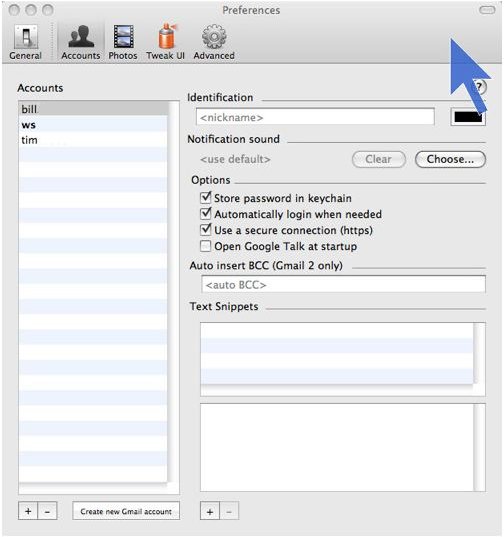
There are settings in each Gmail account’s preference panel to control access to each individual Gmail account, by saving the Gmail account password to the Mac keychain and allowing automatic login as needed. [See Image 3] Of course, this is best used on a Mac that has password-protected user accounts.
Mailplane also provides a setting in each Gmail account that enables https support. While this can affect the application’s overall performance, turning on https is a good idea for anyone who’s using Mailplane on a local area network.
Price to Value (5 out of 5)
Because Mailplane is shareware, there’s a free 30 day evaluation period when the app is first installed. To unlock Mailplane, users must purchase a license. License fees for Mailplane are US$24.95 for a single user, and an additional $8 for a family pack of 5 machine licenses. A 30% discount on a single-user license is available for university users. Payments are made through Kagi .
When the developers confirm the payment, they’ll email a Mailplane license file to the payee. Save this file to the desktop or a folder, and then double-click the license file. This installs the license and launches Mailplane.
Recommendation
Mailplane is an excellent value for any Mac user who relies on their Gmail account. As with most shareware, it’s worth downloading the app from Mailplane’s web site, and trying it for a few days. I paid my Mailplane license fee within a week of my first installation, and it’s become an essential part of my Mac desktop.
Images