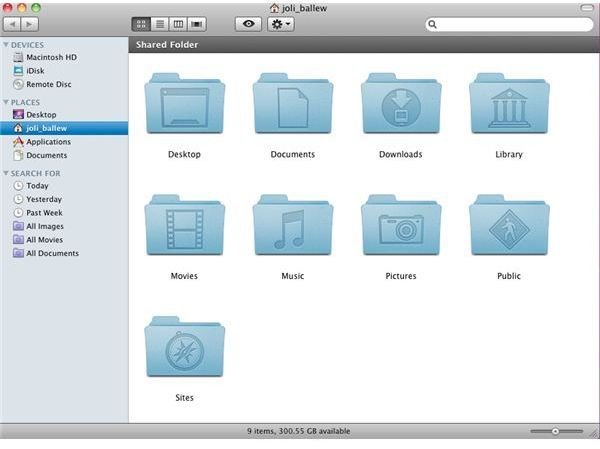
It’s important to place files in the folder to which they belong. This means putting documents in the Documents folder and Pictures in the Pictures folder, for starters. Later you can create additional folders and subfolders to further manage them.
The Mac Folder Structure
Mac OS X does its best to help you put files in the proper folders by offering up your User folder as the default location for saving files. Your user folder is the folder with your name on it. You’ll have several personal folders for saving files. For now, save data in the folders that most closely resemble the type of data they represent. Save video files in the Movies folder, for instance. When you’re ready, create your own subfolders inside these to hold other data that’s related. In the case of Movies, you might consider Raw Video, Project Files, and Completed Movies.
The Basic Folders
Mac OS X provides a Documents folder for storing documents you create. Store all documents there. Likewise there are folders for your Pictures, Music, and Movies. Every time you save data, make sure to save it in the proper folder and with a descriptive name.
The Library folder contains things needed to personalize your Mac, such as your personal Keychain data, personal fonts, preferences, favorites, printers, and much more. It also helps keep your personal data safe from other users whom might use your Mac.
The Public folder is used to share documents and other items with coworkers on a network or others who share your Mac. It contains another folder called a Drop Box, plus anything else you’ve put in there yourself. You can put files in there to share, or others can put files in there they want you to see. If you don’t share your Mac with other users, you may not use this folder much.
The Shared folder is a folder everyone has access to. If you wanted to, you could move your iTunes library there so that all users of the machine could access the songs you’ve downloaded. You might also create a Pictures folder to store pictures that everyone can access, or a Movies folder to share your creations. Other users on the machine can do the same, and add their own creations.
There’s a distinct difference between this Shared folder and the Public folder’s Drop Box in your personal user’s folder though; you are in control of your personal folder and can choose No Access if desired. You can also set the permissions to Read &Write, Read Only, or Write Only. The Shared folders options, on the other hand, are grayed out and cannot be changed by just anyone.
Personal Folders you Create
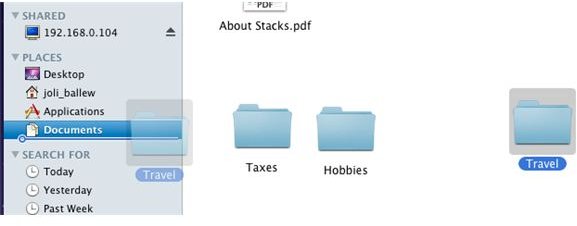
You can create your own personal folders in your Mac’s default folders and subfolders. You may create subfolders in the Pictures folder to organize your pictures, music, or movies, or you may create folders inside the Documents folder to hold files for a project such as a scrapbook, a client, artwork, publications, or even your child’s homework. To create a new folder use Shift+Apple+N. Then, simply drag items to it.
References
-
The author took these images.
It is the author’s experience that it’s best to first store data in folders already available on your Mac, and, as that data amasses, create subfolders to further organize them.
Advertisement


