Do you get hundreds of emails a day and having trouble keeping them organized? If so, a smart mailbox might be what you need.
How to Create a Smart Mailbox
A smart mailbox is similar to a smart folder in the Finder, or a smart album in iPhoto , or a smart playlist in iTunes. It allows you to set parameters for a collection of items to be sucked into one place. In this case that place is a smart mailbox. A smart mailbox can pull emails with a certain subject, from a certain person, from a certain date, or even read and unread emails to clean up that inbox.
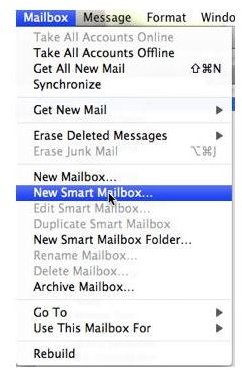
To create a smart mailbox open Mail and go to the “Mailbox” menu. (figure on the right)
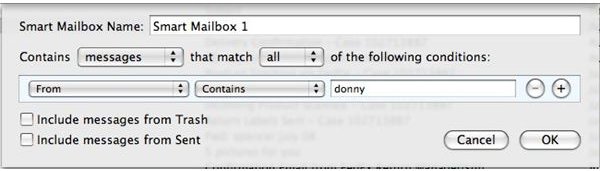
Choose “New Smart Mailbox..” A window will come down allowing you to set the parameters of the Smart Mailbox. This is where you pick the settings I mentioned above, and others. You can have more than one parameter by clicking the “+” symbol. (figure 2) You can also name you mailbox an appropriate title, and choose to search your To Do list items (If you use them) instead of emails.
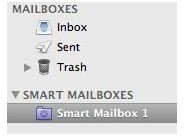
Click OK and a smart mailbox list with the mailbox will appear in the left hand column of the main window where you Inbox is. (figure 3) All emails matching your parameter(s) will instantly go to that mailbox. They will still be in your main Inbox, but they will be sorted for easier finding in the Smart Mailbox you just created.
Changing & Deleting Smart Mailboxes
You can always delete a smart mailbox by contol clicking the mailbox and clicking “Delete” from the menu. The mailbox will go away, but any emails in it will still be in your inbox.
To change the parameters of a smart mailbox just double click it and the parameter window will appear. You can then add, change, or delete parameters.
That is all there is to it. Smart mailboxes are an easy way to keep you inbox organized.
Figures