
Smilebox is a great desktop app that provides easy creation of electronic greeting cards for sending via email for special occasions and holidays. This freeware flash-based app provides a wide variety of highly customizable templates that can be personalized easily with simple drag and drop.
Just In Time For The Holidays
Smilebox is a very useful app especially with the coming holidays. If you’re a fan of sending out electronic greeting cards to faraway loved ones during special occasions, this is the best app for you. What makes Smilebox one of the best tools to use to create e-cards is its huge library of hundreds of highly customizable templates that you can tailor fit to your liking - whether it’s a multipage, music playing, electronic scrapbook of your family’s vacation that you’d like your co-workers to see, or a simple, sentimental holiday greetings to a special someone, Smilebox can provide it all for you.
Best of all, Smilebox is free, cross platform, and easy to use, asking only one simple registration in return. This app can come in very handy, especially for the coming holidays this time of the year. And, with its constantly growing library of high quality flash based customizable templates, there’s always new content as special occasions and holidays come and go over the course of time.
Stunningly Simple
The desktop e-card creation tool’s animated interface makes it an interesting playground and a breeding ground for creativity. The small installer can be downloaded here .
There are four easy steps to complete an e-card: choose, personalize, preview, and either send it via email, post it on a blog, or print, and the mapping of your steps are illustrated at the top of the interface, indicating what step you are currently in.
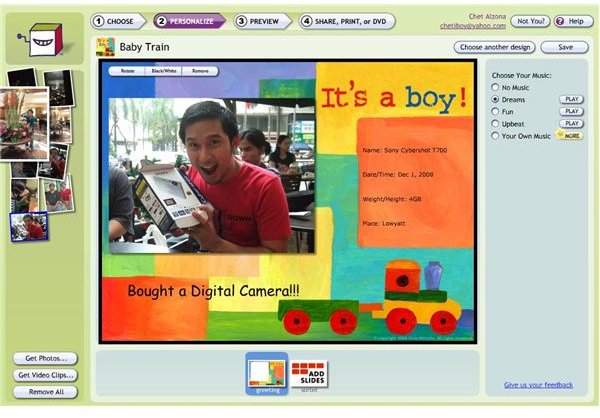
Smilebox is a fluid tool inviting creativity. Each element in the app is animated to slide in its place. Aside from it having a fast and yet aesthetically pleasing app, it also creates this environment of artistic air that actually encourages you to take your time in personalizing your greeting card, and find yourself entertained and amazed every time you add a new element, or fine tune the items you’ve already put in.
What makes Smilebox an even greater tool is because it’s not a hard drive space hog. It just pre-loads the library with links to the actual flash templates where you can preview each one, and only actually downloads the template once you’ve selected it. It’s also nice to know that you have control over which photos, videos, or audio you want to load or remove in Smilebox, instead of having it automatically detect everything for you, making the app much slower to start up. Smilebox therefore, is a fast and smart app because of these features.
Choosing And Personalizing A Template
The flow of the app is smooth and simple enough to follow.
When the app is launched, you will be welcomed by thumbnails for each category available. Designs are grouped cleverly together: New, Top 20, current holiday designs, categories for different occasions like birthdays, weddings, and so on. Clicking on a thumbnail will take you to further subsections until you reach the library containing the pre-loaded template library. Each template or design can be previewed in the confirmation page before you personalize it.
As mentioned previously, templates are only actually downloaded to your hard drive once selected. Hitting the Personalize button will prompt a progress bar for your download. Templates are usually small and quick to download, and you’ll be able to customize the page once the download is complete.
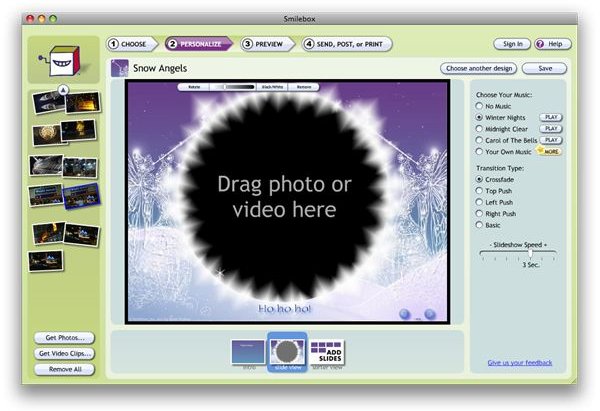
Everything you can drag and drop to image/video placeholders can be acquired from the left pane containing the photos/movies you’ve selected to be loaded onto Smilebox. Areas where you can click and drag these elements are usually tagged “Drag photo or video here” if it doesn’t already have a picture / video loaded into it. Smilebox usually autofills these placeholders for your convenience, but can easily be changed later on. Once a photo or a video has been dragged into their location in the e-card, further personalization can be made, like zooming into the photo, rotating the image, and changing it to black/white.
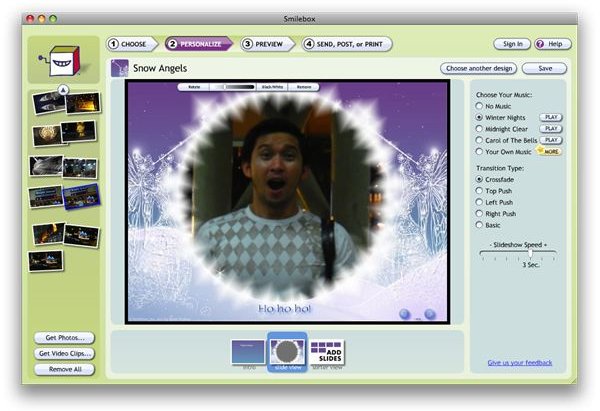
Music can also be chosen to accompany your e-card, which can be set in the right most pane. There is pre-defined music already available that would best match your e-card, but you can also look for a song from your hard drive, or a larger set of audio clips from Smilebox’s library.
You can add more slides as you wish, and you can also set the transition type for each slide as you add more.
Preview and Send
Once you’ve finished designing your e-card, you can go ahead and preview it. Preview will load the web page containing the flash e-card you’ve created. You can choose between a free basic design, or a $3.99 premium design to get rid of the advertisements that come along with the free alternative. Luckily, the advertisements are unobtrusive enough for anybody to settle with the free version. Anyone can opt to pay the premium cap should they choose to do so.
The preview is set to full screen and you’ll see a short loading screen. You can go back in and edit your card further if you’re not satisfied yet, or you can go ahead and send / blog / or print your document when you’re done. For sending emails, Smilebox will ask for the login details you created when you registered.
The recipient will receive an email similar to the image below. Clicking on play will take the user to a page where the e-card you made can be viewed.
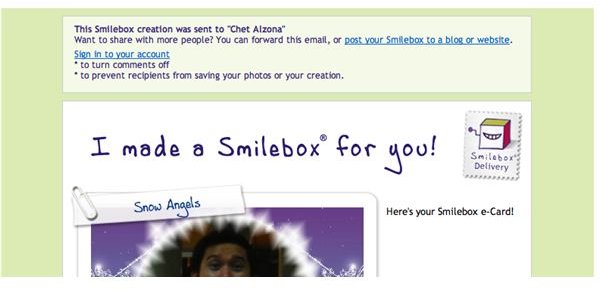
You as a sender will, in turn, receive a confirmation message that your email was sent successfully.
For All Occasions
Smilebox is a keeper. It can be used for all occasions that you might encounter through the years.
What makes Smilebox always fresh is the fact that there’s always new things added to the constantly growing templates that they have. If you like newsletters, you can join the Smilebox newsletter to be informed of new templates periodically. Also, recipients don’t have to sign up to Smilebox just to receive e-cards.
No freeware can compare to Smilebox’s ease of use and rich features. The presentation, convenience and service it provides is unlike any other. This app is a keeper, and I’m positively sure that even after the holiday season, you’ll still keep this app in your Mac “just in case” and for “special occasions”.


