In the Linux world, you can choose from a lot of different file browsers. Each distribution often comes with its own flavor. Krusader is a KDE desktop file browser, but it will work on Gnome as well. In this article, you will find why I think it is great to use.
Why choose Krusader?
If you are like me and use a current version of Kubuntu (here is what I use ), then you might find that D3lphin, which is now said to be the standard file browser, is insufficient in providing the more advanced file-browsing options. For one thing, it doesn’t have tabbing, which I use a lot. It also doesn’t have a very good built-in search for files. D3lphin uses Strigi, and I haven’t been able to get any good search results from Strigi.
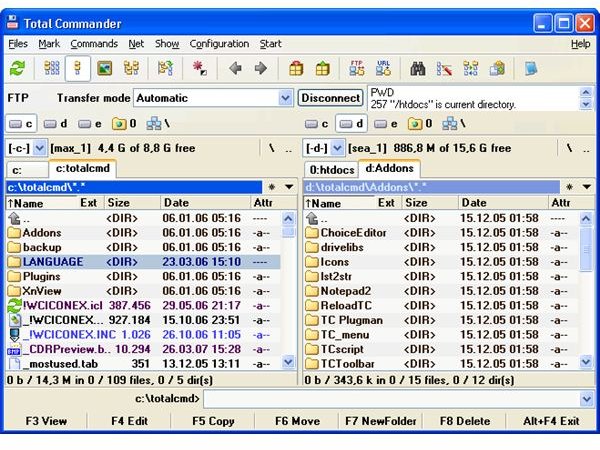
When I was using Windows, there was a file browser called Windows Commander (later changed to Total Commander) that did exactly what I needed it to do. It had a split-window option that made copying and moving files much easier. It also came equipped with a very good searching tool to use when trying to find files. Krusader is similar to this utility.
Krusader and Windows Commander
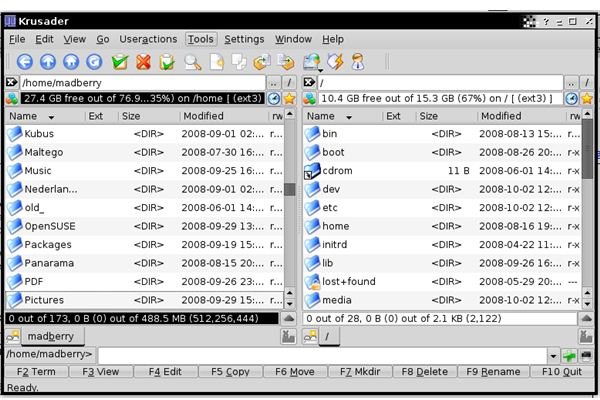
What Does Krusader Have?
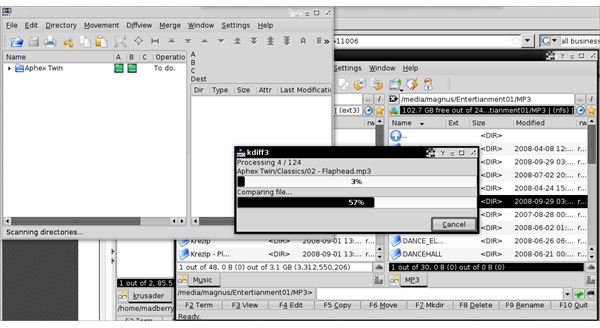
Krusader is very versatile. What it doesn’t come with or what you could need becomes apparent when you start Krusader for the first time. Also, Krusader will open a window that shows other tools that are handy to have with Krusader. You will, almost always, have to install KDiff3 and KRename. KDiff3 will help you find the differences between directories, while KRename will easily bulk rename a directory. So, what does Krusader have?
-
Ability to mount and unmount (CD-Roms for instance).
Advertisement -
Select files using a filter.
-
Pack and unpack files.
Advertisement -
New network connection (this is where you find the FTP stuff).
-
The option to create profiles.
Advertisement -
Much, much more.
KDiff3 in Action
Conclusion
Pros
-
If you need to find a file somewhere on your computer, then chances are Krusader will find it.
Advertisement -
If you like the option of also being able to upload in the same application, then you need Krusader.
-
Krusader is a strong application that seems to be well developed.
Advertisement -
In conclusion, if you move a lot of files around, like me, then you want Krusader.
Cons
- None that I can find.
Final Overall Rating (5 out of 5)
Krusader is a great application, and, in many ways, it is better then both Konqueror and D3lphin. It’s got my vote!


