Understanding the Linux File System
The basics of the Linux file system should be understood by anyone who runs a Linux distribution as their main or only operating system, especially if they’re also the one who has to upgrade and maintain it. There are differences in the Linux directory structure of each distribution (distro), but learning the layout employed by most Unix variants will prove quite useful. The File System Hierarchy (FHS) was a proposal made in 1993 to establish a standard for the location and names of files and directories for Linux and other Unix-like operating systems. Fedora is one distribution that is compliant with the FHS, nevertheless, even some Fedora versions include directories that aren’t a part of the standard.
One of the reasons why a familiarity with the Linux file system is so important is because most everything on the system is a file. Regular files and directories as well as local disk partitions, USB ports, sound and video devices are files. Note that network interfaces are not files. You can easily view your Linux file system via a Graphical User Interface (GUI) or using the command line. How well you know the system is usually determined by the tasks you’ll be doing. If you ever plan to develop software, work as a Linux administrator, or write shell scripts for Linux, you’ll want a good solid knowledge. If you simply want to do light administrative work on your Personal Computer (PC) that perhaps only you use, an in-depth knowledge is not as necessary.
Before exploring the Linux file system, there are few a other helpful facts to know. The layout is hierarchical with / (root) at the top of the “tree.” You may have heard of the root user, sometimes commonly referred to as the superuser. This user has total control over the system without restriction, access to all files and all users, even other administrators. Working as root all of the time is usually unnecessary and can be destructive, particularly when working on the command line. Also, just as there are system changes when you install and uninstall software under Windows, the same is true under Linux. The files on the same version of the same distro might appear differently depending on what software packages have been added or removed and what other administrative tasks have been done.
The deeper you advance into the Linux file system, the more intimidating it can become. Don’t worry about understanding what each of the numerous files you’ll see do–you’ll never manually work with many of them anyway. At this point, you simply want an idea of the names and locations of directories and files. The day you need to modify a file in a text editor, you’ll probably be given the exact location of the specific file with which you need to work. If not, you’ll probably be given at least a general location of where it is. This will happen when someone who runs a different distro than you attempts to help you by giving you instructions. Whenever possible, try to get help from people who run the same distro and preferably the same version as you do.
View the File System of Your Distribution
Now would be a good time for you to take a look at the directories and files on your computer. This can be done even with running a distro in live mode. Again, each system will be slightly different, but basically if you’re at the desktop, you should see an icon that indicates the home directory on which you can click. You can also search in one of the menus to see if the ROX-Filer file manager is present. You’ll probably land in the home directory, but that’s okay, from there you can navigate up to / (root). You’ll know you’re at root, the highest level, when you see directories with names like: bin, boot, dev, lib, mnt, var, and usr. You should see more than a few files, but not a long list.
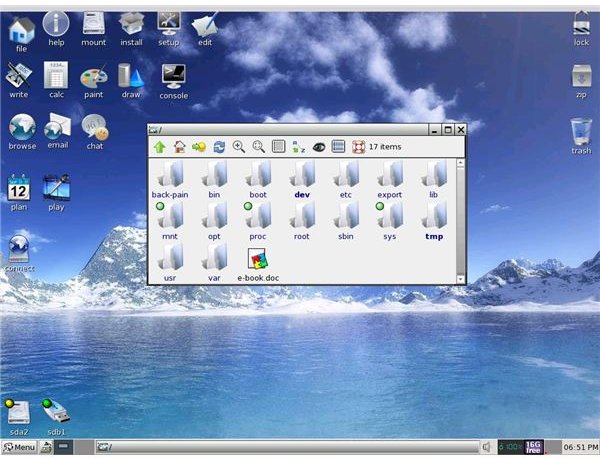
On my Puppy Linux system, I only had to click the green arrow pointing up in the upper left hand corner of the window. You may not have this arrow, but you should at least have an entry box at top or bottom to manually type in /. Once sitting at the root directory, you can begin navigating the file system by clicking on directories which might contain sub-directories and files. Depending on the directory, you might see nothing or you might see an extremely long list of directories and files.
If you know how to open configuration files with an editor such as emacs or vi, you might try viewing code this way. Be very careful not to alter anything, especially if you don’t know what you’re looking at. Python, Perl, and C are some of the programming languages you could encounter when looking at code on a Unix-like system. If you are not working as root on a highly secure system such as Fedora, you won’t be able to edit some files. It’s probably more accurate to say that you might be able to edit them, but you won’t be able to save the changes unless you have “superuser” privileges.
View the Linux File System on the Command Line
Another way to view directories and files is via the command line. If you’re using a system such as Puppy Linux which is really designed to be used in graphical mode by a single user, you’re always root. When working on Puppy, instead of opening a terminal by clicking on console or pressing Ctrl+Alt+delete, I find it easier to simply exit to a command prompt. If you have Puppy, you can click on menu which will open another menu with the option to exit to prompt. Note that this will shut down X, but you can easily return to the desktop by typing startx at the prompt.
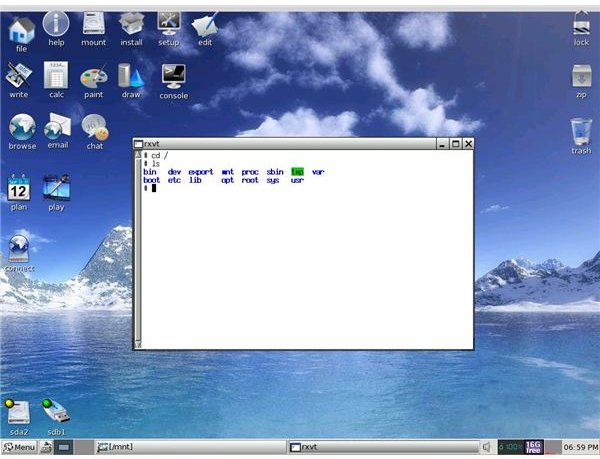
Once at a command prompt, simply type cd / to make sure you’re at root. The letters cd change directory and / is root. You can then type ls to list the high level directories you should see at this point. You can see how I viewed the Linux file system on Puppy in a GUI and on a command line. I clicked on console to work in a shell so I could take a screen shot for the purpose of this article. Normally, I exit to a prompt. You can continue navigating by typing cd + the name of the directory to advance down the file “tree.” The ls command will list the sub-directories and files for you just as it did beginning from root.
Viewing the File System in a GUI and in a console
An Brief Explanation of Directories
The /bin directory contains essential commands needed for the system to run. The boot loader files and the Linux kernel sit in /boot. Device or hardware files, except network interfaces, are located in /dev. System configuration files are in /etc and user home directories are in /home. Shared libraries and kernel modules can be found in /lib and /lost+found is a directory for holding recovered files found during a file system check. The /media directory is found on Fedora systems and is where devices like USB removable drives are mounted whereas /mnt is reserved for local or remote file systems. Kernel information and the control of processes is associated with /proc and /root is the home of the root user. System commands that have been personally set by root are in /sbin and /selinux holds data for the security component (Fedora). Temporary data can be found in /tmp and variable data such as log files are stored in /var. Software typically used by all users on the system is found in /usr.
Again, this applies to a Fedora distribution, so keep in mind that you won’t see everything I’ve listed if you run Ubuntu, Debian, or some other flavor of Linux. I also see different files with my Puppy distro. For example, there’s no /media in Puppy and no need for /selinux. I hope this brief introduction to the Linux file system will prove helpful if you have to locate and modify configuration files.