Case Study for OpenOffice vs Microsoft Office
Is There Really That Big a Difference?
OpenOffice and Microsoft Office are the two biggest players in the office productivity market today. OpenOffice is built and maintained by Sun Microsystems and the other, as the name implies, is made by Microsoft.
The main difference between the two is the philosophy. Open Office is free of charge, and open source. Sun and the OpenOffice community have built and maintained their software for the good of computer users, much like the development of Linux.
OpenOffice is currently the only office package that complies with the International Organization for Standardization. This guarantees it will play nicely with others, and will read other file formats, and allow other file formats to read it. For companies that use a diversity of packages, this can be important.
Microsoft on the other hand is completely commercial. The software is created and maintained for money. While there is absolutely nothing wrong with that, it can make a lot of difference to a consumer, or even a business. There is a significant cost involved in using commercial software.
Office Home and Student 2010 has a suggested retail price of $149.99, Office Home and Business 2010 a price tag of $279.99, and the Microsoft Office 2010 flagship edition Office Professional 2010 costs $499.99 at Microsoft’s online store [1]. That cost is for a single user, and while multiple users won’t pay full price, it is still going to be a significant investment.
On the surface, the two packages look quite similar. OpenOffice is a simpler, less cluttered program, but it doesn’t have the bells and whistles of MS Office. Also, the ribbon of the latest MS Office is a very good control panel that makes using the software very easy.
They each have versions of the same kind of applications:
- Word in Office is Writer in OpenOffice.
-
Excel in Office is Calc in OpenOffice.
-
PowerPoint in Office is Impress in OpenOffice.
-
Access in Office is Base in OpenOffice.
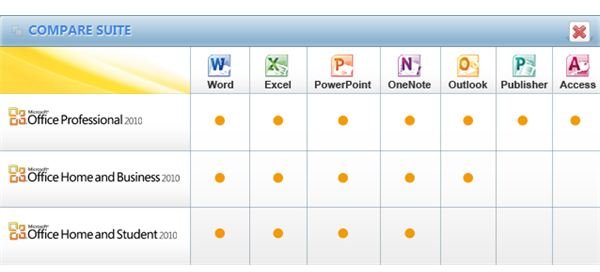
As you can see in the MS Office editions comparison table [2], the database program MS Access is not included in the Office Home and Student edition_._
MS Office Extras
As you can also see in the depicted comparison matrix, Microsoft Office does include other programs with extra functionality not found in OpenOffice. They include
-
OneNote: a digital notebook to organize and search text, photos and multimedia files
-
Publisher: a piece of software to create marketing and publication material for print and electronic purposes
-
InfoPath: software to produce any sort of form ranging from simple forms to form solutions from various data sources including SharePoint
-
Project: A full-fledged project management tool
-
SharePoint Workspace: SharePoint Workspace, previously called Office Groove in the 2007 edition, is your dashboard, whether you are connected to a Sharepoint server or not.
On top of that Microsoft Office 2010 includes Office Web Apps, browser-based versions of the Office applications Word, Excel, PowerPoint and One Note.
Using Microsoft Office Web Apps, you can work with documents right there where the document is stored, on a website, on a server or anywhere in the cloud using Windows Live, a SharePoint site or by means of a subscription to Office 365 services.
The Bottom Line
Microsoft Office is a good, solid product that offers just about every functionality needed for office purposes. It looks good, works well and there are plenty of resources about how to do things. It is kept up to date, and security patches are released as and when they are needed. There is also a wide expert base to call on when something goes wrong.
OpenOffice has everything you need if you only need the basics. It doesn’t have all the neat little features like the ribbon or SharePoint Workspace, nor is it as visually appealing. However, it is solid, interoperable, and has no problem working with other programs. You can use it on any operating system, and freely distribute it.
There aren’t so many technical experts around to help if things go wrong though. There doesn’t need to be, because it is less complex. Nor are there many security updates released for it, because it generally doesn’t need them. Best of all it’s free. There is no single, or per seat licensing, up-front costs for home users or nannying from it to register.
Overall, the case for OpenOffice vs. Microsoft Office comes down to what you want from a productivity package.
If you want it to look nice, need some or all extras, feel safe with a well known name, don’t mind the costs involved, then Microsoft Office is for you.
If you have more of a free spirit, don’t mind sticking to the basics, like the idea of free open source and the philosophy behind it, and prefer having full control over any document type and the system as a whole then OpenOffice should be your choice.
References
OpenOffice Official Product Page: https://www.openoffice.org
Microsoft Office Official Product Page: https://office.microsoft.com/en-us/
[1] https://office.microsoft.com/en-us/buy/
[2] https://office.microsoft.com/en-us/buy/office-2010-which-suite-is-right-for-you-FX101825640.aspx
Screenshots by author.