How do we choose among the thousands of programs to set up our Linux desktop system and start working immediately? How about users switching from Windows? Can they have everything they want? What would it be like to use Linux on desktop as the primary operating system?
Introduction
As a Linux desktop user, we want to have all our programs readily available and start working as soon as our system installation finishes. However, there are still some programs to install to have everything we need available, ready to get going. In this article we will discuss how to set up a typical Linux desktop, reviewing the following areas:
- Internet (web browsers, file sharing applications , news readers, download managers, instant messaging)
- Multimedia (sound and movie players, sound and video editors, photo management, media management)
- Office (office suites, personal information managers, file management)
- Productivity tools (calendar and task management, note taking)
- Security (anti-virus, anti-rootkit, PGP, firewall)
Internet
Usually your distribution comes withe Firefox in the default Linux desktop installation. At this point, as a Google Chrome user, I can safely and strongly suggest this browser. Not only for its speed, but also its ability to synchronize your bookmarks, add-ons across platforms. You can also install Opera , which is another very good web browser and can be enhanced with plugins.
For file sharing, Transmission Bittorrent Client or Ktorrent are installed by default, depending on your Linux desktop/distribution selection. but you can also check Azureus . For peer-to-peer (P2P) file sharing, you can use Amule and Gtk-Gnutella.
For a news reader, Akregator or Liferea are good choices. If you will use KDE PIM (Personal Information Manager) Suite for your e-mail management, Akregator becomes an integral part of it and you can boil down your e-mails, contacts, news feeds, calendar, tasks in one place.
Your typical download manager will be Jdownloader . It can manage downloads from multiple file hosters, allows you to enter your premium account, can unrar files automatically and can join archives splitted with HJSplit.
For instant messaging, Pidgin is a must-have application which connects to various IM networks, from MSN to Gadu-Gadu. MSN fans also need to check aMSN. Skype is also available for Linux. Konversation is an IRC client for KDE and X-Chat-Gnome is for Gnome. Note: Pidgin also supports IRC protocol.
Here are our Internet programs, grouped by desktop environment:
- KDE: Firefox (Chrome or Opera), Ktorrent (and/or Azureus), Amule (and/or Gtk-Gnutella), Akregator, Kopete (Pidgin), aMSN, Skype, Konversation
- Gnome: Firefox (and/or Opera), Transmission (and/or Azureus), Amule (and/or Gtk-Gnutella), Liferea, Pidgin, aMSN, Skype, X-Chat-Gnome
Multimedia
When you say “multimedia”, the next word that comes to mind is codecs. You can check your distribution’s additional repositories or look in non-supported repositories to find and add proprietary codecs to your Linux desktop. Google “your-distribution codecs” and follow the instructions to install them.
For playing music, there are several players to choose from. Look at Amarok, which has very powerful music playing software. It is developed for KDE, so Gnome users will need to download additional dependencies. Another option is the Banshee media player, which supports playing movies as well. As well, keep the VLC player installed.
To play movies and clips, I suggest KMPlayer for KDE users and Totem for Gnome users. To edit your movies, you can use KDENLIVE , Kino or Cinelerra. To convert your movies to DVD, tovid is a great program.
To manage your photos, I found Digikam (KDE) is powerful software. You can also try F-Spot (Gnome) which has a simpler interface. I personally recommend Picasa from Google, which features basic editing of photos, uploading to your Picasa space, tagging etc.
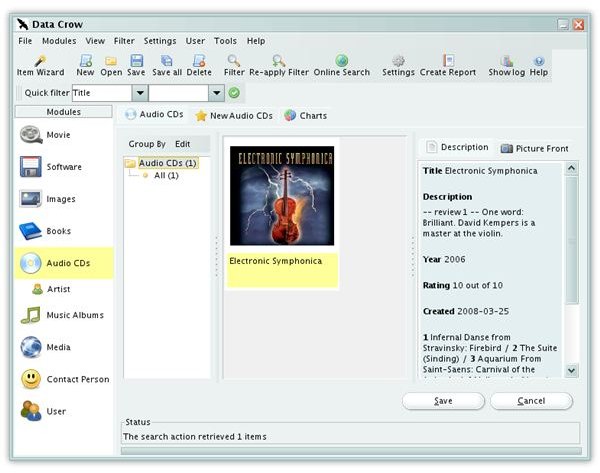
For media management, Datacrow is one application that you will start to use and never want to change. You can catalog books, movie, CD and DVD collections and manage them any way you like. It downloads information from amazon.com and IMDB and presents it in a very clear way.
To sum:
- KDE: Amarok, KMPlayer (or Totem if you prefer), VLC, KDENLIVE, tovid, Digikam (or F-Spot depending on your choice), Picasa, Datacrow
- Gnome: Banshee, Totem, VLC, KDENLIVE, tovid, Digikam (or F-Spot depending on your choice), Picasa, Datacrow
Office
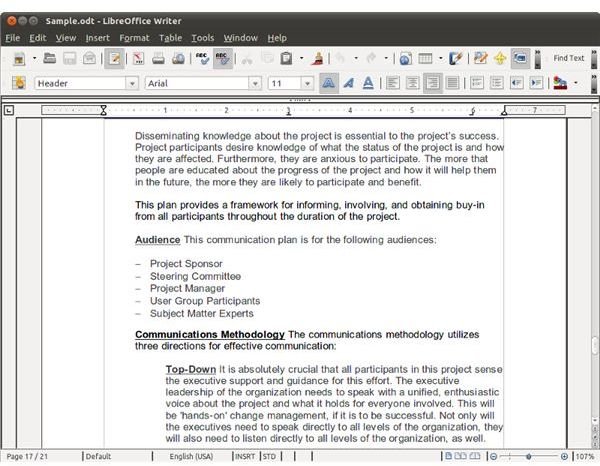
No Linux desktop can be complete without an Office Suite. I recommend Libre Office, which is a spin off from OpenOffice.org. Although there are other options like KOffice , Lotus Symphony or Gnome office programs, Libre Office interface has the fewer compatibility issues with Microsoft Office (I can say that the compatibility problems are almost none.)
For personal information managers, you need to to consider: will you be using your program with Microsoft Exchange Server? If so, then your only choice is Evolution (please note that Evolution connects to Outlook Web App, not directly to Exchange Server.) If not, I can recommend Mozilla Thunderbird or Kontact. With both programs you can manage your e-mail and contacts. If you install Mozilla Sunbird, you can have calendar and task management with your Thunderbird program.
Here is what we have:
- KDE: OpenOffice.org, Evolution (if you will connect to Microsoft Exchange), Kontact (or Mozilla Thunderbird with Sunbird, depending on your taste)
- Gnome: OpenOffice.org, Evolution (or Mozilla Thunderbird with Sunbird, depending on your taste)
Productivity
E-mail and calendar software are just a start for personal productivity. But when things get busy, we need additional software to help organize. And yes, they are essential for our Linux desktop.
For sticky notes there are many choices: you can use Knotes (KDE) or Tomboy (Gnome). If you prefer either Evolution or Kontact, they include note-scribbling features under their “notes” section. For taking notes or sharing information between a small group, Chandler is great software to install. Basket is a KDE program (and can be used in Gnome) and is very similar to (or better than) Microsoft Onenote.
To keep track of your finances, KMyMoney is a good choice.
For mind-mapping, go for a cross-platform FreeMind application.
If you need a powerful calculator, SpeedCrunch is the one to get.
Finally, for split-view file managers, Krusader (KDE) and Gnome Commander (Gnome) are the among the most powerful.
To summarize:
- KDE: Knotes, Basket, Chandler, KMyMoney, Freemind, Supercrunch, Krusader
- Gnome: Tomboy, Basket, Chandler, KMyMoney, Freemind, Supercrunch, Gnome Commander
Security
As Linux users, we tend to think we are safe but too much confidence can leave us open to danger. It’s better to be on the safe side and keep some security software installed.
Security will be good using Avast! as the anti-virus software, chkrootkit as your anti-rootkit (and you may also want to check out OSSEC , which is a very powerful tool).
Use GNUPG for your PGP signed messages and Firestarter as your firewall.
Conclusion
Aside from some specific applications like Opera, Azureus, multimedia codecs, Avast! and IBM Lotus Symphony, all the programs mentioned can be found and installed from your distribution’s package manager. I suggest you take a look at the screenshots and select the program that best suits your taste. All the Gnome and KDE programs provide the same functionality and some of them are exactly the same except the interface, so don’t worry that one feature will be present in one program but missing in the another.
Select your applications, download and install them and enjoy your powerful, secure and beautiful Linux desktop.
References
Article: Author’s own experience
Screenshots:
- Data Crow: https://www.datacrow.net
- LibreOffice: https://www.libreoffice.org/


