Installing Unbuntu on a Wind Netbook
Getting Started & Installing
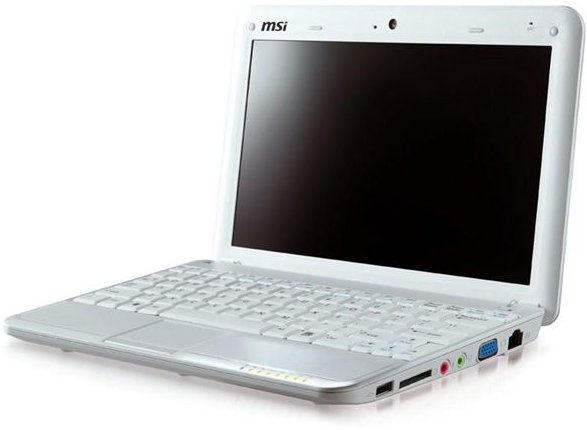
You can install Ubuntu’s latest release Jaunty Jackalope without any problems on your MSI Wind. However, I have to be upfront about the fact that after the installation we will have to do some command-line work in order to get everything up and running.
If you are not familiar with Linux installation, I recommend you review the installation process. You also have to consider if you will wipe out the Windows system completely or run Ubuntu along side it. Once you make these decisions, the installation is not different than any other Operating System installation. Shut down your Wind, put the USB stick that contains the installation to your empty USB slot and boot your system. Hit F11 when booting and select the USB drive, which will start the installation. You will only have to select your language, time zone, keyboard layout, partition layout, user name and password and then Ubuntu installer will do the rest.
If you are using Windows and cannot run Unetbootin, you can go with the Image Writer for Windows, which has exactly the same functionality with Unetbootin but works under Windows.
Create a Super User (Root) Account
It is sometimes annoying and time consuming to put sudo in front of all the commands and enter the password. We will do this a lot, so let’s create a root (super user) account. Enter the following commands:
sudo su (enter your user password when prompted)
passwd (choose a strong password for the root account)
exit
That’s it. Now we can work as root as much as we want. From now on, when I say “switch to root”, you will issue the command su in the terminal (which stands for switch user and changes to root account with no options) and enter the password you have chosen above. When you’re working with the root account, you will see a # sign in the terminal instead of a %.
Installing Ubuntu Netbook Remix
It’s better to update the whole Linux system before going on. Open up a terminal, switch to root account and issue apt-get update command. When finished, issue apt-get full upgrade. When the command finishes its work, we are ready to go on with the Ubuntu Netbook Remix (UNR) installation. First, reboot the system, either by the reboot command or the shutdown -rf now command. Of course, you can always close the terminal and reboot from the Ubuntu menu. When you reach your desktop, open up a terminal.
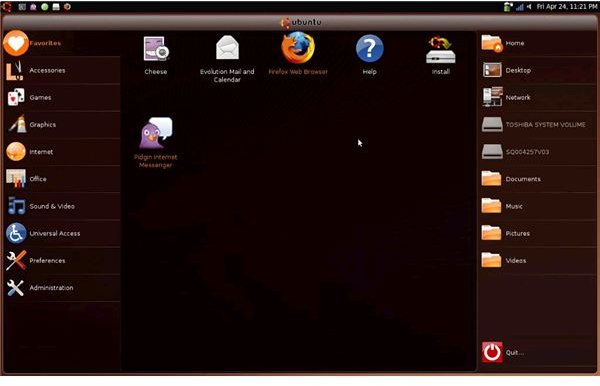
You can go on with a default Ubuntu installation but UNR is designed especially for smaller screens and tailored specifically for the netbooks. It allows you to take advantage of your hardware and screen fully. That’s why I recommend to go with the UNR installation.
Now, with your terminal open, switch to root and add the UNR repository by issuing the command: gedit /etc/apt/sources.list.d/netbook-remix-team.list. This will open a text editor in root mode which we will enter the following sources (just copy and paste the following two lines):
deb https://ppa.launchpad.net/netbook-remix-team/ubuntu jaunty main
deb-src https://ppa.launchpad.net/netbook-remix-team/ubuntu jaunty main
Save and exit the text editor but don’t leave the terminal. Now we will update our software again with the apt-get update command.
It’s time to install the UNR packages. In the terminal that you have the root access, issue the following command:
apt-get install ume-launcher ume-config-netbook go-home-applet window-picker-applet maximus human-netbook-theme
Once that finishes installing, we have a couple of small things to do in order to reach the perfect desktop:
- Right click on the bottom panel and select remove. This will free up some screen space.
- Add the Go Home, Window Picker, Notification Area, Mixer and Clock applets to the top panel.
- Go to System -> Preferences -> Appearance and select the “Human Netbook Theme”.
- Go to System -> Preferences -> Sessions and add maximus to autostart.
- Go to System -> Preferences -> Appearance, switch to Visual Effects and select “None” to disable Compiz. You can have it enabled, but chances are high that you will have some awful graphics.
- Log out and then log back in.
Voila! We have configured our desktop perfectly!
Getting Hardware to Work - Webcam
MSI Wind comes with three different webcam models: Macromedia Pavilion, Acer Bison and Genesys Logic Inc. Webcams. To learn which webcam you have on your MSI Wind netbook, issue the lsusb command from the terminal, the output of this command will give you the manufacturer.
Upon completion of the installation, we expect the webcams to work out of the box. However, things happen and you may run into problems. We will go through the steps for all three webcams.
Macromedia’s Pavilion webcam works out of the box but may freeze Cheese program when you try to record videos. It is best to update the drivers, since this bug is a work in progress and known by the developers in Berlios. If you’re experiencing low refresh rates with your webcam, lower the resolution to 640x480.
Acer’s BisonCam also works out of the box, but in order to get everything going, you have to recompile the drivers. The drivers are hosted in LinuxTV.org, and you can just download them to your computer (create a Downloads folder and save your downloaded files there. I assume you will have this folder in your netbook). The file you downloaded will be something as tip.source.tar.gz.
Open up a terminal, switch to root and issue the following commands in order:
apt-get install subversion build-essential linux-headers-$(uname-r)
cd ~/Downloads
tar -zxvf tip.source.tar.gz (a directory with the name like uvcvideo-xxx will be created)
cd uvcvideo-xxx
make
make install
depmod -ae $(uname-r)
Restart your computer.
There are experimental drivers hosted on Sourceforge.net for the Genesys Logic Inc.’s webcam, which has a non-UVC compliant gl860 chipset. The driver is in alpha stage, so proceed with caution. Download the driver from the website to your Downloads directory, and then issue the following commands:
cd ~/Downloads
tar -zxvf gl860-xxx.tgz (xxx stands for the release version, replace it with the filename)
cd gl860-xxx
make
make install
depmod -ae $(uname-r)
Since this is an alpha release, the above codes should work fine but as of this writing, the installation procedure might have changed. Check the readme file that is in the tgz file you have downloaded.
Getting Hardware to Work - Bluetooth
Bluetooth should be working out of the box, but it’s always a good idea to make it work perfectly. Open up a terminal, change to the root account and issue apt-get install bluez-compat. You’re done when the installation is complete.
Conclusion
As we have seen so far, MSI Wind needs some tweaking to run Linux. If MSI did not use the Genesys Logic’s webcam, which uses proprietary chipset, then I could rate this product as 90% compatible with Linux. Now, I can only say that if you are lucky enough have a model with Macromedia Pavilion or Acer BisonCam, you’re fine.