Want to see what all the Linux hype is about? Want to be able to take part in the Linux based geek conversations around the water cooler at work? Feel left out when your friends are raving about the latest release of Ubuntu, OpenSUSE, Fedora, or Mandriva? Run a Intel based Mac? No problem!
Install rEFIt on your Mac
The most straightforward way I have found to deal with booting multiple operating systems on an EFI based Intel Mac is to install the rEFIt boot manager in OS X. While in Mac OS X, visit the rEFIt website, download the Mac disk image, mount the image, and install. That’s it!
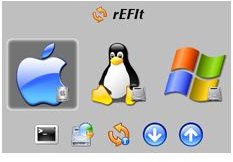
Upon the next reboot of your Mac you will be greeted with the rEFIt boot screen which will automatically detect which operating systems are installed. One thing to note, as mentioned on the authors website , is that the icons representing the various operating systems are not static. At each boot, rEFIt will detect which operating systems you have installed and display the icons for each accordingly.
Use Boot Camp to resize your OSX Partition
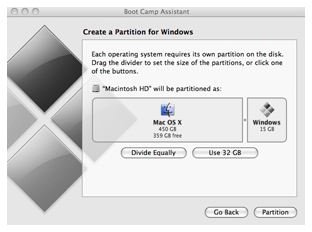
Next, the Mac OS X partition will need to be resized to allow space for your Linux distribution of choice. By far, the most user friendly way to do this is to use the Boot Camp utility included with OS X. You will want to enter your Applications folder, locate the Utilities folder, and finally start the Boot Camp Assistant. From here simply click “Continue” and on the next screen set the size of the second partition using the slider and click “Partition.” On the following screen you, of course, want to select “Quit & Install Later” as our goal is to install Linux not Windows.
Boot from your Linux CD or DVD and Install Linux
Reboot your Mac with the Linux media in your CD/DVD drive holding down the ‘C’ key as your Mac starts up. Now let’s go ahead and install Linux!
There are so many Linux distributions that covering the installation process of each is beyond the scope of this article. That being said one very important thing to keep in mind is the location of the bootloader. The bootloader must be located on the Linux partition and not the MBR (Master Boot Record). As an example, let’s theorize that you have Mac OS X and rEFIt installed at this point. You use the partition Boot Camp created for windows as your Linux root partition, reformatting it to the Linux format of your choice and also creating a small Linux swap partition within that space. Your partitions would look like this:
Partition #1: rEFIt
Partition #2: Mac OS X
Partition #3: Linux Root
Partition #4: Linux Swap
In this case you will want to install the Linux Bootloader to /dev/sda3. This can be accomplished in a variety of ways depending on your choice of Linux distribution. OpenSUSE defaults to this location; however, other distributions may not. Be sure to look at your installation overview and ensure this is set properly before continuing.
At this point you simply need to finish your Linux installation and reboot. You will be greeted by the rEFIt boot screen and should have a fully functional Mac OS X/Linux dual boot machine!


