Do you think that the most comprehensive, all-in-one, everything-included, stellar office suite is Microsoft Office? Think again, because KDE Office is offering you more.
Introduction & KWord
The slogan in KOffice’s website “the most comprehensive office suite in existence” is correct. Many users think that a word processor, a spreadsheet, a presentation program and an e-mail/calendar management is enough for an office productivity software. This definition does not take into account many office tasks which are performed by the workers. OpenOffice.org has nice programs for vector drawing, mathematical equation editing and databases but this is still not sufficient. At this point KOffice will suit your needs better.
KOffice has the following programs:
- Word processing: KWord
- Spreadsheets: KSpread
- Presentation: KPresenter
- Database: Kexi
- Flowcharting: Kivio
- Vector drawing: Karbon14
- Image editing: Krita
- Project management & Planning: KPlato
- Graph and chart drawing: KChart
- Mathematical formula editing: KFormula
- Report generating: Kugar
- E-mail, calendar, task management: KOrganizer
We believe nothing is left behind by these programs.
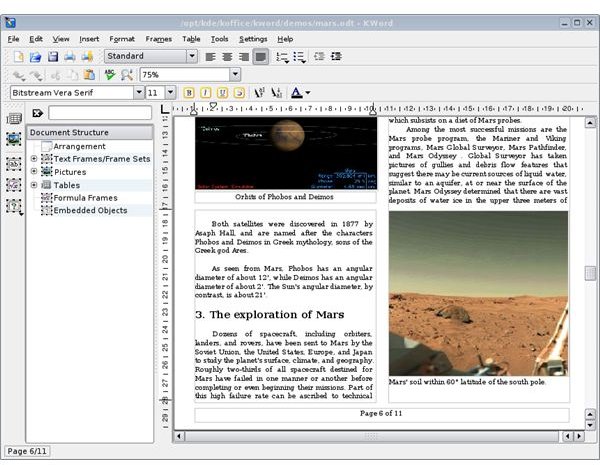
KWord is, as the name says, is the word processor of the KDE Office Suite. KWord differs from the other wordprocessors, since the program is based on frames rather than page orientation. Let’s put it this way: Do you want a document that you can place text, graphics, and tables freely (page layout) or do you want a regular-looking document (text oriented)? With the former, you can make newspaper/magazine-like documents, brochures, invitations and with the latter you can type your regular report, article or book. One of the most powerful points of KWord is the screen layout, which places KWord between a word processor and desktop publishing software.
Beginning with the page layout option, KWord offers flexibility with Paragraph Layouts, known as Styles. The paragraphs contain settings about the indents, line spacing, enumeration (numbering), fonts and alignments, borders etc. There are predefined headings to structure your documents, predefined enumeration and bullet styles plus the flexibility of adding your own. The screen has a pane on the left which shows you the structure (according to your headings for example) or the elements that are present in your document (such as tables, lists, graphics.)
The other standard word processor features are available with KWord such as alignment, Arabic/Roman numbering (both upper and lowercase), header/footer, footnotes, automatic table of contents generation, ruler, tables etc..
KWord can import OpenOffice.org Writer, rich text, Word Perfect, Abiword, HTML files, Microsoft Word, PDF word processors, XML files and can produce LaTeX output.
KSpread
KSpread is, as you already guessed, is the spreadsheet application of KDE Office Suite. The default interfaces for menu, toolbars and the cells are there, meaning that you will not have difficulties starting to work with the program. The program’s logic is the same as all the other spreadsheet programs. You have one “workbook” containing multiple “worksheets”.
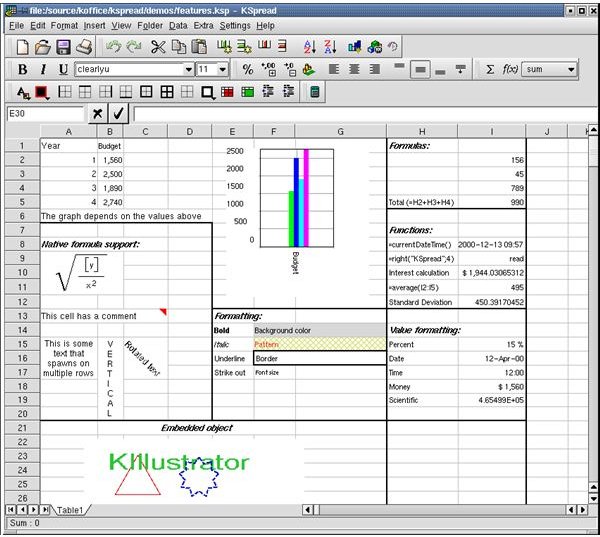
Within the cells, you can do virtually every type of formatting you can think of: vertical text, word wrap (text spanning multiple lines), rotated text, bold, italic, underline, strike out, etc.. This will give you the flexibility to design your spreadsheet as you want to. KSpread also has conditional formatting, validity check, sizing/hiding/showing cells, all as you would expect. Of course these features do not mean that KSpread is all about visual things; it supports about 400 formulas that you can work with, from financial to statistical.
In terms of data input, KSpread can read data from SQL databases. This feature is under “Insert” menu and you have to follow Insert -> External Data -> From Database path, instead of File -> Import, where I personally expect to go.
KSpread is doing average in terms of computations. Although we, the users, are happy to see goal seek in KSpread, we do not understand why dynamic tables (such as Pivot Table/Data Pilot) is not present in the program. What’s even worse is filtering data, which should be present in a spreadsheet program without question. Furthermore, you can not create named ranges. The charting works good, has a lot of features but it is average as it goes. You can find lots of chart types but unfortunately sometimes the charts do not present the values correctly, or let’s say, as you want them to be. These missing features lose KSpread lots of points. KOffice 2.0 is under development and we expect lots of rework in the program code as well as some additional features.
KPresenter & Kexi
Presenter is KOffice’s presentation program. It has the same interface elements expected for the menu, toolbars and the slides and you will not be losing too much time on learning what is where. For those who use presentation software, the menus and the toolbars are at the top of the screen, slide views are at the left pane and the rest of the screen is the main slide design.
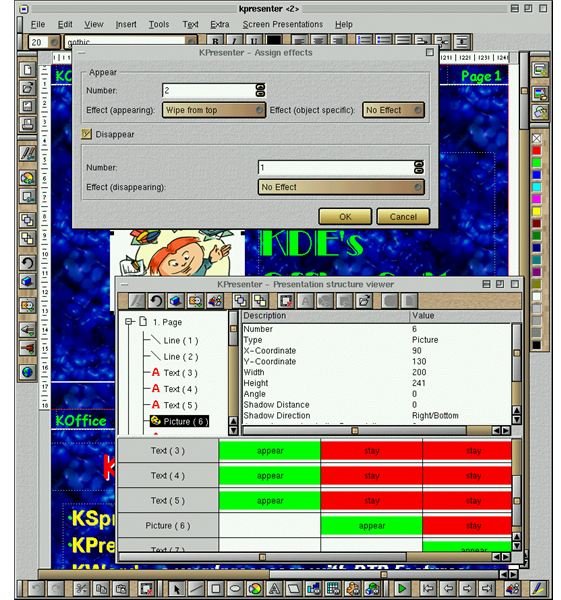
KPresenter offers you the basic functionalities of any on-screen presenting applications. You can insert/edit text, use bullets, numbering, indentation, color etc., include and edit graphics, set background, set header/footer, group/ungroup of elements and of course use animations. Inserting tables is a little bit weird though, because KPresenter offers KSpread to insert tables. Since we do not expect a fully functional table in a presentation slide, it would be much better to include a simple table, I believe. In addition, do not look for a master slide. This has a different implementation in the program with “Sticky Objects” which are displayed on each slide.
KPresenter can output the presentation in HTML format, which is particularly handy if you want to publish your presentation in a web page. Importing from Microsoft PowerPoint is still under development.
Kexi is KOffice’s database application. Although it is one of KOffice’s younger members, it has come a long way. It is a simple database application that lets the users design and use databases without going deep into database notions. However, to begin working with database applications differ from working with a word processor and you have to know some basics to design a database.
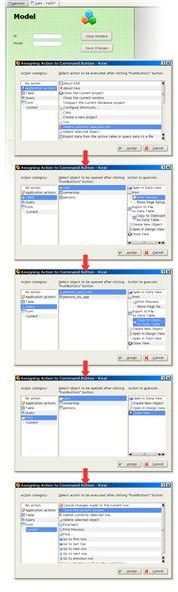
Like other database applications, Kexi has tables, queries and forms. The data is stored in the tables, extracted, computed and manipulated by queries and easily input with forms. Kexi has all these features handy in terms of interface. If you know the simple database concepts you will get going easily.
One of the Kexi’s powerful points is that it can either work with its own database in .kexi files or connect and work with MySQL/PostGresQL through plug-ins both for local and remote databases. The program asks you with the launch which database type you prefer to work and the relevant component has to be installed for PostGresQL, and kexi-driver-mysql for MySQL.
Queries are dynamic, meaning that in addition to working with one table you can also work with multiple data tables.
Forms are created by the users visually and it is possible to insert additional buttons, such as check boxes, radio buttons, text fields etc. (called widgets in Kexi) in the form design mode.
For the advanced users, Kexi has scripting and macro support. You can use Python or Ruby for scripts. Javascript is currently under development. For creating macros, the language is similar to Microsoft Access. If you are migrating from Access, learning the macros will not take too much time.
Kexi can import Microsoft Access databases and allows you to migrate from MySQL/PostGresQL. The program has improved support for working with CSV (Comma Separated Values) files as well.
Koffice Review Part 2
In the next article we review these additional components of the KOffice Suite:
- Flowcharting: Kivio
- Vector drawing: Karbon14
- Project management & Planning: KPlato
- Graph and chart drawing: KChart
- Mathematical formula editing: KFormula
- Report generating: Kugar
All screenshots are from KOffice ’s individual applications’ homepages.
This post is part of the series: Linux Office Suites
You are leaving your beloved operating system and migrating fully to Linux. You are thinking to yourself: how will you be able to create documents; how will you be able to work with spreadsheets; how will you be able to create presentations. Answers plus bonuses inside.


