Most sound related issues in Ubuntu can be traced to the sound device or the volume controls, but issues in Firefox are more likely caused by Adobe Flash Player. Fortunately, these problems are easy to resolve…
Firefox - The Top Browser on Ubuntu
The popularity of rich media content on the web means that popular browsers need to be equipped with all of the latest tools so that the user can enjoy content from video streaming sites such as YouTube, audio services such as Last.fm and even online gaming sites.
The best choice for all of these in Linux Ubuntu is Firefox, the popular alternative to proprietary browsers, which is descended from the failed Netscape Navigator project which famously lost the “Browser Wars” against Internet Explorer back in the early days of the web.
Firefox is hugely popular and comes as the default browser in Ubuntu. However, with regular changes to the way rich media content is displayed in browsers, you might find that from time to time there is no audio in Firefox. Fortunately, Ubuntu users can follow these steps for resolving such a problem and restore their browsing of media-rich websites once again.
What Causes This “No Audio” Problem?
There are various reasons why you might experience problems with a lack of audio in YouTube or other rich media websites viewed in Firefox on Ubuntu, and these all relate to the version of Adobe Flash Player that is in use.
Introduced in 1996, Flash Player has become a must-have plugin for all pre-HTML5 web browsers, enabling websites to easily stream media content and games to users’ computers. Its position as the key technology in this area is under threat, however, with the arrival of HTML5, Microsoft’s own Silverlight technology and Apple’s refusal to allow the technology on any of the iOS devices, not to mention delays introducing a 64-bit version.
When an Ubuntu computer is upgraded from, say, Ubuntu 8.04 to Ubuntu 10.10 , the issue with Flash Player not playing sound in Firefox occurs. Fortunately, this is a problem that can be resolved using various methods, such as altering sound settings or upgrading Flash.
Before embarking on either of these fixes, however, spend a few minutes with your computer hardware, checking that no headphones are plugged in or that any external speakers that you use are powered on. Basically, you want to rule out any other aspects beyond these two.
Altering Your Sound Settings
The first thing you should check when encountering this problem is the current status of your sound settings. While you might expect them to remain constant following an upgrade from one version of Ubuntu to the next, on reflection this expectation is unreasonable; with so many changes made to the operating system and developments to the user interface applied in an upgrade, there is little chance that things would stay exactly the same, especially when the software concerned is a third party application.
By altering your PCM volume in System > Preferences > Sound you can overcome this problem in the majority of cases, resulting in the restoration of audio in Firefox Ubuntu.
Be aware, however, that this fix isn’t universal. There are other possible causes for the issue, most notably a need to upgrade the current version of Adobe Flash Player . If you find that this fix doesn’t work, then upgrading is the next step.
Upgrading Adobe Flash Player in Ubuntu
Downloading and installing the most recent version of Adobe Flash Player is a reasonably straightforward. There is one particularly good method for doing this.
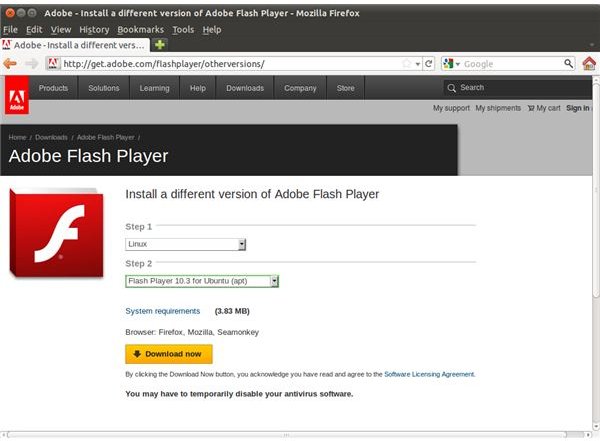
First, browse to get.adobe.com/flashplayer/otherversions where you will find a pair of drop down menus that you can use to select a version of the software to download for your operating system. In the top menu, select Linux, and in the second select Flash Player 10.3 for Ubuntu (apt). Next, click the Download now button, which will launch Ubuntu Software Center; if this is the first time you have clicked an apt link on a web page, you will have the chance to remember the choice, otherwise, just click OK. Ubuntu Software Center will then run, advising you of the version of Flash that you will be downloading. Click Use this source to proceed, following any prompts that are displayed.
A few moments later the most recent version of Flash should be installed. If your browser is still open, restart it and reload any of the pages that you were previously experiencing problems with. You should find that these now play the content you were looking for, with the audio intact!
Remember Future Flash Player Upgrades
It is worth noting that although the Flash audio issue in Firefox is cleared up relatively easily, you may still encounter it following future upgrades. As such, keep your eye out for any updates to Adobe Flash Player so that you can keep your system up-to-date with the latest versions. Also remember that your system volume can also be used to resolve many Flash Player/Mozilla Firefox audio issues on your Ubuntu computer.
References
Ubuntu Forums, https://ubuntuforums.org/showthread.php?t=982976
Screenshots provided by author.


