The Oki B2200 Printer is a LED printer - not a laser printer, but it does the exact same things for you that a small mono laser printer would do. Bright Hub reviews the printer and lets you know what an LED printer is.
The Oki B2200 printer is a small mono printer which produces output just like you would expect a small mono laser printer would. It does this by using a LED optical system, not a laser optical system. Okidata pioneered the LED technology, and has been quite faithful in using it. Here are pictures from Okidata’s site showing the difference in the system.
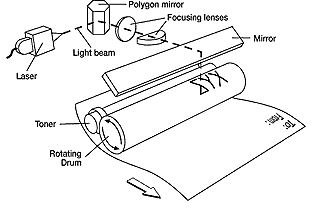
Okidata says:
Laser systems rely on elaborate combinations of rotating mirrors and lenses that must remain in alignment through use. The laser scans from one end of a line to another, then zig-zags down to the next line.
LED technology uses a Light Emitting Diode printhead as a light source within the imaging device. Unlike laser systems, the LED printhead is solid-state and has no moving parts. The LED bar pulse-flashes across the entire page width and creates the image on the print drum as it moves down.
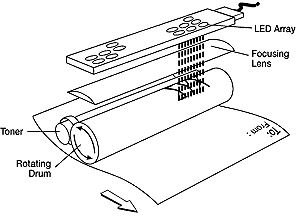
As you can see, there are fewer places where the LED system can go out of alignment than there are on a laser printer. Other than that, the output is what you would expect from a home laser printer going for two or three times the current price for the Oki B2200.
Images from Okidata site explanation of LED vs. Laser technology.
Cost, Compatibility and Connectivity (4 out of 5)
The Okidata site gives $136 for the MSRP, but, aside from one site which seems to think they can get people to pay $200 for the printer, it is retailing online for $47 to $100 dollars.
Okidata says it is compatible with Vista, XP, 2000, NT4.0 Windows OS, and Mac OS 9 and 10.3 and up. Okidata does not list Linux drivers on its site, but I found a Ubuntu forum with a driver .pdf file which posts say works with the Oki B2200.
The B2200 is only set up for a USB connection to one computer. However, there are other printers in the Oki B2200 line which do have networking capability, for prices online from $69 to $220.
Like almost all printers, it does not come with the needed USB cable. Be aware a user noted that it needs a square end USB cable to fit the printer.
Features (4 out of 5)
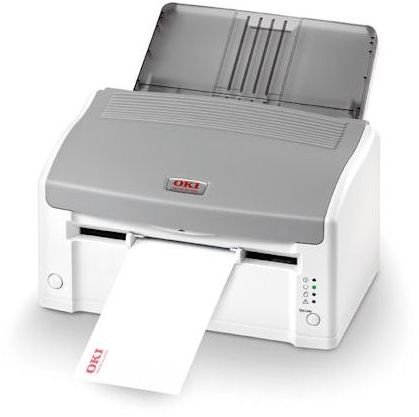
Okidata gives it a speed of 21 ppm, after a 6 second warm up. It has one 150 sheet paper tray, with no upgrade available. The output tray holds 30 sheets. Unusually, the paper path turns a full 180 degrees inside the printer, but it does have a manual front paper feed which goes straight through the printer. It takes a single sheet at a time, but can be used for envelopes and heavy stock paper.
It prints on letter, legal, A4, A5, A6, Com 10 and Monarch envelopes and in the manual feed can use up to 32 bond stock. The supplies listed in association with the printer have transparencies for sale, but the product description does not mention printing on transparencies.
It is not a duplex printer, and none of the series have the capability to duplex. It can add watermarks to paper. There are 4 indicators on the printer showing power, online status, paper jams, and other errors. There are 2 buttons, one for power, and one to send it online. The printer does not have a standby mode, so when it is turned off, no energy is used.
Okidata is very sure of their technology, and warranties the LED printhead for 5 years. The printer itself has a 1 year warranty.
It lists a monthly duty cycle of 15,000 pages, but since 15,000 pages is the recommended life of the image drum, I think it would be more accurate to say the printer has a life cycle of 15,000 pages. Across a life of 3 years, that works out to about 5000 pages a year, or a bit over 400 pages a month. So if you think you will average printing about 100 pages a week, this would be a good printer for you. It does not sound suitable for anything larger than a small home office, a casual family printer, or a printer for a student. It prints at 1200 x 600 dpi, weighs a bit over 9 pounds, and has a footprint of 12.6 x 8 x 7.1 inches. When the paper tray is attached, it extends out from the back of the printer and nearly doubles the depth of the printer in space needed. However, you could put it at the back of a desk and have the paper tray extend into the air if you did not have a lot of space. Interestingly enough, Okidata has a total cost of ownership page - and they give the results that this printer does not save you money over 3 years vs. comparable printers. However, if you read through the comparisons, only one of the other printers entered has its original cost entered, and there is no mention of the price of the consumables that should be being compared. Testing is done by GAP Intelligence, and I don’t know if this problem is due to poor research on their part, since the page is not actually on the Okidata site. This argues well for Okidata’s honesty, but raises questions about the printer costs, covered in the next section.
Continue on to the next page for the remainder of Bright Hub’s review of the Oki B2200 printer.
Supplies (4 out of 5)
The printer comes with a full sized toner cartridge, printing 2K pages. Okidata sells replacement toner for $66. Online, Okidata toner for the printer can be found for about $44. At that price, the toner costs for printing are 2.2 cents a page, which is quite respectable for a home laser printer, and cheaper by quite a bit than most inkjet printers . At Okidata’s $66 a cartridge, a page costs 3.3 cents a
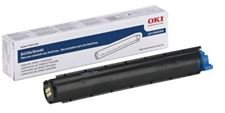
page. For laser quality printing, in a home or student environment, the TCO seems to me to be rather good, as long as your printing needs are low enough.
At 15,000 pages, Okidata advises replacement of the image drum, for $100. Given that you can pick the printer up for $50 or so, it seems much more reasonable to replace the printer. Since a new toner cartridge can be gotten in the same price range- $50, and one comes with the printer, you seem to either be paying for a printer and getting a free toner cartridge, or buying a toner cartridge and getting a free printer with it.
User Reviews (4 out of 5)
One user complained that it was not dark enough. However, other users mentioned the darkness was above average. Another user did say that draft mode was very light. Several people commented that the printer seemed very solidly built. One reviewer thought it was slow, while another said that once it warmed up, printing speed was as fast as reported.
It is reported to be a quiet printer, and a couple users did have problems with paper jamming. They pointed out it was not meant for printing photos, but that it reproduced graphics at adequate quality.
Excellent product support, based in Long Beach, CA was noted by several users.
One person commented that when using lightweight bond, paper came out curled- no doubt due to the 180 degree printing path, but as the paper cooled, it flattened. A couple people mentioned a funny odor when it first started printing.
Conclusion (4 out of 5)
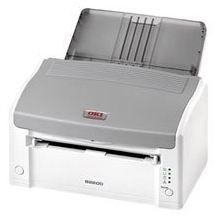
At the price the Oki B2200 can be found online, it is a great deal for a small laser printer. It does not have many fancy options, although it does come with some specific printing software and templates for various uses. If you don’t need a lot of pages on a regular basis, the printer with toner cartridge is well worth considering. The toner cartridges are good for 2000 pages, which means you’d be replacing the cartridge 2 to 3 times a year if you print 100 pages a week.
It is in that funny price category where if you needed to print a lot, replacing a cartridge every 2000 pages for $44-$66 dollars each time would give you a terrible TCO. However, light duty users get a a good quality printer and a toner cartridge at the price of replacing a toner cartridge. If you found it for cheap enough, and shipping costs were low, you could even get a new printer every time the toner was used up, and donate the printer to the Salvation Army for a tax write off.
Bright Hub gives the printer a definite thumbs up for light duty users.


