Are you looking for a new mouse for general desktop work, photo editing, or computer gaming? Find out more about this new revolution in computer mice.
Introduction to the Logitech MX Revolution
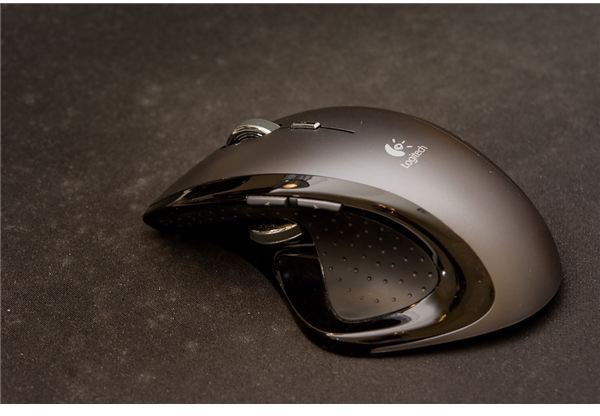
On first glance at this mouse, it has an eye-catching modern design with its sleek curves, many buttons, and ergonomic design. Upon using the mouse, the first thing that came to my mind was comfort. The mouse conforms nicely to any sized right hand. If you are coming from a smaller mouse, which you undoubtedly will, it may take a few days to get completely comfortable with its larger, heavier design and many buttons. However, once you get used to it, you will be left wondering how you got around the computer without it.
Photo by .dr4gon.
Features (5 out of 5)
This mouse features the standard right and left mouse buttons, a middle button (also the scroll wheel), a small “quick-flip” button (for fast window changing), back and forward buttons on the left hand side for easy browser navigation, and a thumb scroll wheel for addition scrolling capabilities. Underneath is an on/off switch and a small hole for the laser sensor. Unlike regular optical mice, there is no red light emanating from the bottom.
The ergonomics are phenomenal, but what really sets this mouse apart from the other mice in the field is the scroll wheel. It has the ability to scroll via the standard click to click that many are accustomed to, but it also has the ability to go to free spin when it detects faster rotation. In free spin, you can quickly navigate numerous pages with ease. Give it a flick and you can be back at the top of a long page after you have finished reading it. Using the free Logitech SetPoint software, you have the ability to customize the rotation and speed of the scroll wheel and assign custom actions or keys to any button. The software can even create custom application profiles so that in certain applications or games, you can have specifically defined actions for each button. This small, lightweight software conveniently sits in the system tray for easy access. While it is not necessary (the mouse is plug and play in Windows XP, Vista, and 7), it allows you to get the most out of your mouse.
Performance (5 out of 5)
With its constant 800 dpi of sensitivity, mouse movement is smooth, very accurate, and comfortable. In the real world, this mouse lives up to its promises, delivering what a mouse should: effortless navigation. I have been using this mouse for about one and a half years and I can say this is the best mouse I have ever used. Whenever I am away from my computer, I really miss this mouse.
In the browser, the quick scrolling, back and forward buttons are a great combination for effortless navigation. In Photoshop or other photo editing tools, the mouse allows for full control over brushes and touchups. For gaming, the many buttons give quick access to many commands and actions giving you an edge to your game whether you are playing a first person shooter or an RTS.
The wireless functionality is great for freeing up precious desktop space and giving more freedom to use the mouse anywhere (and I mean anywhere, the wireless tracks beyond the base station’s room).
The battery life on this mouse is excellent. On a full charge, I can expect about 7 days of regular use (several hours at my computer). On the top of the mouse is a battery level indicator with 3 bars. Personally I have never dropped below one because I just have a habit of charging it every couple of days. The SetPoint software gives a more accurate estimate in days and percentages to help gauge battery life.
Value (4 out of 5)
In choosing this mouse, I wanted something cordless to reduce my desktop clutter, functional (with many customizable buttons), comfortable, and reliable. It has succeeded beyond my expectations in every one of these aspects. This mouse is truly one of a kind in its many features outlined here. This mouse though doesn’t come without a fairly hefty price tag. It retails for $99.99, but can be had for $55.49 with free shipping at Amazon.com at the time of this writing. I’ve seen it cheaper at other places (like Best Buy which has it on sale this week for $50). The mouse also comes backed with Logitech’s superior 3 year warranty. Logitech support is very helpful and I have never had any trouble getting new (not refurbished) replacement products shipped to me for free. You are investing in one of your most important computer peripherals, so it the price is well worth it.
This mouse really deserves 4.5/5 stars because it is quite expensive and many cheaper mice can do similar tasks. The MX Revolution just does the job best and for that gives good value for your money.
Conclusion (5 out of 5)
Since its release back in 2007, I know of no better desktop mouse on the market. I would not hesitate to recommend this mouse to anyone. So if you are looking for a new desktop mouse to replace your old broken one or one seeking an upgrade, look no further than the Logitech MX Revolution. You can get it right now at Amazon.com for $55.49. At that price, it is a steal!


