The HP Mini 1151NR netbook is a special member of HP’s Mini netbook series being offered by Verizon Wireless in conjunction with a mobile broadband package. In this review, we’ll concentrate on the netbook itself and see how well it performs.
Overview of the HP Mini 1151NR Netbook
The HP Mini 1151NR is part of a netbook/mobile broadband package currently being offered by Verizon Wireless. We’ll take a closer look at the details of this package in another review, but here, we’ll restrict ourselves to looking primarily at the netbook part of the deal.
Later in this review, we’ll give a more in-depth examination of the hardware components of the HP Mini 1151NR netbook. But, for those who want an idea of what’s included with this PC before reading any further, here’s an overview of the hardware specifications.
Hardware Specifications of the HP Mini 1151NR Netbook
- Processor: 1.6 GHz Intel Atom N270 with 512 KB L2 cache
- Memory: 1 GB DDR2 (not upgradeable)
- Video: Intel Graphics Media Accelerator 950 (integrated) with up to 128MB video memory
- Hard Drive: 80GB, 4200 RPM
- Display: 10.1” Diagonal Widescreen (1024 x 576)
- Network Card: Integrated 10/100 Ethernet/LAN
- Wireless Connectivity: 802.11 b/g WLAN, Bluetooth (13)
- Keyboard: 82 key (92% full size)
- Pointing Device: Touch Pad with dedicated scrolling pad and on/off button
- Weight: 2.45 lbs
- Dimensions: 10.3” x 6.56” x 0.99” when closed
- Power: 30 W AC adapter, 3-cell lithium-ion polymer battery
- External Ports: 2 USB 2.0 ports, SD card reader, headphone-out/microphone-in combo jack
Product Setup (5 out of 5)
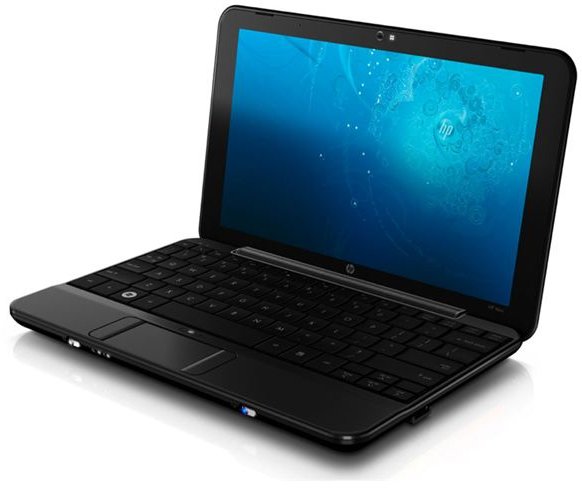
Like most netbooks, and almost all notebook PCs these days, the HP Mini 1151NR netbook was easy to set up, right out of the box. Just pop in the battery pack, connect the power cord, and you’re done.
Although the battery may have enough juice to turn the netbook on right away, you’ll most likely need to plug the device in and charge it before you start configuring the settings. The setup instructions that come with the netbook warn that the battery will not be charged, but I was lucky enough to get a pre-charged battery with the model I received. That’s not a given though, so it’s best to go ahead and plan to charge the device first.
Design (5 out of 5)
The HP Mini1151NR has an elegant, simple design that blends functionality with an attractive appearance. The upper portion of the netbook is glossy black with a barely noticeable silver swirl pattern on the lid. The bottom half of the device is a more basic matte black that I’ve already noted (ahem) is fairly scruff and scratch resistant. (Yes, I somehow managed to clumsily drop the machine several times within hours of first receiving it.)
The keyboard on the HP Mini 1151NR is a real treat. One of the problems that I have with most netbooks, and all laptops for that matter, is the keyboard. I spend most of my time working on a desktop PC so I’m used to a full size keyboard. When I have to switch to using one that’s much smaller in size, I feel clumsy and inefficient when typing. Since the 1151NR is a wider netbook, it was able to incorporate an “almost” full-sized keyboard into its design with large, flat and easily accessible keys. This should be a definite plus to those who prefer fuller keyboards.
While I still prefer to hook up a mouse to the netbook to use as a pointing device, I am not entirely dismissive of the 1151NR’s touch pad. The touch pad has a central dedicated scrolling pad with clickable selection buttons on either side of the pad. This diminishes the number of times that I accidentally “click” while scrolling – something that I have found very frustrating in other portable PCs. Above the touch pad is a small button that you click to turn the touch pad completely off if you prefer to work without it and don’t want to chance accidentally brushing it while typing.
Continue on to the next page for the rest of our review of the HP Mini 1151NR netbook, including some of the not-so-hot features of the device.
Performance (4 out of 5)
The HP Mini 1151NR comes loaded with the Windows XP Home Edition SP3 operating system. Initial setup and configuration of the device took about 10 minutes. After that, with no changes to the initial configuration, the netbook took about 45 seconds to start from a cold boot. That’s not too bad, but you can probably shave some time from this with a little bit of optimization .
For other aspects, the 1151NR performed right in line with other netbooks of similar specifications. Internet-based activities were limited more by various connection speeds than by anything else. Basic word processing, image viewing, and running PC maintenance software went smoothly with no glitches or hiccups. Although I plan to test some higher-end applications like photo editors in the future, netbooks really weren’t built to handle such software so any decent performance with these applications will be a bonus more than anything else.
Connectivity (5 out of 5)
The HP Mini 1151NR offers several options for Internet connectivity. With the integrated 10/100 Ethernet LAN network card, you can use the netbook with your Cable or DSL modem at home. Additionally, the netbook will search and detect all nearby available Wi-Fi networks. Finally, by virtue of the Verizon mobile broadband package, the netbook has a built-in 3G modem that can be used to connect to the Verizon data network.
Verizon’s VZAccess Manager is pre-installed to help manage Wi-Fi and Verizon connections, but the first time you open the application, you’ll be asked if you want to update to a newer version that’s easier to use. Definitely choose this option since the updated VZAccess Manager is a big improvement over the older software.
Battery (2 out of 5)
A 3-cell lithium-ion polymer battery is included with the HP Mini 1151NR. This is probably my only real disappointment with the machine. You’ll be lucky to get three hours of use out of the netbook with this battery, and much less if you’re watching videos. If you plan on needing the netbook for longer periods of time without access to an AC outlet, you should think about investing in a second 3-cell battery or purchasing a 6-cell extended-life battery through HP.
Price to Value (4 out of 5)
If you sign up for a two-year mobile broadband contract with Verizon, you can pick up the HP Mini 1151NR for $199. While this is a substantial discount over what the netbook would cost without the contract (Verizon lists the retail price of the 1151NR as $466.64 on the invoice for sales tax purposes), you are still saddled with the two-year contract. If you need a mobile broadband plan anyway, this is no problem since Verizon’s pricing is very competitive with other carriers in the industry. So, for a combination netbook/mobile broadband deal, this package is hard to beat. However, if you’re not that interested in the mobile broadband capabilities of the netbook, you’re much better off purchasing one of the other netbooks in the HP Mini series even if the price is higher – you’ll save a lot of money in the long run.
Overall Rating (4 out of 5)
As far as netbooks go, the HP Mini 1151NR is a great little machine. The only real issue I have with the device is the rather minimal battery that comes included with the netbook. I wouldn’t have minded paying a bit more for the netbook up front if there was an option to upgrade to the 6-cell battery. In all other regards – portability, design, performance, and connectivity – the 1151NR is a solid performer worth its price.


