Microsoft Wireless Comfort Keyboard 4000 – Best Mid-Priced Keyboard Review
Microsoft Wireless Comfort Keyboard 4000
In a recent quest to replace my keyboard and mouse, I purchased the Microsoft Wireless Laser Desktop 4000 package containing the Wireless Comfort Keyboard 4000 and the Wireless Laser Mouse 5000.
While I’m fairly pleased with the mouse, I’m genuinely thrilled with the keyboard. It is, by far, the best keyboard that I have ever used, but let’s take a more in-depth look at some of the device’s key features.
Wireless Functionality (4 out of 5)
As I mentioned in my review of the Wireless Laser Mouse 5000, one nice thing about buying the Desktop 4000 package is that it comes with a shared wireless receiver for the keyboard and mouse so only one USB port is being used for both devices.
From the moment I first connected the receiver, I’ve had no problems with the keyboard receiving a wireless signal. For the most part, the receiver only sits about three feet away from the keyboard, but I did move it around some just for testing purposes. Even with the receiver 10 feet away, the signal was still fine.
Design (5 out of 5)
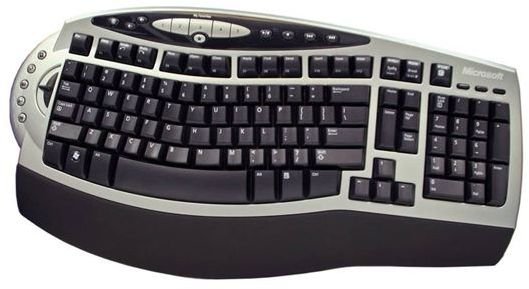
Generally, I’m not big on ergonomic keyboards, but the curved style of the Comfort Keyboard 4000 really does live up to its name. This feature along with the cushioned palm rest makes typing on the keyboard much more comfortable than any other keyboard I have ever used.
Since I spend a large portion of everyday working on the computer, a comfortable keyboard design is extremely important to me. In fact, it’s important enough that I am willing to overlook a lot of other issues if the keyboard excels in this area, as this one certainly does.
Special Buttons and Features (5 out of 5)
When I bought the keyboard, I really didn’t pay attention to the built-in extra buttons and gadgets. Since I am accustomed to using keyboards without these extras, I figured that they would just remain “scenery” on the keyboard. Even so, I had to try them out once I got the keyboard set up just to see what they would do.
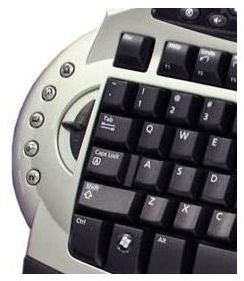
While I still doubt that I will use many of these features that often, I was pretty impressed with the zoom tool. Not only did it make it easier to zoom in or out in most applications, the sliding zoom bar acted as a scrolling device for Firefox.
Five specialized buttons sit curved around the zoom tool. They provide a quick way to access items like the home page of your web browser, the Gadget Gallery of Windows Live, email, and the My Documents folder.
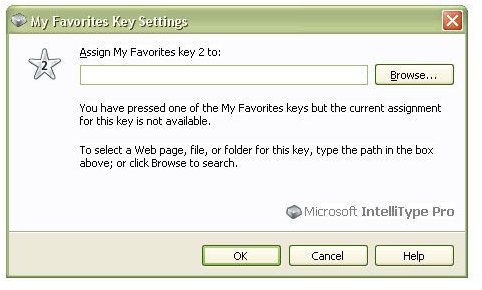
In addition, there are five customizable buttons at the top of the keyboard that you can assign to a file, folder, or web page of your choice. Assigning these keys is pretty simple, too. Just click on any unmapped button and a window like the one shown in the screenshot below will pop up, allowing you to enter a file path or URL. If you don’t know the path of the item you wish to map, you can use the browse function to locate it.
Enhanced Function Keys (5 out of 5)
Again, the enhanced function keys weren’t a motivation for my choice in buying the keyboard, but I’ve already come to love them. If you work in a lot of Microsoft applications, especially Microsoft Office, you should find this addition pretty handy.
In addition to their standard operations, the 12 function keys on the keyboard have each been assigned to frequently-used commands such as Undo, Redo, Open, Save, and Print. With as much as I use the Undo feature in almost every piece of software I own, having an Undo key right on the keyboard is a great timesaver.
Price and Overall Rating (4 out of 5)
The Wireless Comfort Keyboard 4000 is part of the Microsoft Wireless Laser Desktop Package which lists for a suggested retail price of $79.95. However, there are several places where you can find this package cheaper. In fact, at the time of this review, Amazon.com has the set listed for $66.24.
I’m very happy with the product and feel it’s definitely worth the price, especially for someone who spends several hours a day behind a computer. If you’re a more casual user, then this might be a bit more than you want to spend. There are a lot of cheaper keyboards on the market, but you’ll be hard-pressed to find one as comfortable and well-designed as this one in a lower price range.