The keyboard is the most important interface peripheral connected to a computer. Learn how to troubleshoot a malfunctioning keyboard that is not working at start up.
Sometimes the keyboard just will not respond after startup and needs to be either fixed or replaced. Your keyboard attaches to your computer in one of two ways . A PS2 port is a connector on your motherboard that has several pins sticking out of it. Round in shape, the PS2 port has been the standard peripheral connector for several decades. With the advent of the USB port , connecting peripherals to your computer became easier but also became less reliable as USB ports can be finicky.
The following directions should help you troubleshoot your keyboard problems. They will work for Windows XP, Vista and 7.
Troubleshooting a Keyboard Connected to a PS2 Port
Your first step in troubleshooting a keyboard that is not working at startup is to determine whether the keyboard itself or the keyboard’s PS2 port is causing the problem. Most modern keyboards have three LED lights to indicate that the Num Lock, the Caps Lock, or the Scroll Lock is on.
If the lights do not turn on, check the connection between the keyboard and the computer to be certain that the connection is tight (i.e. plugged all the way in to the PS2 port on your motherboard). If the connection is tight, then you may simply have a keyboard that is not working or has burned out after many hours of use. The only option you probably have is to replace the keyboard.
If they turn on momentarily, you now know that the computer is capable of communicating with the keyboard.
If the lights on the keyboard come on momentarily during startup but do not work after the operating system has finished loading, restart your computer again and go into your computer’s BIOS .
You can usually access the BIOS by pressing the DEL key during the POST. Simply restart your computer and look for the prompt to press the DEL key to enter the BIOS. While you have access to your computer’s BIOS, look for a setting that will allow you to halt boot up for a keyboard error. Not all BIOSes will have this option so you may have to skip this step. Restart your computer and see if the BIOS halts the boot up because of a keyboard error. If so, you will likely need to replace your keyboard with a new one.
Troubleshooting a Keyboard Connected to a USB Port
Although USB ports offer a range of advantages over other connection ports on a computer, the truth is that they are far less reliable than the standard PS2 from the 1980s. They are more likely to stop working or work intermittently which is why it is wise to be certain you computer has PS2 ports on its motherboard for both keyboard and mouse connections in case the USB ports stop working.
You can use the troubleshooting techniques described above to troubleshoot a non-working keyboard that is attached to a computer with a USB port. So, startup your computer and look for the LED lights to come on and check to see if your computer’s BIOS is set to halt in keyboard errors. If your USB keyboard passes these tests, you can move on to troubleshooting issues specific to USB keyboards.
If you computer has a USB keyboard, it is likely that your mouse also connects to your computer using a USB connection. Startup your computer and verify that your keyboard does not work after the operating system is finished loading. Now, check to see if the mouse is working.
First, if you are using an optical or laser mouse, turn the mouse over and look for a bright red (or maybe blue or green) light is coming out the opening on the bottom of the mouse. If not, this is an indication that no power is going to mouse and that the USB port is malfunctioning. Unplug your mouse and keyboard from their current USB connection and reconnect them into two different USB ports on your computer. Available ports may be located on the back of your computer on the motherboard or in the front of your computer.
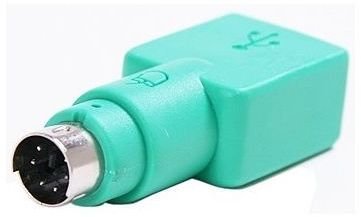
If your mouse and keyboard still do not work, there are two possibilities. First, the USB ports on your computer have stopped working altogether. In this case, you can try to connect your mouse and keyboard to PS2 ports if your computer’s motherboard has them. To connect a USB keyboard and mouse to PS2 ports, you will need two inexpensive USB-to-PS2 adapters like the one shown in the picture.
Second, it is possible that both your keyboard and mouse are broken but this would be an amazing coincidence for them both to stop working at the same time. At this point, you should check to see if your computer is still under warranty and have a professional check out your computer.


