Are you a little lost with all the speaker cabling to hooking up your speakers? This guide will clear things up and have you hearing your favorite tunes in no time!
Introduction
A computer these days would not be complete without the full visual and audio experience of videos, music, and the internet. Whether you have headphones or a full-blown 5.1, 6.1, or 7.1 surround sound speaker set, hooking up your sound is very simple. Speakers are designed to be plug and play, but you just have to know what plug goes where.
Match the Colors!
Front Audio
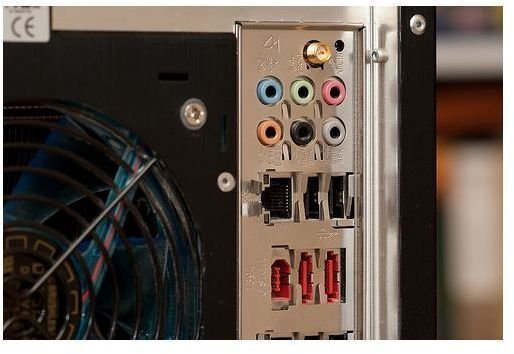
More often than not, your speaker or computer headphone’s cable will be color coded for easy plug and play audio. For a single headset or pair of desktop speakers, plug the small green 3.5mm connector into the green plug in the back of your computer’s audio panel. It is usually a cluster of colored plugs; see the picture to the left. If you have a sound card, then it may look a little bit different and might not always be color-coded (like the Creative X-Fi series). Consult the manual to the sound card for the correct plugs. The green plug is universal for front speakers, left and right. Look for this first!
Photo by .dr4gon
Microphone
If you have a standalone microphone or a headset with a microphone, the cable will likely be pink. This plugs into the pink port in the back of the computer, usually right next to the green port where you first plugged in your speakers. Pink is also universal for the microphone or other recording device. The pink and green ports are on every modern PC, laptop, notebook, and netbook.
If you have a simple setup with the first two items, you are now done and can stop here. If you have a more elaborate setup with a subwoofer and rear speakers, continue on, you’re half way there!
Rear Speakers
These speakers have a black plug that go to the back of your computer’s audio panel.
Subwoofer and Center Speaker
These two speakers use an orange plug.
Mid Side Speakers
The two side speakers for a 7.1 channel setup use the grey plug.
Alternate Speaker Configurations
Subwoofer AV Receiver in 5.1 and 7.1 Setups
Many speaker setups (those by Logitech and Creative) have subwooders that act as a receiver for your 5 or 7 speakers. All of these speakers plug into the subwoofer which has three or four audio cables coming out of it. Again, green for front speakers, black for rear speakers, orange for the front center and subwoofer speakers, and if applicable, grey for the mid side speakers on a 7.1 system.
Adding Speakers to a Stereo (2.1) Setup
Adding an additional two speakers to an existing 2.1 setup is possible. Plug this set of speaker’s green plug into the black jack of your computer’s sound card. Additionally, you will need to go to the control panel of your audio card an enable 4 channels.
Conclusion and Troubleshooting
Hopefully, you’re sound works perfectly now and you are enjoying some music. Give yourself a pat on the back! If for whatever reason the sound does not work, try double checking your cables, if necessary, power on your speakers, restart your computer, and/or consult your computer’s owner manual or the documentation that came with your speakers or headphones. If sound is coming up a different speaker than is supposed to (surround sound coming out of the front speakers), one of your plugs needs to be switched. As you can see, troubleshooting sound is usually an easy fix as it could be something you overlooked.


