Since its release in early September, 2009, the Core i5 has been branded as the mainstream version of Intel’s Core i7. So what are the real differences between Core i5 and Core i7, and how do Intel’s two product lines compare? Updated to reflect Sandy Bridge architecture.
Core i5: The New Middle Class
Intel recently re-released the Core processors in the i3, i5 and i7 processor brands. This was necessary because Intel has released a new architecture, called Sandy Bridge, which brings improved performance when compared to the previous Core i branded products.
While the hardware has changed, Intel’s branding scheme remains the same, and Core i5 remains Intel’s primary mid-range processor. It is targeted at the heart of the market, with pricing that is not at budget levels but still affordable, and performance that is extremely quick but not the fastest Intel offers.
Intel’s high-end processor line is the Core i7. Many users who are looking for a high-performance part end up considering both i5 and i7 products. The i5 is quick, but the i7 promises to be faster - is it really, and if so, does the extra performance justify the cost?
A Unified Socket and Chipset
Perhaps the best news to come out of Intel’s new line of i5 and i7 processors is introduction of a single socket for all Sandy Bridge Core i3/i5/i7 processors. This is a state of affairs that may not last forever, as it is rumored that Intel will release a new high-end socket alongside a new chipset and new processors towards the end of 2011.
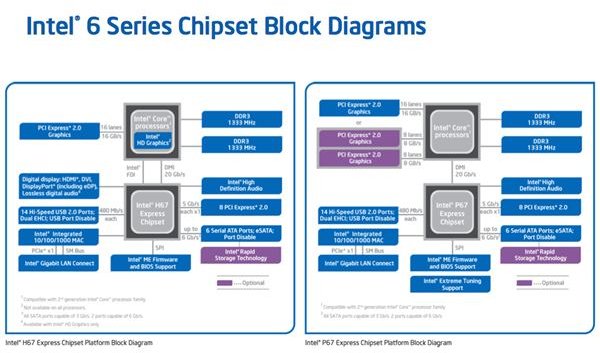
For now, however, the Sandy Bridge processors all use the LGA 1155 socket. In case you’re wondering, this socket is not backwards compatible with previous LGA1156 processors - don’t try it unless you like junking your hardware. The new chipsets at P67 and H67, and they’re targeted towards performance and mainstream users respectively. The P67 offers processor overclocking support and 16 additional lanes of PCIe bandwidth - these are the primary advantages over H67.
The new, more unified approach to sockets and chipsets certainly makes constructing a system much easier than before. At the moment, you can buy any Sandy Bridge processor and any H67 and P67 motherboard and expect the two to work together.
Intel Turbo Boost
Intel has made Turbo Boost a standard feature on all Core i5 and i7 processors, from the least to most expensive. Intel has also reduced the gap between the maximum turbo boost frequency on different processors. Previously, some of the older Core i7 processors actually had a much less efficient Turbo Boost feature than some newer Core i5s.
All of Intel’s current Core i5 and i7 processors offer a boost of between 300 and 400 MHz. The least expensive i5s offer the 300 MHz boost - for example, the Core i5 2300 has a base clock speed of 2.8 GHz and a maximum Turbo Boost speed of 3.1 GHz. The Intel Core i7 2600, on the other hand, offers a base clock speed of 3.4 GHz and a maximum Turbo Boost of 3.8 GHz.
Besides the clock speed difference, Turbo Boost is essentially the same on the i5 and i7 processors.
Difference in Hyper-Threading
Another significant performance difference is how the Core i7 and Core i5 products will be handling hyper-threading. Hyper-threading is a technology used by Intel to simulate more cores than actually exist on the processor. While Core i7 products have all been quad-cores, they appear in Windows as having eight cores. This further improves performance when using programs that make good use of multi-threading.
All Sandy Bridge Core i5 processors have hyper-threading disabled, and all Sandy Bridge Core i7 processors have hyper-threading enabled. This is a major feature difference of Core i5 vs Core i7 processors, and it will give the Core i7 products an advantage over Core i5 processors in some heavily multi-threaded applications.
The New IGP
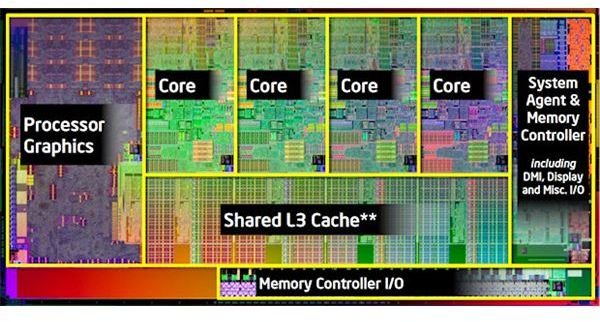
All of Intel’s Sandy Bridge processors make use of a new integrated IGP that is part of the processor architecture. While far from a gaming-grade video solution, the integrated IGP offers reasonable performance without consuming much power. It also enables features like Quick Sync, which can transcode video extremely quickly.
There are two versions of this IGP; the 2000 and the 3000. The only difference between the two is the number of execution units. The 2000 has 6, while the 3000 has 12. This doesn’t mean the 3000 is twice as quick, but it does means the 3000 is about 50% quicker in most benchmarks.
The type of IGP receives isn’t tied to the processor brand. Instead, Intel has tied it to the “K” series. Intel offers a Core i5-2500K and Core i7-2600K, and these are the only processors with the 3000 series IGP (for now). The K series processors also have unlocked multipliers for easy overclocking.
i5 vs. i7: What it Means to Consumers and Power Users
Currently, the Core i5 processor brand makes up most of Intel’s Sandy Bridge processor line. The prices of these processors range from $177 to $216 with base clock speeds between 2.8 GHz and 3.3 GHz. Intel only offers two Core i7 products, the Core i7-2600 and Core i7-2600K, both of which have a 3.4 GHz base clock speed. The i7-2600 has a price tag of $294.
As you may have guessed, paying about $80 more for the 100 MHz clock speed increase between the fastest i5 and the i7 isn’t a great deal. The main reason to pay this additional cash for a i7 is hyper-threading, but this advantage will only be evident if you frequently use programs that can actually make use of 8 threads.
For most users, the i5 is clearly the better deal. The i5-2500 makes the most sense in my opinion, as it offers an extremely quick base clock speed of 3.3 GHz for about $200. Of course, the value of this is subject to change in the future as Intel fleshes out its product line with new models.
Core i3 vs. Core i5
Core i3 is now out. If you’re wondering how the Core i3 and Core i5 processors are different, check out our Core i3 vs. Core i5 comparison article .
This post is part of the series: Core i3, i5, and i7 Explained
It is often difficult to discern which new processors are the best. This guide to Intel’s new Core i3, i5, and i7 processors gives advice and information about them so that you can decide which processor is best for your needs.


