Wireless Protocols Explained - Key Differences Between Wireless N and G Protocols

Written by:  • Edited by: Tricia Goss
Updated Jan 11, 2012
• Related Guides: Wireless Networking

What is the difference between 802.11g and 802.11n? There are many confused consumers who end up walking out of the store with the wrong wireless device. Not only do we explain the difference, we tell you why they are different and how to choose in a way that actually makes sense.

802.11 Wireless Protocol Series

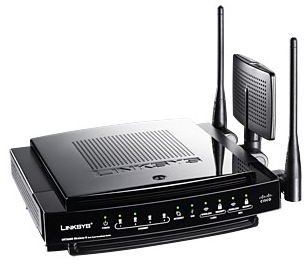
Linksys Wireless-N Gigabit Router 

802.11 is the wireless protocol series of standardization created by the IEEE (Institute of Electrical and Electronic Engineers) society. 802 is the number classifying all standards relating to Networking, be it WAN, LAN, or WLAN technologies. 802.11 is specific to standards dealing with wireless networking. That standard is further broken down into letters, such as 802.11a, 802.11b, 802.11g, etc.

As you can see, there are some letters missing in there. When these standards were initially proposed each proposition was given a letter, and a team was assigned to develop them. It was never intended for every one of them to be a success, and many didn't make it past the theoretical stages of development.

The sole purpose of this standardization process is so that you and I can go the store, purchase a wireless router from Linksys and a wireless card for our laptop from Dlink, and know that the two will work together, so long as they both support the same standard. Without these standardizations of wireless protocols, there would be dozens of proprietary standards out there and nothing would work together. There would be no coffee shop LANs or free access at the library - it would all be a mess.

Today's Most Common Wireless Standards

While 802.11a and 802.11b were used for quite some time, today the vast majority of wireless devices run on either the older 802.11g protocol or the newer 802.11n protocol. There are many differences between these two standards, meaning they are not "backwards compatible" like 802.11g was to 802.11b. However, if you are using a mix of N and G standardized devices, most wireless routers that support N will also support G - but count on speeds being limited to the "oldest" standard currently running.

Features of 802.11g

802.11g was the fastest wireless networking protocol in existence until wireless N drew closer to completion. Like 802.11a, 802.11g supports a maximum speed of 56Mbps (mega-bits per second). However, unlike 802.11a it functions on the 2.4GHz band. This means that G was not compatible with A. However, the slower (11Mbps) 802.11b was compatible, as it also worked on the 2.4GHz band.

The problem with G is not so much that it is too slow (56Mbps for wireless is pretty respectable) but that it shares a wireless band with many common devices that cause considerable interference. For example, most cell phones, cordless phones, Bluetooth, and microwaves share the 2.4GHz band. In fact, if it were not for this problem we probably would not have an 802.11n in the first place, since 802.11g can be pushed up to 108Mbps on some devices ("super-G").

So, to recap:

Standard: 802.11g

Band: 2.4GHz

Speed: 54Mbps, or 108 Mbps

Features of 802.11n

802.11n is an ambitious standard. In fact, it is so ambitious that the proposed standard has been revised multiple times, and has been "on the table" so to speak for nearly 5 years. It is worth noting that the 802.11n devices that we see in stores now are based upon a proposed 802.11n standard from 2007 - it hasn't been accepted or finalized by the IEEE.

Wireless N uses a technology known in the industry as MIMO. This stands for multiple input, multiple output. In effect, instead of a device having a single antenna, it has multiple antennae that are arranged so as to have maximum transmitting power, and maximum reception. In simple terms, it is the difference between trying to shoot a fish with an arrow and simply grabbing it with a net.

Wireless N claims "real world" speeds of 130-160Mbps, with a listed maximum of 300Mbps. This is reliant on the router transmitting in full 802.11n mode, which is impossible when an 802.11g device is also connected to the network.

As far as the wireless band goes, 802.11n devices can operate on 2.4 or 5GHz bands. However, to use 5GHz all connected devices must be 802.11n compliant. Note, too, the 5GHz band will significantly decrease the maximum range. The tradeoff is that there will be much less interference, and 5GHz is drastically more effective at penetrating concrete and brick walls.

Related Articles

For more information on wireless devices, read the Bright Hub articles What is a Wireless Bridge? and How to Secure a Wireless Network.


Comments

Showing all 50 comments
 
Carly Jan 11, 2012 11:52 PM
RE: Wireless Protocols Explained - Key Differences Between Wireless N and G Protocols
Yep - you are right - changed it back to the way it was originally.<br>http://acronyms.thefreediction...
RF dude Jan 9, 2012 11:02 PM
RE: Wireless Protocols Explained - Key Differences Between Wireless N and G Protocols
The notation norm is :<br>Mbps = Mega Bits per sec<br>MBps = Mega Bytes per sec<br><br>Note the capitilised B to distinguish bits and Bytes<br><br>This is well established, so the OP was correct.<br><br>There is quite a bit of debate and confusion over Baud versus Bytes (bits) / sec !<br><br>
Carly Jan 9, 2012 7:36 PM
RE: Wireless Protocols Explained - Key Differences Between Wireless N and G Protocols
Thanks for pointing out that error. We have corrected it.
Cowdungdan Jan 9, 2012 4:56 PM
RE: Wireless Protocols Explained - Key Differences Between Wireless N and G Protocols
A small mistake:  Mbps is Mega Bytes per second, not Bits.<br>Great Article...I needed the explanation
Adf Dec 11, 2011 1:32 PM
RE: Wireless Protocols Explained - Key Differences Between Wireless N and G Protocols
Thanks. Nice article.. :-)
Raymond Nov 24, 2011 10:03 AM
RE: Wireless Protocols Explained - Key Differences Between Wireless N and G Protocols
2 years ago when I was first looking into buying a router, I kept seeing the wireless g and wireless n and I was like what's the difference?!  Finally when I just did a search on that, I finally understand.  Thanks for making it clear now.
bkm Aug 7, 2011 12:01 PM
Helpful
Well this article was helpful to me to see the interference from a wireless baby monitor in my whole wifi system that I had overlooked. Thanks for the forum and help
RF dude May 1, 2011 7:34 PM
RE: Wireless Protocols Explained - Key Differences Between Wireless N and G Protocols
Anonymous Re: John thought about it a lot and then should have stopped there :

> The article was right.

No it's not !

>At the higher frequency, the range will
> be quite a bit less.

Correct.

> The article was also right in talking
> about the penetrating power,

It so is NOT that it's not funny.

> At higher frequencies, any kind of
> wave, be it sound, radio or whatever,
> carries more energy, and has the
> ability to penetrate obstacles such as > walls. The use of the word penetrate
> here does not imply passing straight
> through the obstacle and carrying on
> to its destination on the other side, but > rather penetrating the obstacle and
> being absorbed.

Man, please refrain from posting such outrageously incorrect crap !

> Lower frequencies have a greater
> range because the lower energy of the > low frequency wave allows it to
> bounce off of obstacles, and
> eventually make it to its target.

This is tragic by now.

Facts :
1. Propagation absorption is inversely proportional to frequency. Period.
2. 5 GHZ, in other words 802.11n, will have much higher losses than 2.4 GHz.
However, the fact that 2,4 GHz is already a trashband, worsened by the fact that 2.4 GHz is the resonance frequency of water molecules (hence microwave cooking). Absorption is higher than it should be at that frequency.
3. The MIMO nonsense about catching more fish is misleading and untrue.
Antenna diversity improves reception quite a bit on mobile targets (especially slow moving ones).

The article overall is quite good, but has oversimplified some issues to the absurd level - resulting in misinformation. But at least it's misinformation on the cautious side. Hopefully people will realise that the "5 times more range sticker" is such a web of lies. I can see 802.11n never really breaking through and being dumped.
Stick to good old, proven 802.11g !!
(and optionally chnage the physical layer side and move it to another band, non-2.4 GHz).
juan pablo Apr 5, 2011 12:33 PM
thanks
thanks for the information , i was looking for this..
thank you for your time
Filter Mar 17, 2011 2:03 AM
Misinformation
Please don't let "pleb" comment ever again.
He takes a tiny bit of knowledge about frequency and creates a fantasy world around it.
Do some research on why 802.11n is faster than g. It's not because there's a smaller antenna. Also range doesn't decrease due to having a smaller antenna....
/facepalm
Harry Barrington Mar 1, 2011 6:07 PM
connection problem?
I just received a dell latitude 620 laptop which says it needs a wireless 802.11 g/b router to connect to internet. However, I have a n router. Will I have any problems connecting?
mark Feb 19, 2011 12:47 PM
agree
Thank you very much. your article was well written and helped me understand something that I did not understand before.

Thanks!
pleb Feb 15, 2011 2:52 PM
antenna
as frequencies go higher, the antenna goes smaller. thats why range decrease. n routers design have no external antenna. instead a bunch of small antennas inside. that is also why the speedrate is faster.
roagwolf Feb 15, 2011 1:59 PM
what!!!
all i want to know is. ok i run a G router with 3 pc,s. I use 3, N wireless adapters
and i pick up 54mbs. we do a lot of gameing and watching u tube.but we will lose conection at the blink of a eye.like if i change web page the other pc will go off line and itsdriving me bonkers. so should i upgrade my router
because it is the best that my ips has to offer. should i go out side the isp and use a diff router a N and if so how do i know it will work i mean all 3 pcs are in the same room with the router so no walls and about 20-25 feet from unit
i am still confused?
Anthony Feb 15, 2011 9:05 AM
Cool, thank you.
What a dumb I am, lol. I really do thank you for the info. Now, I got to tell ya, Wireless N we have here, did stuff up a lot and we are taking it back to the store and replace it with the Wireless G. Excellent, it all makes sense now. Thank you, thank you. 5 stars.
I hope there will be no more interference after this exchange, like it was the other night, I heard some keyboard typing from another persons place with this Wireless N router, so annoying. Then I realize, it was the Wireless N router after I read this page. Thank you again.
steve Feb 11, 2011 8:15 AM
Clarification
I believe the author mispoke or made a typo when she said that 5 ghz spectrum would allow more wall penetration.

Submarines use signals around 1 or 2 hz. Antennaes are buried in the ground to pick up signals from subs all over the world.
Ryan Jan 30, 2011 1:07 PM
Re: John
The article was right. At the higher frequency, the range will be quite a bit less. The article was also right in talking about the penetrating power, At higher frequencies, any kind of wave, be it sound, radio or whatever, carries more energy, and has the ability to penetrate obstacles such as walls. The use of the word penetrate here does not imply passing straight through the obstacle and carrying on to its destination on the other side, but rather penetrating the obstacle and being absorbed. This is why higher frequencies have less range. Lower frequencies have a greater range because the lower energy of the low frequency wave allows it to bounce off of obstacles, and eventually make it to its target.
John Jan 25, 2011 4:15 AM
Inconsistency
"the 5GHz band will significantly decrease the maximum range. The tradeoff is that there will be much less interference, and 5GHz is drastically more effective at penetrating concrete and brick walls"

Which is it; more range, or less range?

My understanding was higher freq had greater line of sight range, but less ability to penetrate obstacles.
Ed Jan 8, 2011 8:11 AM
NICE !!
Good info IN = Keep the G band I already have and save my money for a better purchase down the road !!
dennis H Dec 24, 2010 12:00 PM
Perfect
Thank you soooo much for that explanation!!
ali Dec 23, 2010 2:19 AM
very good
it helps me a lot thankyou for knowing the diffrence between wireless devices
Mark Dec 17, 2010 12:41 PM
Very simple
Many Thanks
Madhu Dec 10, 2010 12:38 PM
Great job
Great explanation, really helpful!
Abb Dec 6, 2010 12:14 PM
RE: Wireless Protocols Explained - Key Differences Between Wireless N and G Protocols
Thank you so much for the info.
but will a device be able to max out or use all of the wireless G bandwidth (speed) ?
I mean .. do we really need a wireless N router to get a high speed connection .. lets say, a 2 MB/sec download speed ?
Mikey P Nov 26, 2010 4:09 PM
Wrong
802.11g max's out at 54Mbps not 56 and to run the wireless N at 5GHz will cause way more interference when it comes to concrete walls and metals because it has so much more to pass through just like the main issue with 802.11a. Other than these good article!
rizalito Nov 9, 2010 2:48 PM
Ambuiguity cleared
Really enlightening, carry on the good work!!
Good Stuff Nov 5, 2010 1:21 PM
Good Stuff
great way of putting it down on paper. well you get the point. Anyways keep it up all power to you.
Bryan Oct 25, 2010 10:17 AM
Amazing!
This is the best, most user-friendly explanation of wireless standards I've seen. Why can't more technical articles be this simple and applicable to the real world? Thank you!
Michael Oct 17, 2010 12:31 PM
Very Succinct
I was headed for the store, because of 811g trouble, to get an 811n router. Now I know I get to replace my client cards, too. Yippee! At least I found out now! (Should have known better.)
muhammad Oct 12, 2010 3:40 AM
nice explaination
a good means of learning sometin' new.i like this article!thanx so much creator!
Sergey Oct 1, 2010 7:40 PM
Wireless G vs N
Very good explanation!
Anonymous Oct 1, 2010 11:08 AM
satisfaction
i am, as the subject demonstrates, completely satisfied with this explanation.
cheers
dfd Sep 16, 2010 2:17 PM
GooD
GooD
Joe Sep 5, 2010 11:33 AM
Excellent overview. Thank you so much.
zip103 Sep 2, 2010 4:03 AM
Excellent overview
This is the first post i read from this site.
Now i am a member.
Flip Aug 31, 2010 7:46 PM
Good Stuff
ok, now how about the theory of relativity?
;)
kristen Aug 16, 2010 6:53 PM
Wireless G vs N
it's clear and concise. thank you!
andrew Aug 14, 2010 9:20 AM
thank you
i love it when i find answers this quickly ;)
Audwin Aug 7, 2010 6:49 PM
Wonderful Info!!!!!
Thank you for a comprehensive and clear look at the key differences between Wireless N and G Protocols!

I hope you have more articles as your style was refreshingly substanitive!

Keep up the great work!!
Emmanuel Naicca Aug 5, 2010 8:20 AM
Wireles protocol query. Please advice.
What is the wireless protocol in Democratic Republic of Congo, Republic of Congo, Gabon, Uganda and Tanzania?
Dave Brown Jul 15, 2010 3:38 PM
Jeff is correct the higher the GHz the worse the penetration
Jeff. You are correct. 5Ghz will penetrate LESS then 2Ghz
veronica Jul 11, 2010 2:06 PM
is an n router good for sharing with my neighbor approx 100 ft or more away
I currently have a g router set up on my computer and my signal is very low. I am trying to get signal from my neighbor's house. I am unable to hook up a magic jack for phone service because the internet is so splotchy. Every time I go to use the magic jack for the phone it says I am not connected to the internet. Would a N router work better for better speeds and connectivity at this range?
Marko Jul 5, 2010 8:38 PM
Marko Vukobrat
Great review,
a written i true.

thanks,

Marko Vukobrat
eli Jul 2, 2010 8:48 PM
thanks
thanks a butt-load. saved alot of work me me. i set my wifi network and it was very slow because it was wireless g of course i am only 12 years old
Jaleel Ahmed May 29, 2010 8:01 AM
Wireless G vs N
Very Informative & helpful.
Dan May 27, 2010 5:31 AM
Concisely Put
Very clear, informative, and substantial. You're an excellent writer, thanks for posting :)
rm Apr 24, 2010 10:21 PM
Well written
very helpful
blackfire Feb 12, 2010 8:11 PM
thank you
it was such a great information... lots of love...
John Nov 30, 2009 1:09 AM
Good article
Great article. I am currently shopping around for a new wireless router and this information is very helpful.

I have a few questions still remaining that I hope someone can answer for me or atleast point me in the direction of the answers.

I am currently using an older single antenna wireless G router for my home and I would like to update/upgrade that. Until recently there was usually only 1 laptop using the wireless connection. Now my entire family has a laptop so at any point in time there could be up to 5 laptops (streaming music, videos, etc.) connected simultaneously. This is why I would like to upgrade to a more powerful/better coverage router.

So my main question is:
Is this going to be too much traffic/demand for a G router to handle? If not, should I look into upgrading the laptops wireless network cards (super-G?) for a better/stronger signal?

I was also thinking about N routers. All of my laptops support 802.11ABG so if i were to go with a N router I would have to upgrade all of the network cards in the laptops. Would a N router offer me a better/stronger signal for all of the laptops connecting to it?

any info/advice is welcome and would be most helpful.
Jeff Nov 26, 2009 3:28 PM
5GHz has worse propagation
Good article, but are you sure the last sentence is true?...I don't think so. Higher frequencies have worse penetration through materials, so 5 GHz can't have better range than 2.4 GHz. I think the main benefit of N is simply with the MIMO technology and lessened interference in the 5 Ghz band.

The following article compares 2.4 and 5 GHz propagation in modern houses:
http://www.am1.us/Papers/E10589%20Propagation%20Losses%202%20and%205GHz.pdf

 
blog comments powered by Disqus
Email to a friend


